Security audit
Analysis > Security audit (Ctrl+Shift+A) checks the domain against 35 rules. Each one relies on recognised sources:
- the ANSSI Active Directory checklist, with each control point's official identifier and level;
- NIST: SP 800-53 (security controls) and SP 800-63B (authentication);
- CIS Controls v8;
- MITRE ATT&CK, for the matching attack techniques;
- Microsoft documentation (tiered access model, protected accounts, delegation).
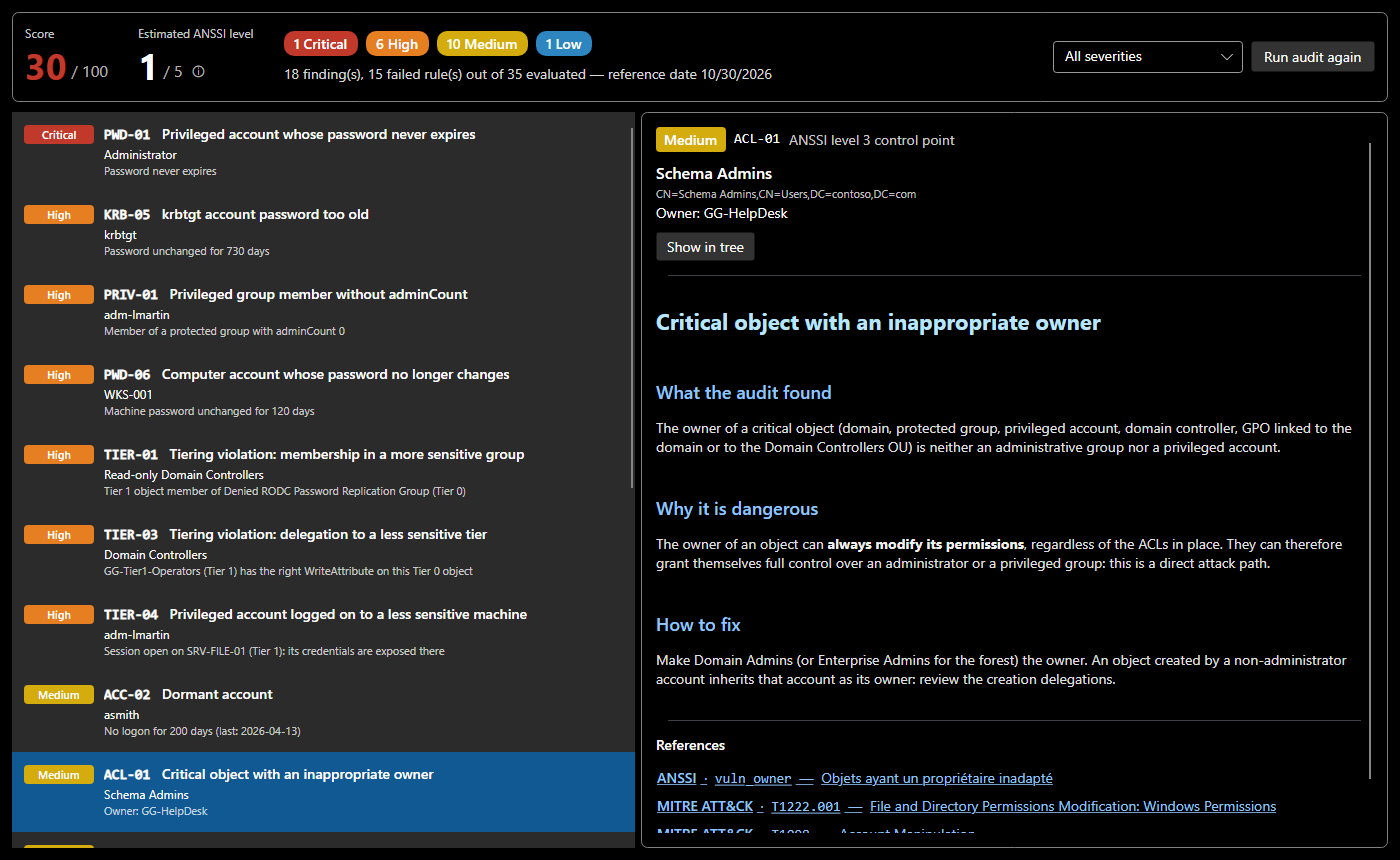
Reading the result
| Element | Meaning |
|---|---|
| Score | 100 minus one penalty per failed rule: 12 (critical), 6 (high), 3 (medium), 1 (low). A rule counts once, whether it affects one object or ten, so that a widespread issue does not overshadow a rare but critical one. |
| Estimated ANSSI level | the level of the most critical failed ANSSI control point, from 1 (most severe) to 5 (no failed point). It is an ANSSI-style estimate, not the official computation of ANSSI's ADS tool. |
| Counters | findings per severity, and a severity filter |
| Finding list | rule, affected object and detail (for example "password unchanged for 730 days") |
| Sheet | what the audit found, why it is dangerous, how to fix, going further, and clickable references |
Show in tree selects the affected object; the tree also shows an AUDIT badge on every object at fault. Fix, then Run audit again.
The screenshot shows the sample domain with a weakness added for this documentation: the help desk owns the Schema Admins group (ACL-01).
Rule families
| Prefix | Area | Examples |
|---|---|---|
KRB |
Kerberos | kerberoastable accounts, AS-REP roasting, old krbtgt |
DLG |
delegation | unconstrained delegation outside DCs, constrained delegation to a DC, delegable privileged accounts |
PWD |
passwords | expiry, password not required, unchanged passwords (privileged accounts, DCs, computers, managed service accounts) |
ACC |
accounts | Guest enabled, dormant accounts |
PRIV |
privileged groups | groups that should stay empty, DnsAdmins, missing or orphaned adminCount, protected group outside Tier 0 |
ACL |
owners and permissions | non-administrative owner of a critical object (DC GPOs included), dangerous permissions on the domain, AdminSDHolder or the DCs (DCSync, Shadow Credentials, RBCD), control path through permissions from an ordinary account |
TIER |
tiering | membership, GPO, delegation or local administration across tiers, administrator session on a less sensitive machine |
LAPS |
workstations and servers | computer whose local administrator password is not managed by LAPS |
GRP |
groups | nesting loops |
A fresh domain, like a real one
The SMAD-X fresh domain is the one Windows Server installs: the same containers, built-in groups and accounts, owners, memberships, domain controller SPNs, password policy, and the same permissions on the root and the containers (Enterprise Admins, replication for the domain controllers, Key Admins on msDS-KeyCredentialLink, AdminSDHolder, Account Operators in Users and Computers…); every joined computer has Domain Admins as local administrator. What gives control goes to privileged groups: the audit does not report it, just as it would not on a real fresh domain. What it finds there (password policy too short, machine account quota, built-in administrator) is what it would find on an AD fresh out of setup.
The fresh domain is the one of the Windows Server version chosen when it is created: 2019, 2022 (the default) or 2025. All three share the same accounts and permissions; 2019 locks an account out for 30 minutes instead of 10, 2022 adds the System\SOA-Policies container, 2025 the OpenSSH Users, External Trust Accounts and Forest Trust Accounts groups. The domain is seen as it is once SDProp has run, within an hour of promotion: SDProp has protected the sensitive accounts and groups: adminCount, Domain Admins as owner and the permissions of AdminSDHolder.
The SMAD-X tests check it for each version: they compare the fresh domain with the export of a real, freshly promoted domain, object by object and permission by permission, and the audit of both.
The full list, with each rule's severity, ANSSI level and references, is on the Audit rules page, generated from the code.
Discuss rather than apply
Sheets point out where frameworks disagree. Example: NIST (SP 800-63B) advises against forcing periodic password changes on users, while ANSSI requires expiry for privileged accounts. Both views meet: a long, unique password, changed as soon as a compromise is possible.