Getting started
The main window
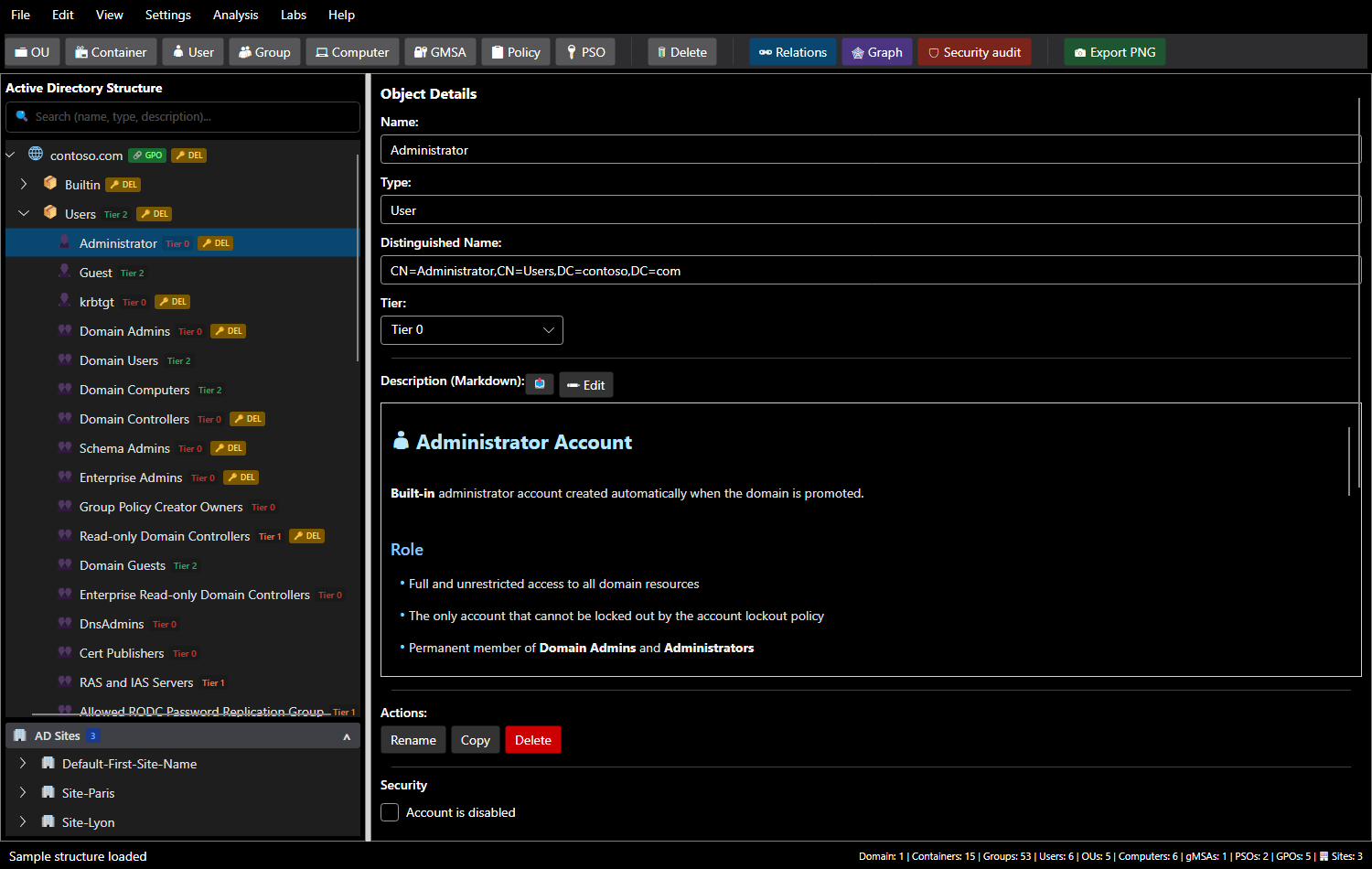
| Area | Purpose |
|---|---|
| Menus | File, Edit, View, Settings, Analyse, Labs, Help |
| Toolbar | create an object (OU, container, user, group, computer, gMSA, policy, PSO) under the selected object; Relations, Graph, Security audit, Export PNG |
| Active Directory Structure | the domain tree, with a search bar (name, type or description) and badges: tier, linked GPO, DEL delegation, AUDIT finding |
| AD Sites | below the tree: sites, their subnets and domain controllers |
| Object Details | name, type, DN, tier, Markdown sheet, actions, Security section |
| Status bar | latest message and object counts per type |
A first domain
On startup, SMAD-X loads contoso.com: a domain in production for two years, with three sites (Paris, Lyon and the default site), business OUs, GPOs, PSOs and a few common deviations the audit reveals. The named administrators (adm-…) are members of GG-Tier0-Admins, itself a member of Domain Admins. File > New Structure (sample) (Ctrl+Shift+N) reloads it at any time.
File > New Domain... (Ctrl+N), enter the DNS name (for example corp.local), choose the Windows Server version of the first domain controller (2019, 2022 or 2025) and whether to apply tier classification. SMAD-X creates the AD DS that this version installs, without any change:
- the Builtin container (all its groups: Administrators, Account Operators, Print Operators, Pre-Windows 2000 Compatible Access…), Users (built-in accounts and groups), Computers, ForeignSecurityPrincipals, Keys, LostAndFound, Managed Service Accounts, Program Data, Infrastructure, NTDS Quotas, TPM Devices;
- System, with AdminSDHolder, Password Settings Container and Policies (Default Domain Policy and Default Domain Controllers Policy);
- the Domain Controllers OU and DC01;
- the default password policy: 7 characters, complexity, history of 24, maximum age of 42 days, no lockout;
- what is specific to the version: the
System\SOA-Policiescontainer on 2022, the OpenSSH Users, External Trust Accounts and Forest Trust Accounts groups on 2025; - the join quota: any user can join 10 computers to the domain (ms-DS-MachineAccountQuota).
Nothing is hardened: auditing a new domain shows what an installation leaves to fix.
File > Open... (Ctrl+O) loads a .smad-x.json. A file from an older version is converted on load; a file written by a newer version of SMAD-X is refused with a clear message.
Adding and editing objects
- Select the parent container in the tree.
- Click the object type in the toolbar, or right-click the parent.
- Fill in the details panel. The DN is computed automatically.
| Action | Shortcut |
|---|---|
| Rename | F2 |
| Copy / paste (with children) | Ctrl+C / Ctrl+V |
| Delete | Del |
| Undo / redo | Ctrl+Z / Ctrl+Y |
SMAD-X enforces AD rules: forbidden characters, length, unique names, and allowed child types (a container cannot hold OUs, for example).
A new name is confirmed with Enter or by leaving the field; Esc cancels it. As in the directory, renaming an object updates everything that refers to it: group memberships, PSOs, linked GPOs, owners, delegations and site domain controllers. Deleting an object removes these references; the status bar says how many were touched.
Each object's sheet
Every object has a Markdown description. Built-in objects come with sheets written in English and French: role, security notes, recommendations. Switching language translates these original sheets, never the ones you wrote or changed. Edit switches to editing, and File > Import Description (.md)... replaces the sheet with a file.
AD sites
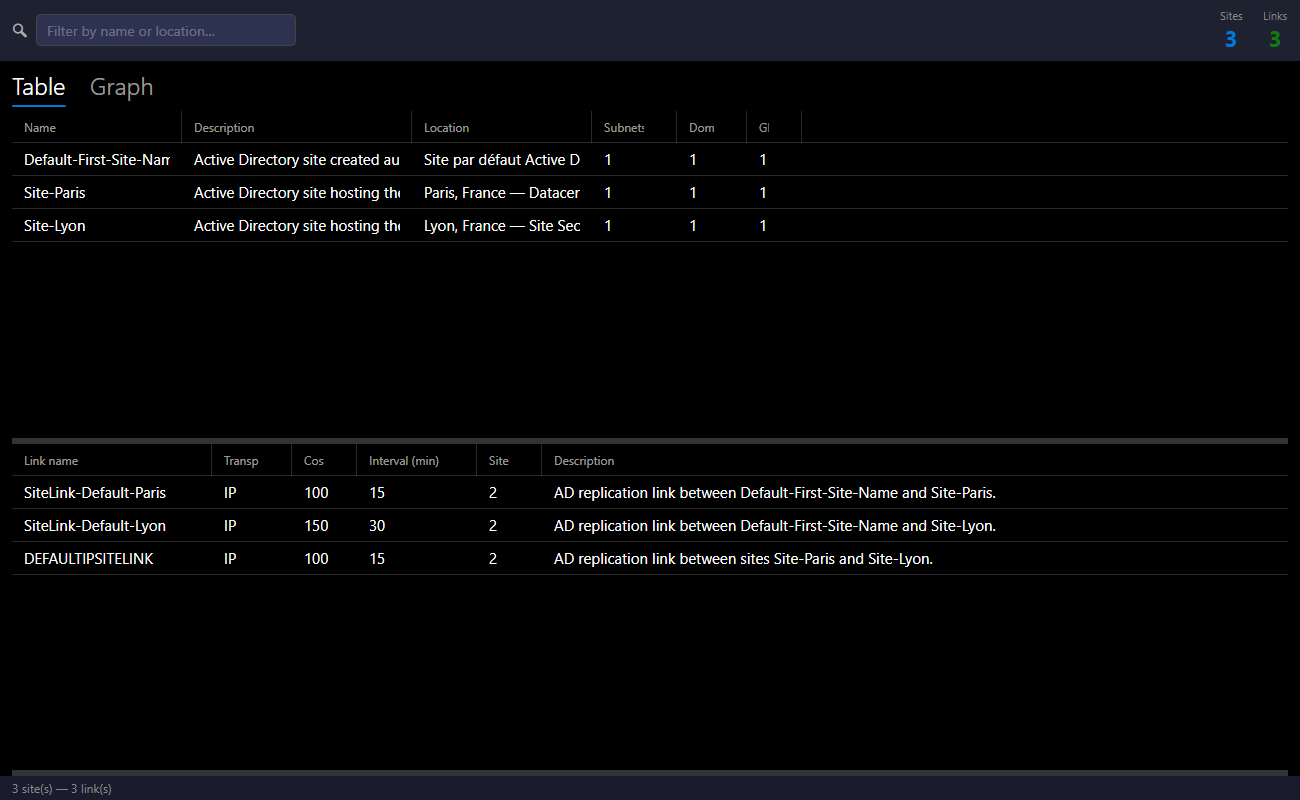
Analysis > View sites... (Ctrl+Shift+S) manages the topology: sites, subnets, domain controllers, replication links, with a table and a graph view.
Language and theme
View > Language and View > Theme switch the language (English, French) and the theme (dark, light) without restarting.
Going further
- Model a domain's security: account options, delegations, owners, tiers.
- Audit the domain.
- Try a first lab.