Le labo
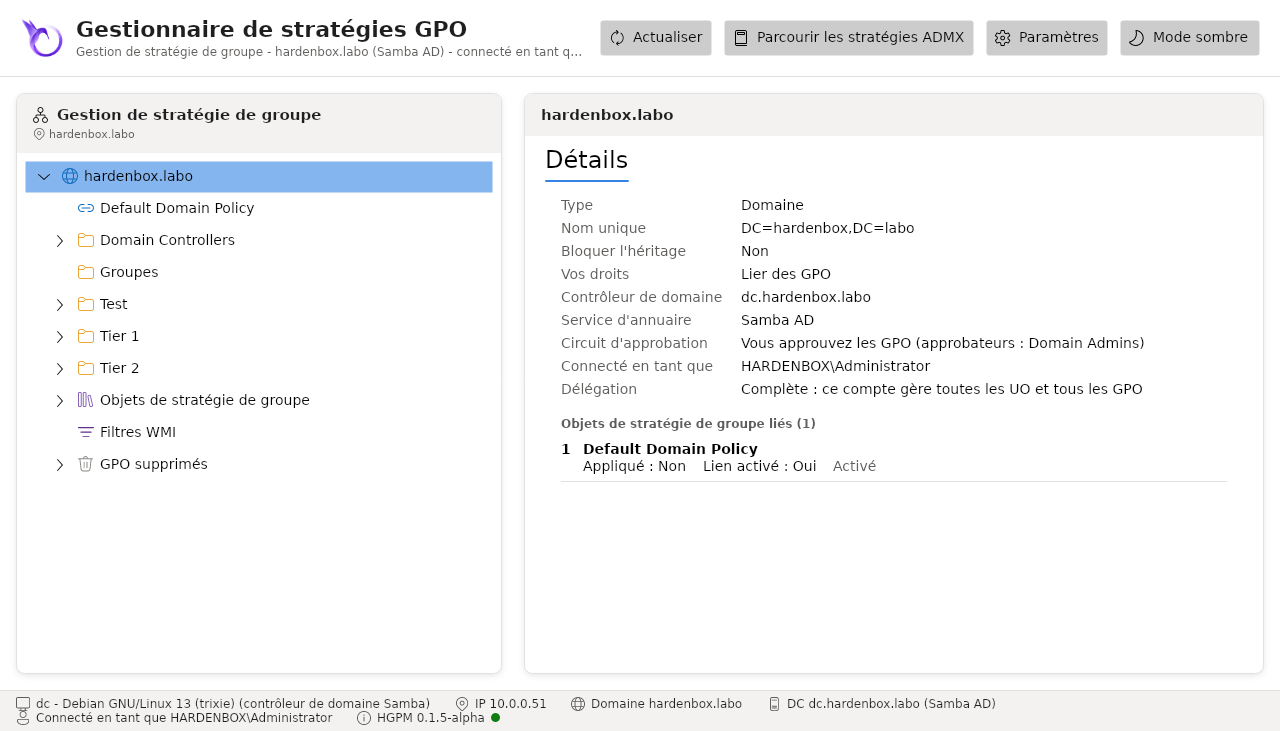
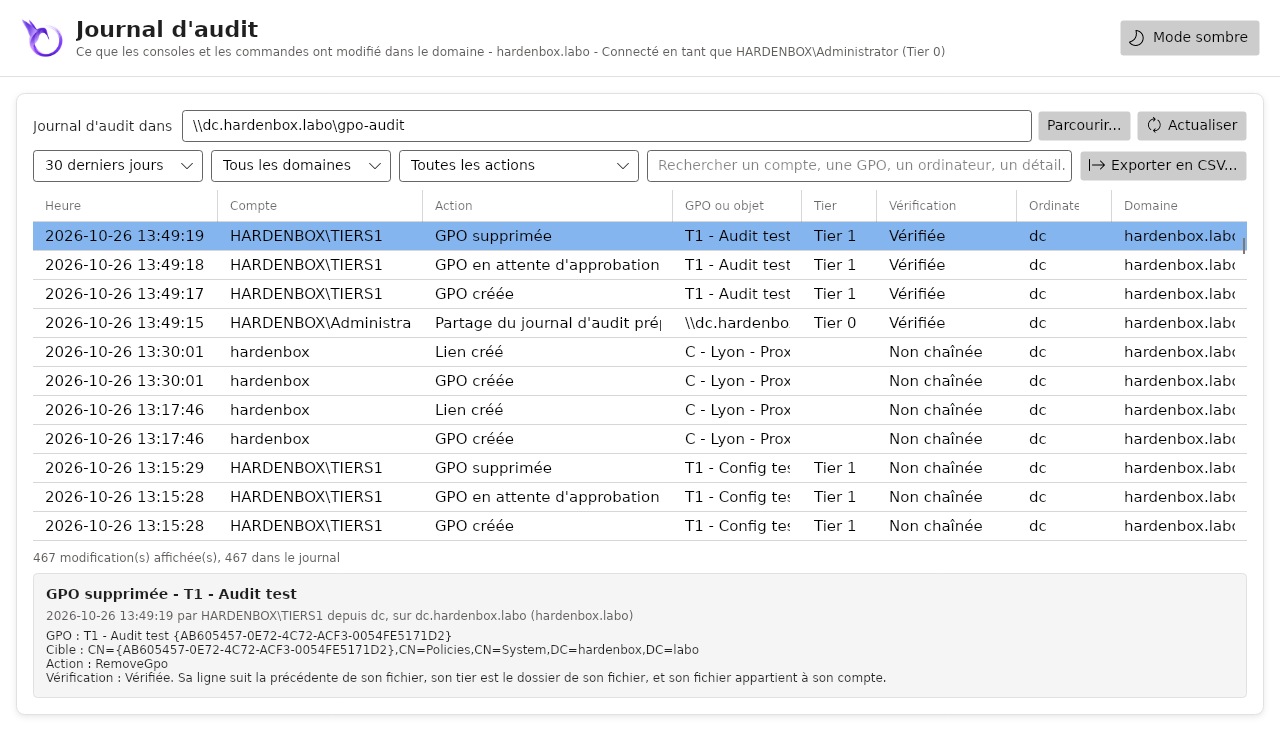
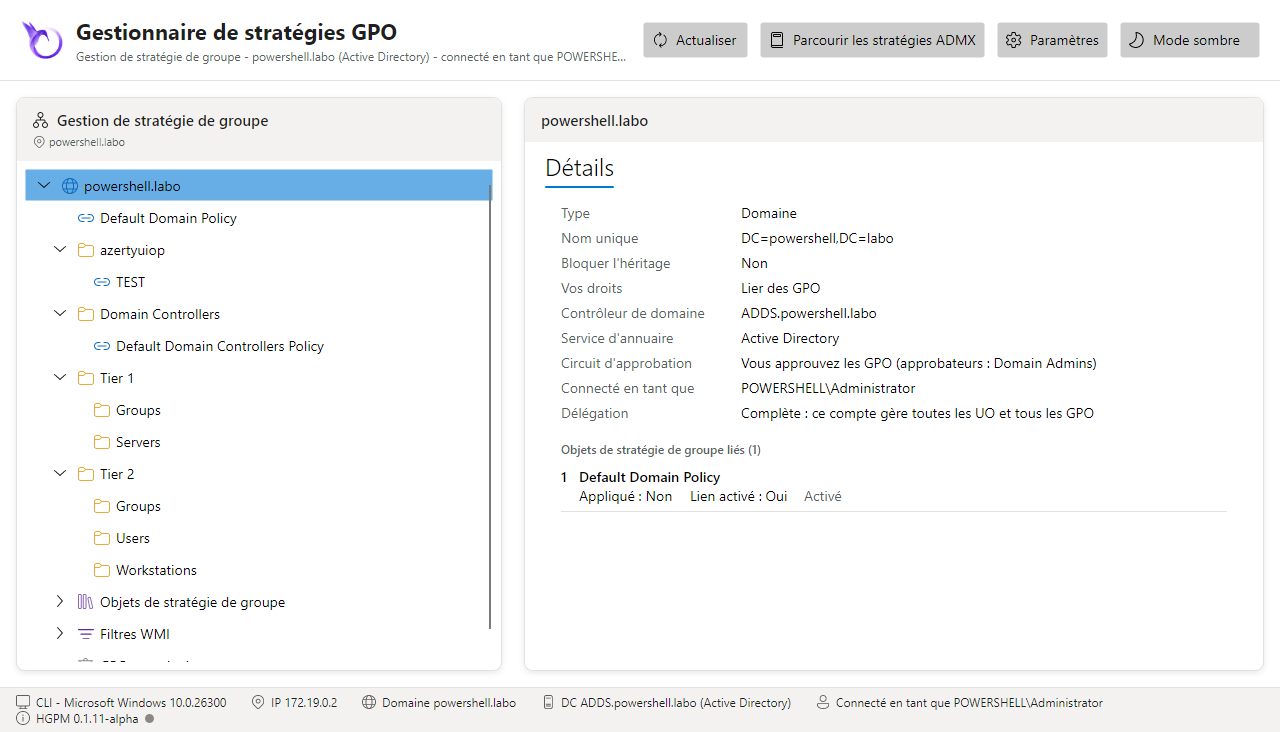
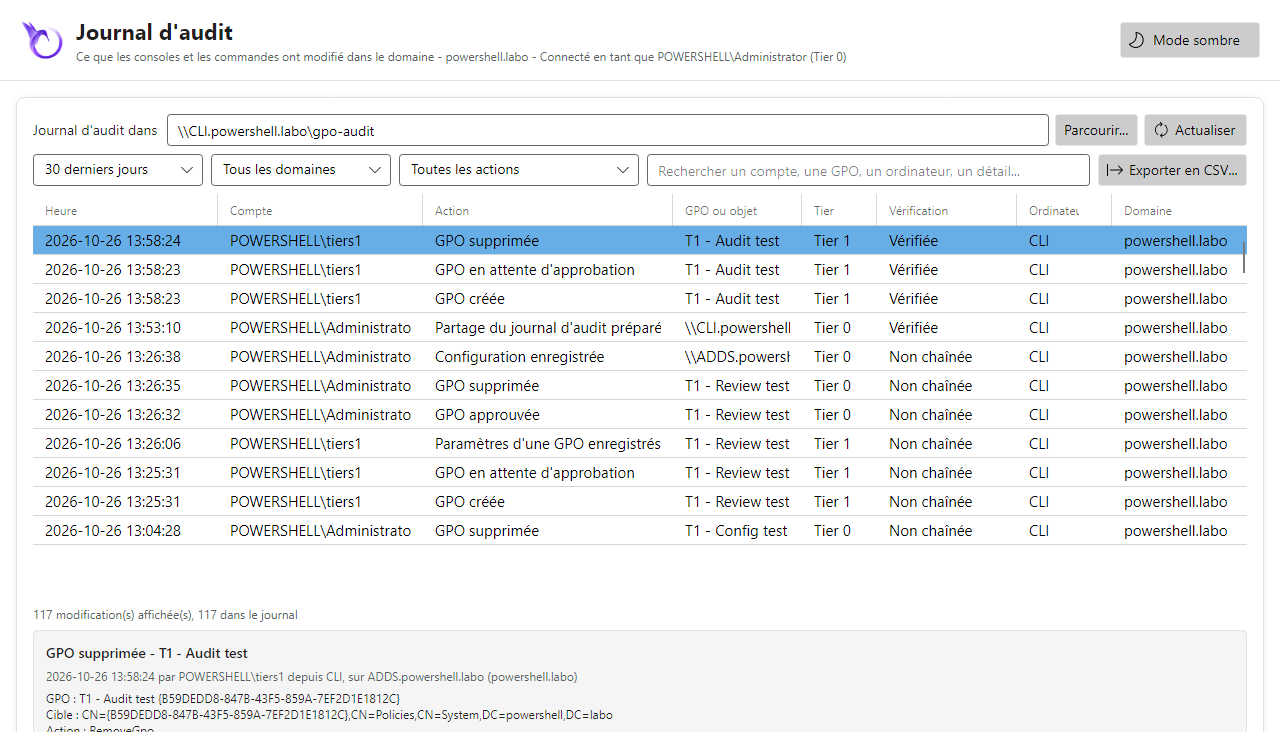
Les captures et les tests de cette documentation viennent de deux domaines construits de la même façon, l'un sous Linux avec Samba AD, l'autre sous Windows avec Active Directory : les mêmes tiers, groupes, délégation, workflow d'approbation et partages centraux.
| hardenbox.labo (Samba AD) | powershell.labo (Active Directory) | |
|---|---|---|
| Contrôleur de domaine | dc.hardenbox.labo, Debian 13, Samba 4.22 |
ADDS.powershell.labo, Windows Server |
| Console | sur le contrôleur de domaine lui-même, Linux, PowerShell 7 | CLI, Windows 11 membre du domaine, PowerShell 7, outils RSAT de gestion des stratégies de groupe |
| Compte de la console | un ticket Kerberos d'administrator (Tier 0) ou de tiers1 (Tier 1) : kinit le change |
la session d'Administrator (Tier 0), ou de tiers1 |
| OU | Tier 1 (Servers, Groups), Tier 2 (Workstations, Users, Groups), Test, Groupes, Domain Controllers |
Tier 1 (Servers, Groups), Tier 2 (Workstations, Users, Groups), azertyuiop, Domain Controllers |
| Groupes | GPO-Tier1-Admins (membre tiers1), GPO-Tier2-Admins (membre tiers2) |
GPO-Tier1-Admins (membre Tiers1), GPO-Tier2-Admins (membre Tiers2) |
| Délégation | chaque groupe lie des GPO à son OU (écriture de gPLink et gPOptions) |
la même |
| GPO | Default Domain Policy, Default Domain Controllers Policy, T1 - Servers - Baseline, T2 - Workstations - Baseline… |
Default Domain Policy, Default Domain Controllers Policy, TEST |
| Workflow d'approbation | activé : approbateurs Domain Admins, créateurs GPO-Tier1-Admins, GPO-Tier2-Admins |
le même |
| Journal d'audit central | \\dc.hardenbox.labo\gpo-audit (partage Samba du contrôleur de domaine) |
\\CLI.powershell.labo\gpo-audit (C:\Shares\gpo-audit) |
| Sauvegardes centrales | \\dc.hardenbox.labo\gpo-backups, monté sur /mnt/gpo-backups |
\\CLI.powershell.labo\gpo-backups (C:\Shares\gpo-backups) |
| Journal du système | journald (journalctl -t hgpm) |
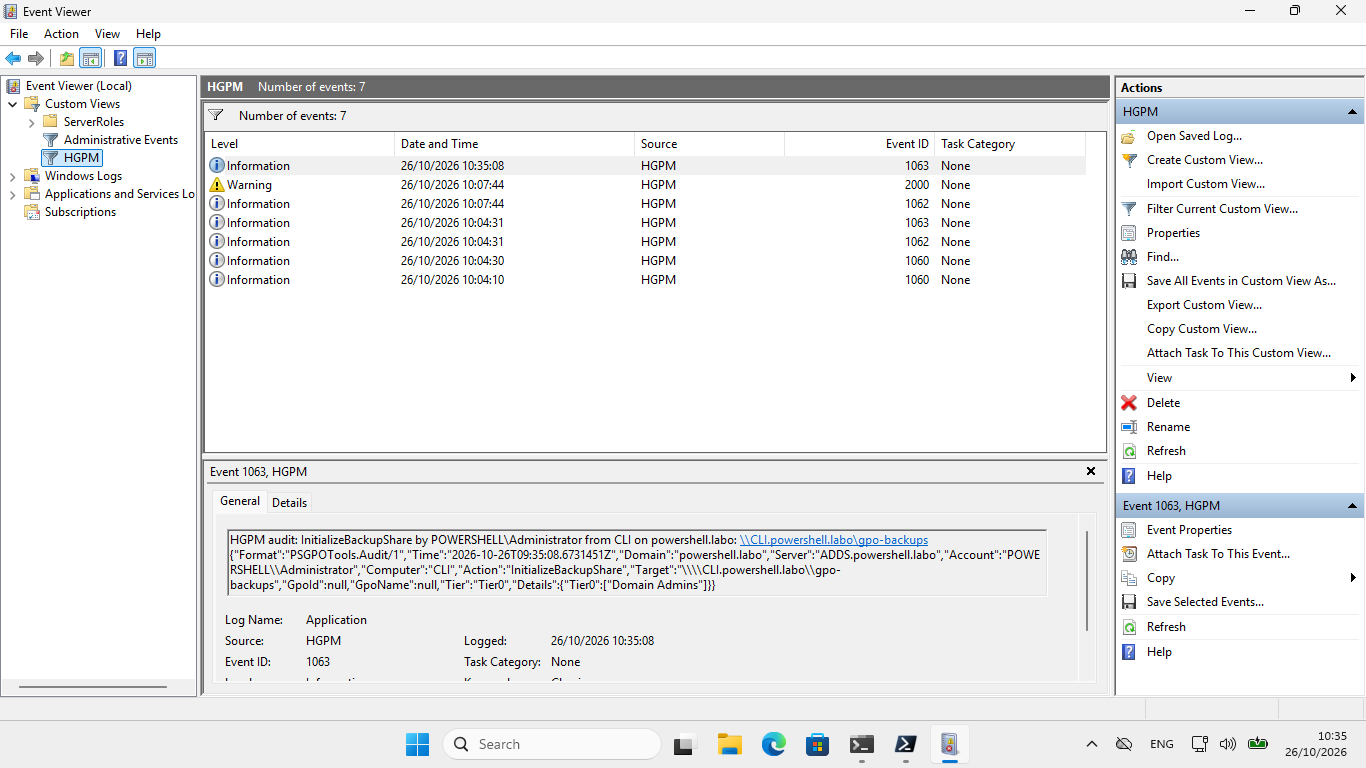
le journal d'événements Application, source HGPM |
Monter le vôtre
Un labo qui montre tout demande un domaine (Samba AD ou Active Directory), un ordinateur avec la
console (un membre, ou le contrôleur de domaine), et le tiering de hardenbox.labo : deux scripts le
créent dans n'importe quel domaine, dont ils lisent le nom distinctif (DN) sur le contrôleur de
domaine. Les deux peuvent être relancés (ce qui existe est gardé), et -WhatIf montre ce qu'ils
changeraient.
- Windows : LDAP avec l'identité de la session (System.DirectoryServices, intégré à Windows, sans RSAT), Active Directory ou Samba AD, dans une session d'un administrateur du domaine (ouverte avec son mot de passe : une session SSH par clé n'a pas de ticket Kerberos à présenter au contrôleur de domaine).
- Linux :
samba-tool, avec un ticket Kerberos d'un administrateur du domaine (kinit administrator) ; aucun mot de passe n'est demandé.
Un domaine de test seulement
Les comptes tiers1 et tiers2 reçoivent le mot de passe du labo, H@rdenB0x! (-Password en
donne un autre).
1. Les tiers, leurs groupes et leurs techniciens
New-PSGPOTierLab.ps1 crée OU=Tier 1 (Servers, Groups) et OU=Tier 2
(Workstations, Users, Groups), les groupes GPO-Tier1-Admins et GPO-Tier2-Admins dans l'OU
Groups de leur tier, et les comptes tiers1 et tiers2 dans CN=Users, chacun membre du groupe
de son tier.
Télécharger windows/New-PSGPOTierLab.ps1
windows/New-PSGPOTierLab.ps1
#Requires -Version 7.4
<#
.SYNOPSIS
    Creates the tiering of the HGPM lab from Windows: the OUs of Tier 1 and Tier 2, their
    groups, and a technician account per tier.
.DESCRIPTION
    In the domain of the computer, or of the domain controller -Server, whatever its name (its
    distinguished name is read from the RootDSE of the domain controller):

        OU=Tier 1       OU=Servers, OU=Groups (group GPO-Tier1-Admins)
        OU=Tier 2       OU=Workstations, OU=Users, OU=Groups (group GPO-Tier2-Admins)
        CN=Users        tiers1, member of GPO-Tier1-Admins; tiers2, member of GPO-Tier2-Admins

    What is there is kept: the script can run again, and an account that exists keeps its
    password. -WhatIf shows what it would create.

    LDAP with the Kerberos identity of the session (System.DirectoryServices, part of Windows):
    no RSAT needed, Active Directory or Samba AD. Run it in a session of a domain administrator.
    For a test domain only: the accounts get the password of the lab.
.PARAMETER Server
    A domain controller of the domain; the domain of the computer by default.
.PARAMETER Password
    The password of tiers1 and tiers2; the one of the lab by default.
.EXAMPLE
    .\New-PSGPOTierLab.ps1
.EXAMPLE
    .\New-PSGPOTierLab.ps1 -Server ADDS.powershell.labo -WhatIf
.LINK
    https://jm2k69.github.io/PSGPOTools/en/getting-started/lab/
#>
[CmdletBinding(SupportsShouldProcess)]
param(
    [string]$Server,
    [securestring]$Password = (ConvertTo-SecureString -String 'H@rdenB0x!' -AsPlainText -Force)
)

$ErrorActionPreference = 'Stop'
if (-not $IsWindows) { throw 'This script is for Windows: on Linux, take the Linux one (samba-tool).' }

# The tiering: an OU per tier, the OUs below it, the group of its technicians and their account.
$tiers = @(
    @{ Ou = 'Tier 1'; Children = 'Servers', 'Groups'; Group = 'GPO-Tier1-Admins'; User = 'tiers1'; Name = 'Tiers1' }
    @{ Ou = 'Tier 2'; Children = 'Workstations', 'Users', 'Groups'; Group = 'GPO-Tier2-Admins'; User = 'tiers2'; Name = 'Tiers2' }
)

# An object of the directory, on the domain controller, with Kerberos, signed and sealed (the
# password of an account is only set over a sealed connection).
# The members of a DirectoryEntry are read through psbase: PowerShell adapts the object to its
# LDAP attributes, and .Children or .Properties would be $null.
$prefix = if ($Server) { "LDAP://$Server/" } else { 'LDAP://' }
function Get-Entry {
    param([string]$DistinguishedName)
    # [NullString]::Value, not $null: PowerShell would pass an empty user name and password, an
    # anonymous bind; a null one is the identity of the session.
    [System.DirectoryServices.DirectoryEntry]::new("$prefix$DistinguishedName", [NullString]::Value, [NullString]::Value, [System.DirectoryServices.AuthenticationTypes]'Secure, Signing, Sealing')
}
# A value in an LDAP filter, its special characters escaped (RFC 4515).
function ConvertTo-FilterValue {
    param([string]$Value)
    $Value.Replace('\', '\5c').Replace('*', '\2a').Replace('(', '\28').Replace(')', '\29').Replace("`0", '\00')
}
# Is there an object of this distinguished name? Searched for: binding an object that is not
# there does not always fail.
function Test-Entry {
    param([string]$DistinguishedName)
    $searcher = [System.DirectoryServices.DirectorySearcher]::new((Get-Entry $domainDN), "(distinguishedName=$(ConvertTo-FilterValue $DistinguishedName))", [string[]]'distinguishedName')
    $null -ne $searcher.FindOne()
}
# The distinguished name of the account or group of a sAMAccountName, $null when there is none.
function Find-Account {
    param([string]$Name)
    $searcher = [System.DirectoryServices.DirectorySearcher]::new((Get-Entry $domainDN), "(sAMAccountName=$(ConvertTo-FilterValue $Name))", [string[]]'distinguishedName')
    $found = $searcher.FindOne()
    if ($found) { "$($found.Properties['distinguishedname'][0])" }
}

$rootDse = Get-Entry 'RootDSE'
$domainDN = "$($rootDse.psbase.Properties['defaultNamingContext'].Value)"
if (-not $domainDN) { throw "No distinguished name of the domain read from $(if ($Server) { $Server } else { 'the domain of the computer' })." }
$domainName = ($domainDN -split ',' | ForEach-Object { $_ -replace '^DC=' }) -join '.'
$usersDN = "CN=Users,$domainDN"
Write-Host "Domain $domainName ($domainDN), domain controller $($rootDse.psbase.Properties['dnsHostName'].Value)"

foreach ($tier in $tiers) {
    $tierDN = "OU=$($tier.Ou),$domainDN"

    # The OU of the tier, then the OUs below it.
    foreach ($ou in @(@{ Name = $tier.Ou; Parent = $domainDN }) + @($tier.Children | ForEach-Object { @{ Name = $_; Parent = $tierDN } })) {
        $dn = "OU=$($ou.Name),$($ou.Parent)"
        if (Test-Entry $dn) { Write-Host "  $dn is there"; continue }
        if (-not $PSCmdlet.ShouldProcess($dn, 'Create the OU')) { continue }
        $entry = (Get-Entry $ou.Parent).psbase.Children.Add("OU=$($ou.Name)", 'organizationalUnit')
        $entry.psbase.CommitChanges()
        Write-Host "  $dn created"
    }

    # The group of the technicians of the tier, in its Groups OU: global security group.
    $groupDN = Find-Account $tier.Group
    if ($groupDN) { Write-Host "  group $($tier.Group) is there" }
    elseif ($PSCmdlet.ShouldProcess("CN=$($tier.Group),OU=Groups,$tierDN", 'Create the global security group')) {
        $entry = (Get-Entry "OU=Groups,$tierDN").psbase.Children.Add("CN=$($tier.Group)", 'group')
        $entry.psbase.Properties['sAMAccountName'].Value = $tier.Group
        $entry.psbase.Properties['groupType'].Value = [int](0x2 -bor 0x80000000)
        $entry.psbase.Properties['description'].Value = "Technicians of $($tier.Ou)"
        $entry.psbase.CommitChanges()
        $groupDN = "CN=$($tier.Group),OU=Groups,$tierDN"
        Write-Host "  group $($tier.Group) created"
    }

    # The account of the technician, in the Users container of the domain, as in the lab:
    # created disabled, given its password, then enabled.
    $userDN = Find-Account $tier.User
    if ($userDN) { Write-Host "  account $($tier.User) is there, its password kept" }
    elseif ($PSCmdlet.ShouldProcess("CN=$($tier.Name),$usersDN", 'Create the account')) {
        $entry = (Get-Entry $usersDN).psbase.Children.Add("CN=$($tier.Name)", 'user')
        $entry.psbase.Properties['sAMAccountName'].Value = $tier.User
        $entry.psbase.Properties['userPrincipalName'].Value = "$($tier.User)@$domainName"
        $entry.psbase.Properties['givenName'].Value = $tier.Name
        $entry.psbase.Properties['displayName'].Value = $tier.Name
        $entry.psbase.Properties['description'].Value = "Technician of $($tier.Ou)"
        $entry.psbase.CommitChanges()
        $entry.psbase.Invoke('SetPassword', (ConvertFrom-SecureString -SecureString $Password -AsPlainText))
        # NORMAL_ACCOUNT, enabled.
        $entry.psbase.Properties['userAccountControl'].Value = 0x200
        $entry.psbase.CommitChanges()
        $userDN = "CN=$($tier.Name),$usersDN"
        Write-Host "  account $($tier.User) created"
    }

    # The technician in the group of the tier.
    $member = $groupDN -and $userDN -and @((Get-Entry $groupDN).psbase.Properties['member'] | ForEach-Object { "$_" }) -contains $userDN
    if ($member) { Write-Host "  $($tier.User) is a member of $($tier.Group)" }
    elseif ($PSCmdlet.ShouldProcess($tier.Group, "Add $($tier.User)")) {
        $group = Get-Entry $groupDN
        $null = $group.psbase.Properties['member'].Add($userDN)
        $group.psbase.CommitChanges()
        Write-Host "  $($tier.User) added to $($tier.Group)"
    }
}
Write-Host 'Next: Grant-PSGPOTierDelegation.ps1, the rights of the groups on GPOs.'
Télécharger linux/New-PSGPOTierLab.ps1
./New-PSGPOTierLab.ps1 -Server dc.hardenbox.labo
./New-PSGPOTierLab.ps1 -Server dc.hardenbox.labo -WhatIf
linux/New-PSGPOTierLab.ps1
#Requires -Version 7.4
<#
.SYNOPSIS
    Creates the tiering of the HGPM lab from Linux: the OUs of Tier 1 and Tier 2, their
    groups, and a technician account per tier.
.DESCRIPTION
    In the domain of the domain controller -Server, whatever its name (its distinguished name is
    read from the domain controller):

        OU=Tier 1       OU=Servers, OU=Groups (group GPO-Tier1-Admins)
        OU=Tier 2       OU=Workstations, OU=Users, OU=Groups (group GPO-Tier2-Admins)
        CN=Users        tiers1, member of GPO-Tier1-Admins; tiers2, member of GPO-Tier2-Admins

    What is there is kept: the script can run again, and an account that exists keeps its
    password. -WhatIf shows what it would create.

    Needs samba-tool (Samba AD, or Active Directory over LDAP) and a Kerberos ticket of a domain
    administrator (kinit administrator): no password is asked. For a test domain only: the
    accounts get the password of the lab.
.PARAMETER Server
    The domain controller of the domain.
.PARAMETER Password
    The password of tiers1 and tiers2; the one of the lab by default.
.EXAMPLE
    ./New-PSGPOTierLab.ps1 -Server dc.hardenbox.labo
.EXAMPLE
    ./New-PSGPOTierLab.ps1 -Server dc.hardenbox.labo -WhatIf
.LINK
    https://jm2k69.github.io/PSGPOTools/en/getting-started/lab/
#>
[CmdletBinding(SupportsShouldProcess)]
param(
    [Parameter(Mandatory)] [string]$Server,
    [securestring]$Password = (ConvertTo-SecureString -String 'H@rdenB0x!' -AsPlainText -Force)
)

$ErrorActionPreference = 'Stop'

# The tiering: an OU per tier, the OUs below it, the group of its technicians and their account.
$tiers = @(
    @{ Ou = 'Tier 1'; Children = 'Servers', 'Groups'; Group = 'GPO-Tier1-Admins'; User = 'tiers1'; Name = 'Tiers1' }
    @{ Ou = 'Tier 2'; Children = 'Workstations', 'Users', 'Groups'; Group = 'GPO-Tier2-Admins'; User = 'tiers2'; Name = 'Tiers2' }
)

# The distinguished name of the domain, from the RootDSE of the domain controller (read without
# an account).
function Get-DomainDistinguishedName {
    param([string]$Server)
    Add-Type -AssemblyName System.DirectoryServices.Protocols
    $connection = [System.DirectoryServices.Protocols.LdapConnection]::new([System.DirectoryServices.Protocols.LdapDirectoryIdentifier]::new($Server, 389))
    try {
        $connection.AuthType = [System.DirectoryServices.Protocols.AuthType]::Anonymous
        $connection.SessionOptions.ProtocolVersion = 3
        $request = [System.DirectoryServices.Protocols.SearchRequest]::new('', '(objectClass=*)', [System.DirectoryServices.Protocols.SearchScope]::Base, 'defaultNamingContext')
        "$($connection.SendRequest($request).Entries[0].Attributes['defaultNamingContext'][0])"
    } finally {
        $connection.Dispose()
    }
}

# samba-tool on the domain controller, with the Kerberos ticket of the session: its output, or
# $null when it fails and -AllowFailure is given.
function Invoke-SambaTool {
    param([string[]]$Argument, [switch]$AllowFailure)
    # Kerberos only, never a password prompt.
    $output = & samba-tool @Argument -H "ldap://$Server" --use-kerberos=required --no-pass 2>&1
    if ($LASTEXITCODE -ne 0) {
        if ($AllowFailure) { return $null }
        throw "samba-tool $($Argument -join ' ') failed: $($output -join ' ')"
    }
    $output | ForEach-Object { "$_" }
}

if (-not (Get-Command samba-tool -ErrorAction SilentlyContinue)) {
    throw 'samba-tool is needed (Debian/Ubuntu: apt install samba-common-bin), with a Kerberos ticket of a domain administrator (kinit administrator).'
}
$domainDN = Get-DomainDistinguishedName -Server $Server
if (-not $domainDN) { throw "No distinguished name of the domain read from $Server." }
Write-Host "Domain $domainDN, domain controller $Server"

foreach ($tier in $tiers) {
    $tierDN = "OU=$($tier.Ou),$domainDN"

    # The OU of the tier, then the OUs below it.
    $existing = @(Invoke-SambaTool 'ou', 'list', '--full-dn')
    foreach ($dn in @($tierDN) + @($tier.Children | ForEach-Object { "OU=$_,$tierDN" })) {
        if ($existing -contains $dn) { Write-Host "  $dn is there"; continue }
        if (-not $PSCmdlet.ShouldProcess($dn, 'Create the OU')) { continue }
        $null = Invoke-SambaTool 'ou', 'add', $dn
        Write-Host "  $dn created"
    }

    # The group of the technicians of the tier, in its Groups OU.
    if ($null -ne (Invoke-SambaTool 'group', 'show', $tier.Group -AllowFailure)) { Write-Host "  group $($tier.Group) is there" }
    elseif ($PSCmdlet.ShouldProcess("CN=$($tier.Group),OU=Groups,$tierDN", 'Create the global security group')) {
        $null = Invoke-SambaTool 'group', 'add', $tier.Group, "--groupou=OU=Groups,OU=$($tier.Ou)", "--description=Technicians of $($tier.Ou)"
        Write-Host "  group $($tier.Group) created"
    }

    # The account of the technician, in the Users container of the domain, as in the lab.
    if ($null -ne (Invoke-SambaTool 'user', 'show', $tier.User -AllowFailure)) { Write-Host "  account $($tier.User) is there, its password kept" }
    elseif ($PSCmdlet.ShouldProcess("CN=$($tier.Name),CN=Users,$domainDN", 'Create the account')) {
        $plain = ConvertFrom-SecureString -SecureString $Password -AsPlainText
        $null = Invoke-SambaTool 'user', 'create', $tier.User, $plain, "--given-name=$($tier.Name)", "--description=Technician of $($tier.Ou)"
        Write-Host "  account $($tier.User) created"
    }

    # The technician in the group of the tier.
    if (@(Invoke-SambaTool 'group', 'listmembers', $tier.Group -AllowFailure) -contains $tier.User) { Write-Host "  $($tier.User) is a member of $($tier.Group)" }
    elseif ($PSCmdlet.ShouldProcess($tier.Group, "Add $($tier.User)")) {
        $null = Invoke-SambaTool 'group', 'addmembers', $tier.Group, $tier.User
        Write-Host "  $($tier.User) added to $($tier.Group)"
    }
}
Write-Host 'Next: Grant-PSGPOTierDelegation.ps1, the rights of the groups on GPOs.'
2. Leurs droits sur les GPO
Grant-PSGPOTierDelegation.ps1 donne à chaque groupe :
- Lier des GPO à l'OU de son tier et aux OU en dessous, comme l'onglet Délégation de GPMC :
lecture et écriture de
gPLinketgPOptions; - la création de GPO, par le workflow d'approbation : une délégation
fine, jamais Group Policy Creator Owners, dont les membres créent des GPO hors du workflow.
Initialize-PSGPOWorkflow -Applyleur donne le droit de créer des objetsgroupPolicyContainerdansCN=Policies,CN=Systemet leur dossier dans le dossierPoliciesde SYSVOL ; leurs GPO attendent l'approbation d'un administrateur du domaine.
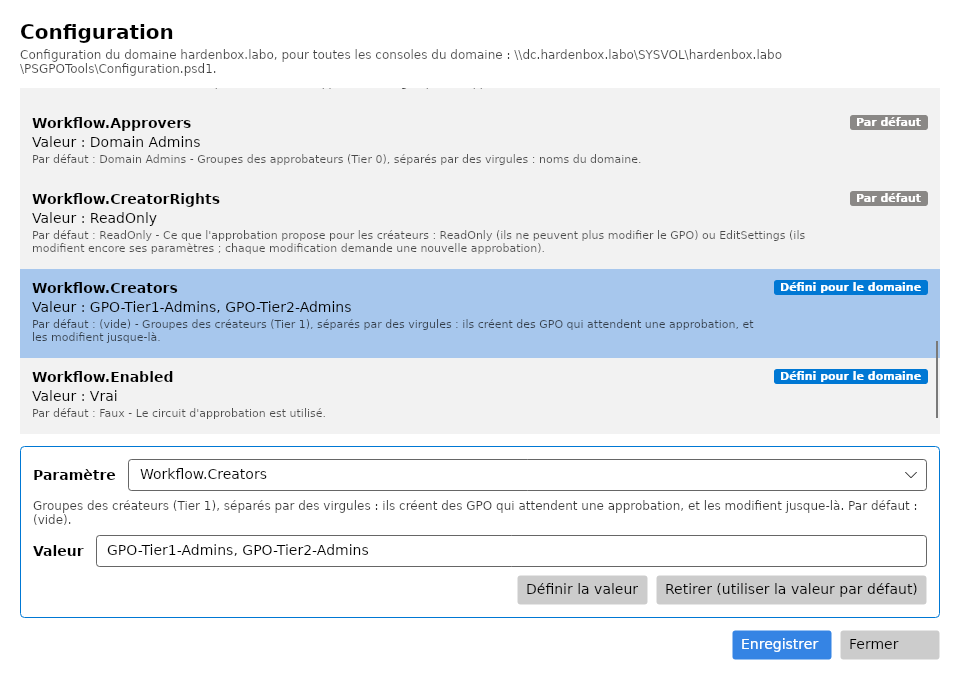
D'abord, activez le workflow du domaine avec les deux groupes comme créateurs : dans la console, en
administrateur du domaine, Paramètres : Workflow.Enabled = True, Workflow.Creators =
GPO-Tier1-Admins, GPO-Tier2-Admins, Enregistrer (pas à pas dans
Workflow d'approbation). Sans cela,
le script s'arrête avant de rien changer, et dit ce qu'il a lu.
Le magasin central du domaine doit exister aussi (Install-PSGPOAdmx -CentralStore, ou une copie
d'un dossier PolicyDefinitions) : sans lui, les créateurs n'ont aucun droit, car l'un d'eux
pourrait le créer et en être propriétaire (durcissement).
Télécharger windows/Grant-PSGPOTierDelegation.ps1
windows/Grant-PSGPOTierDelegation.ps1
#Requires -Version 7.4
<#
.SYNOPSIS
    Delegates from Windows, finely, to the technicians of Tier 1 and Tier 2 of the HGPM lab the
    creation of GPOs, and the links of GPOs to the OUs of their tier.
.DESCRIPTION
    After New-PSGPOTierLab.ps1, for each tier, to its group (GPO-Tier1-Admins with tiers1,
    GPO-Tier2-Admins with tiers2):

    - Link GPOs, as the Delegation tab of GPMC gives it on an OU: read and write of gPLink and
      gPOptions on the OU of the tier and the OUs below it.
    - The creation of GPOs, through the approval workflow of HGPM: a fine delegation,
      never Group Policy Creator Owners (which creates GPOs outside the workflow). The
      configuration of the domain must have the workflow enabled with both groups as its
      creators (the console: Settings, Workflow); Initialize-PSGPOWorkflow -Apply then gives
      them the right to create groupPolicyContainer objects in CN=Policies,CN=System and
      their folder in the Policies folder of SYSVOL. The GPOs they create wait for the
      approval of a domain administrator.

    What is there is kept: the script can run again. -WhatIf shows what it would change.

    LDAP with the Kerberos identity of the session (System.DirectoryServices, part of Windows):
    no RSAT needed, Active Directory or Samba AD. Run it in a session of a domain administrator;
    the HGPM module for the workflow.
.PARAMETER Server
    A domain controller of the domain; the domain of the computer by default.
.EXAMPLE
    .\Grant-PSGPOTierDelegation.ps1
.EXAMPLE
    .\Grant-PSGPOTierDelegation.ps1 -Server ADDS.powershell.labo -WhatIf
.LINK
    https://jm2k69.github.io/PSGPOTools/en/getting-started/lab/
#>
[CmdletBinding(SupportsShouldProcess)]
param(
    [string]$Server
)

$ErrorActionPreference = 'Stop'
if (-not $IsWindows) { throw 'This script is for Windows: on Linux, take the Linux one (samba-tool).' }

$tiers = @(
    @{ Ou = 'Tier 1'; Group = 'GPO-Tier1-Admins' }
    @{ Ou = 'Tier 2'; Group = 'GPO-Tier2-Admins' }
)
# The attributes of the links of an OU (schema of Active Directory).
$linkAttributes = [ordered]@{ gPLink = [guid]'f30e3bbe-9ff0-11d1-b603-0000f80367c1'; gPOptions = [guid]'f30e3bbf-9ff0-11d1-b603-0000f80367c1' }
$readWrite = [System.DirectoryServices.ActiveDirectoryRights]'ReadProperty, WriteProperty'

# An object of the directory, on the domain controller, with Kerberos, signed and sealed.
# The members of a DirectoryEntry are read through psbase: PowerShell adapts the object to its
# LDAP attributes, and .Children or .Properties would be $null.
$prefix = if ($Server) { "LDAP://$Server/" } else { 'LDAP://' }
function Get-Entry {
    param([string]$DistinguishedName)
    # [NullString]::Value, not $null: PowerShell would pass an empty user name and password, an
    # anonymous bind; a null one is the identity of the session.
    [System.DirectoryServices.DirectoryEntry]::new("$prefix$DistinguishedName", [NullString]::Value, [NullString]::Value, [System.DirectoryServices.AuthenticationTypes]'Secure, Signing, Sealing')
}
function Find-Account {
    param([string]$Name)
    $searcher = [System.DirectoryServices.DirectorySearcher]::new((Get-Entry $domainDN), "(sAMAccountName=$Name)", [string[]]'distinguishedName')
    $found = $searcher.FindOne()
    if ($found) { "$($found.Properties['distinguishedname'][0])" }
}

$rootDse = Get-Entry 'RootDSE'
$domainDN = "$($rootDse.psbase.Properties['defaultNamingContext'].Value)"
if (-not $domainDN) { throw "No distinguished name of the domain read from $(if ($Server) { $Server } else { 'the domain of the computer' })." }
if (-not $Server) { $Server = "$($rootDse.psbase.Properties['dnsHostName'].Value)" }
Write-Host "Domain $domainDN, domain controller $Server"

# The workflow first: without it, nothing is changed.
$groups = @($tiers | ForEach-Object { $_.Group })
if (-not (Get-Module HGPM)) { Import-Module HGPM -ErrorAction Stop }
# Read only: -WhatIf is for the changes.
$configuration = & { $WhatIfPreference = $false; Get-PSGPOConfiguration -Server $Server }
$workflow = $configuration.Configuration.Workflow
$creators = @("$($workflow.Creators)" -split ',' | ForEach-Object { $_.Trim() } | Where-Object { $_ })
if (-not $workflow.Enabled -or @($groups | Where-Object { $creators -notcontains $_ }).Count) {
    # What was read, and from where: a configuration that cannot be read is the defaults (no workflow).
    $read = if ($configuration.DomainFileExists) { "read from $($configuration.DomainPath): Enabled = $($workflow.Enabled), Creators = '$($workflow.Creators)'" }
        else { "no configuration of the domain in $($configuration.DomainPath)" }
    if ($configuration.Problem) { $read += " ($($configuration.Problem))" }
    throw "The approval workflow of the domain must be enabled, with $($groups -join ' and ') as its creators ($read): in the console, Settings, Workflow (Enabled, Creators = '$($groups -join ', ')'), then run this script again."
}

foreach ($tier in $tiers) {
    $ouDN = "OU=$($tier.Ou),$domainDN"
    $groupDN = Find-Account $tier.Group
    if (-not $groupDN) { throw "No group $($tier.Group): run New-PSGPOTierLab.ps1 first." }
    $sid = [System.Security.Principal.SecurityIdentifier]::new([byte[]](Get-Entry $groupDN).psbase.Properties['objectSid'].Value, 0)

    # Link GPOs: read and write of gPLink and gPOptions, on the OU and the OUs below it.
    foreach ($attribute in $linkAttributes.GetEnumerator()) {
        $ou = Get-Entry $ouDN
        $present = @($ou.psbase.ObjectSecurity.GetAccessRules($true, $false, [System.Security.Principal.SecurityIdentifier]) | Where-Object {
                $_.IdentityReference -eq $sid -and $_.AccessControlType -eq 'Allow' -and $_.ObjectType -eq $attribute.Value -and
                $_.InheritanceType -eq 'All' -and ($_.ActiveDirectoryRights -band $readWrite) -eq $readWrite
            }).Count
        if ($present) { Write-Host "  $($tier.Group) writes $($attribute.Key) of $ouDN"; continue }
        if (-not $PSCmdlet.ShouldProcess($ouDN, "Let $($tier.Group) write $($attribute.Key), on this OU and the OUs below it")) { continue }
        $ou.psbase.ObjectSecurity.AddAccessRule([System.DirectoryServices.ActiveDirectoryAccessRule]::new($sid, $readWrite,
                [System.Security.AccessControl.AccessControlType]::Allow, $attribute.Value, [System.DirectoryServices.ActiveDirectorySecurityInheritance]::All))
        # The DACL only: the owner and the audit are left as they are.
        $ou.psbase.Options.SecurityMasks = [System.DirectoryServices.SecurityMasks]::Dacl
        $ou.psbase.CommitChanges()
        Write-Host "  $($tier.Group) now writes $($attribute.Key) of $ouDN"
    }
}

# The creation of GPOs: the right to create GPOs, in the directory and in SYSVOL: what is missing, added.
Initialize-PSGPOWorkflow -Server $Server -Apply -WhatIf:$WhatIfPreference | Format-Table Target, Account, State -AutoSize
Write-Host 'Next: log on as tiers1 (or tiers2), then open the console: Show-GPOManagerAvalonia.'
Télécharger linux/Grant-PSGPOTierDelegation.ps1
Import-Module HGPM
./Grant-PSGPOTierDelegation.ps1 -Server dc.hardenbox.labo -WhatIf
./Grant-PSGPOTierDelegation.ps1 -Server dc.hardenbox.labo
linux/Grant-PSGPOTierDelegation.ps1
#Requires -Version 7.4
<#
.SYNOPSIS
    Delegates from Linux, finely, to the technicians of Tier 1 and Tier 2 of the HGPM lab the
    creation of GPOs, and the links of GPOs to the OUs of their tier.
.DESCRIPTION
    After New-PSGPOTierLab.ps1, for each tier, to its group (GPO-Tier1-Admins with tiers1,
    GPO-Tier2-Admins with tiers2):

    - Link GPOs, as the Delegation tab of GPMC gives it on an OU: read and write of gPLink and
      gPOptions on the OU of the tier and the OUs below it.
    - The creation of GPOs, through the approval workflow of HGPM: a fine delegation,
      never Group Policy Creator Owners (which creates GPOs outside the workflow). The
      configuration of the domain must have the workflow enabled with both groups as its
      creators (the console: Settings, Workflow); Initialize-PSGPOWorkflow -Apply then gives
      them the right to create groupPolicyContainer objects in CN=Policies,CN=System and
      their folder in the Policies folder of SYSVOL. The GPOs they create wait for the
      approval of a domain administrator.

    What is there is kept: the script can run again. -WhatIf shows what it would change.

    Needs samba-tool and a Kerberos ticket of a domain administrator (kinit administrator); the
    HGPM module for the workflow.
.PARAMETER Server
    The domain controller of the domain.
.EXAMPLE
    ./Grant-PSGPOTierDelegation.ps1 -Server dc.hardenbox.labo
.EXAMPLE
    ./Grant-PSGPOTierDelegation.ps1 -Server dc.hardenbox.labo -WhatIf
.LINK
    https://jm2k69.github.io/PSGPOTools/en/getting-started/lab/
#>
[CmdletBinding(SupportsShouldProcess)]
param(
    [Parameter(Mandatory)] [string]$Server
)

$ErrorActionPreference = 'Stop'

$tiers = @(
    @{ Ou = 'Tier 1'; Group = 'GPO-Tier1-Admins' }
    @{ Ou = 'Tier 2'; Group = 'GPO-Tier2-Admins' }
)
# The attributes of the links of an OU (schema of Active Directory).
$linkAttributes = [ordered]@{ gPLink = 'f30e3bbe-9ff0-11d1-b603-0000f80367c1'; gPOptions = 'f30e3bbf-9ff0-11d1-b603-0000f80367c1' }

# The distinguished name of the domain, from the RootDSE of the domain controller (read without
# an account).
function Get-DomainDistinguishedName {
    param([string]$Server)
    Add-Type -AssemblyName System.DirectoryServices.Protocols
    $connection = [System.DirectoryServices.Protocols.LdapConnection]::new([System.DirectoryServices.Protocols.LdapDirectoryIdentifier]::new($Server, 389))
    try {
        $connection.AuthType = [System.DirectoryServices.Protocols.AuthType]::Anonymous
        $connection.SessionOptions.ProtocolVersion = 3
        $request = [System.DirectoryServices.Protocols.SearchRequest]::new('', '(objectClass=*)', [System.DirectoryServices.Protocols.SearchScope]::Base, 'defaultNamingContext')
        "$($connection.SendRequest($request).Entries[0].Attributes['defaultNamingContext'][0])"
    } finally {
        $connection.Dispose()
    }
}

function Invoke-SambaTool {
    param([string[]]$Argument, [switch]$AllowFailure)
    # Kerberos only, never a password prompt.
    $output = & samba-tool @Argument -H "ldap://$Server" --use-kerberos=required --no-pass 2>&1
    if ($LASTEXITCODE -ne 0) {
        if ($AllowFailure) { return $null }
        throw "samba-tool $($Argument -join ' ') failed: $($output -join ' ')"
    }
    $output | ForEach-Object { "$_" }
}

if (-not (Get-Command samba-tool -ErrorAction SilentlyContinue)) {
    throw 'samba-tool is needed (Debian/Ubuntu: apt install samba-common-bin), with a Kerberos ticket of a domain administrator (kinit administrator).'
}
$domainDN = Get-DomainDistinguishedName -Server $Server
if (-not $domainDN) { throw "No distinguished name of the domain read from $Server." }
Write-Host "Domain $domainDN, domain controller $Server"

# The workflow first: without it, nothing is changed.
$groups = @($tiers | ForEach-Object { $_.Group })
if (-not (Get-Module HGPM)) { Import-Module HGPM -ErrorAction Stop }
# Read only: -WhatIf is for the changes.
$configuration = & { $WhatIfPreference = $false; Get-PSGPOConfiguration -Server $Server }
$workflow = $configuration.Configuration.Workflow
$creators = @("$($workflow.Creators)" -split ',' | ForEach-Object { $_.Trim() } | Where-Object { $_ })
if (-not $workflow.Enabled -or @($groups | Where-Object { $creators -notcontains $_ }).Count) {
    # What was read, and from where: a configuration that cannot be read is the defaults (no workflow).
    $read = if ($configuration.DomainFileExists) { "read from $($configuration.DomainPath): Enabled = $($workflow.Enabled), Creators = '$($workflow.Creators)'" }
        else { "no configuration of the domain in $($configuration.DomainPath)" }
    if ($configuration.Problem) { $read += " ($($configuration.Problem))" }
    throw "The approval workflow of the domain must be enabled, with $($groups -join ' and ') as its creators ($read): in the console, Settings, Workflow (Enabled, Creators = '$($groups -join ', ')'), then run this script again."
}

foreach ($tier in $tiers) {
    $ouDN = "OU=$($tier.Ou),$domainDN"
    $sid = "$(@(Invoke-SambaTool 'group', 'show', $tier.Group, '--attributes=objectSid' -AllowFailure) -match '^objectSid: ' | Select-Object -First 1)" -replace '^objectSid: '
    if (-not $sid) { throw "No group $($tier.Group): run New-PSGPOTierLab.ps1 first." }

    # Link GPOs: read and write of gPLink and gPOptions, on the OU and the OUs below it (CI).
    foreach ($attribute in $linkAttributes.GetEnumerator()) {
        $ace = "(OA;CI;RPWP;$($attribute.Value);;$sid)"
        $acl = (@(Invoke-SambaTool 'dsacl', 'get', "--objectdn=$ouDN") -join '').ToLowerInvariant()
        if ($acl.Contains($ace.ToLowerInvariant())) { Write-Host "  $($tier.Group) writes $($attribute.Key) of $ouDN"; continue }
        if (-not $PSCmdlet.ShouldProcess($ouDN, "Let $($tier.Group) write $($attribute.Key), on this OU and the OUs below it")) { continue }
        $null = Invoke-SambaTool 'dsacl', 'set', "--objectdn=$ouDN", "--sddl=$ace"
        Write-Host "  $($tier.Group) now writes $($attribute.Key) of $ouDN"
    }
}

# The creation of GPOs: the right to create GPOs, in the directory and in SYSVOL: what is missing, added.
Initialize-PSGPOWorkflow -Server $Server -Apply -WhatIf:$WhatIfPreference | Format-Table Target, Account, State -AutoSize
Write-Host 'Next: kinit tiers1 (or tiers2), then open the console: Show-GPOManagerAvalonia.'
3. La console en technicien
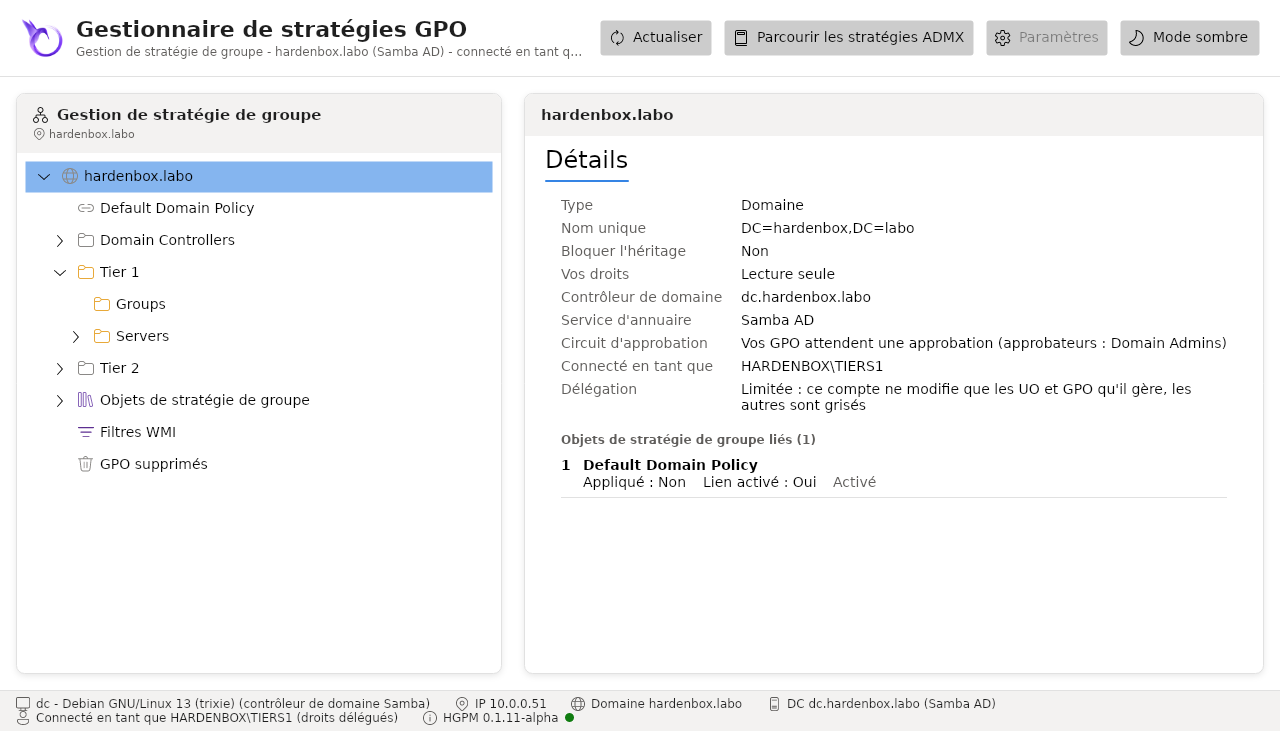
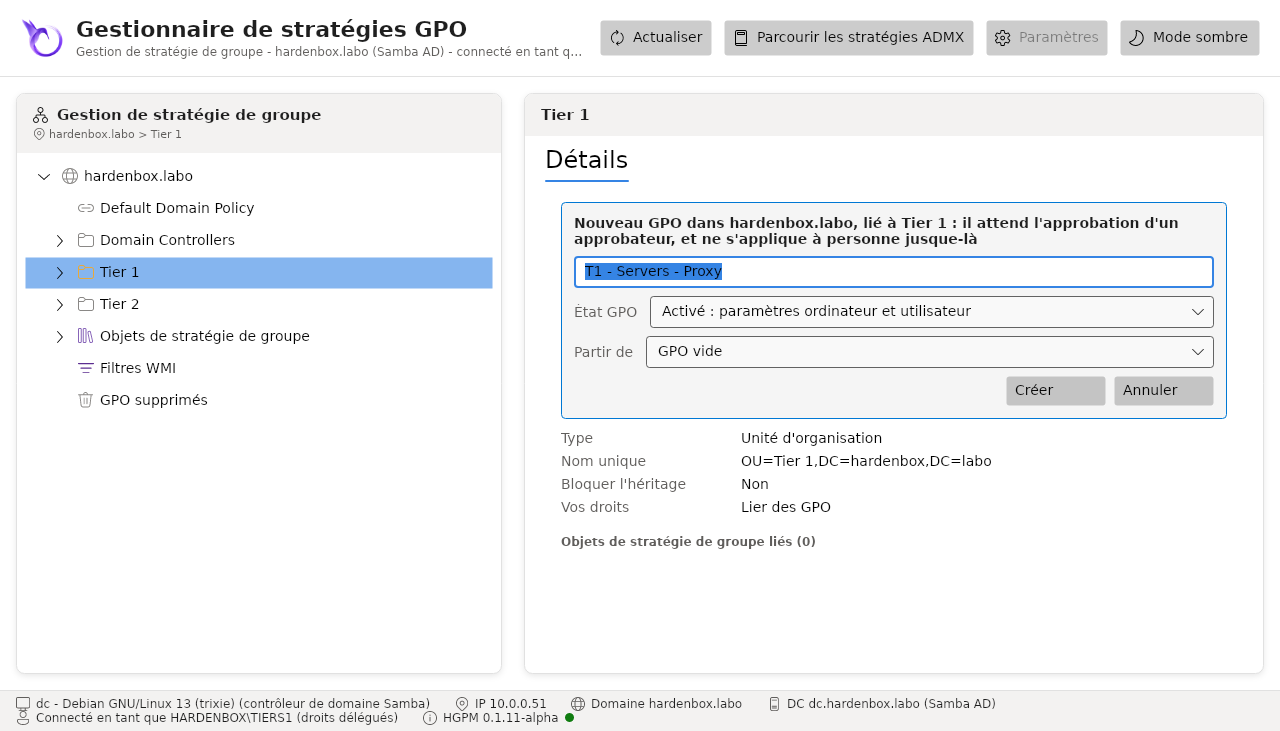
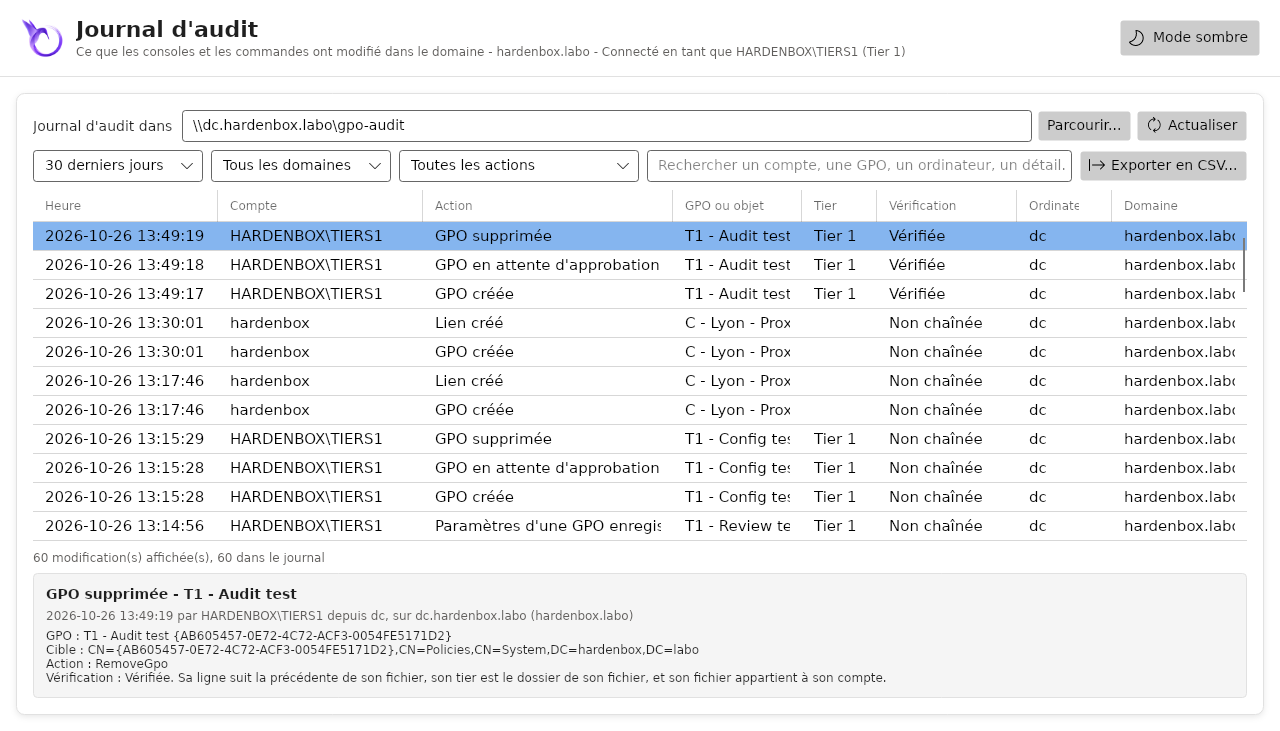
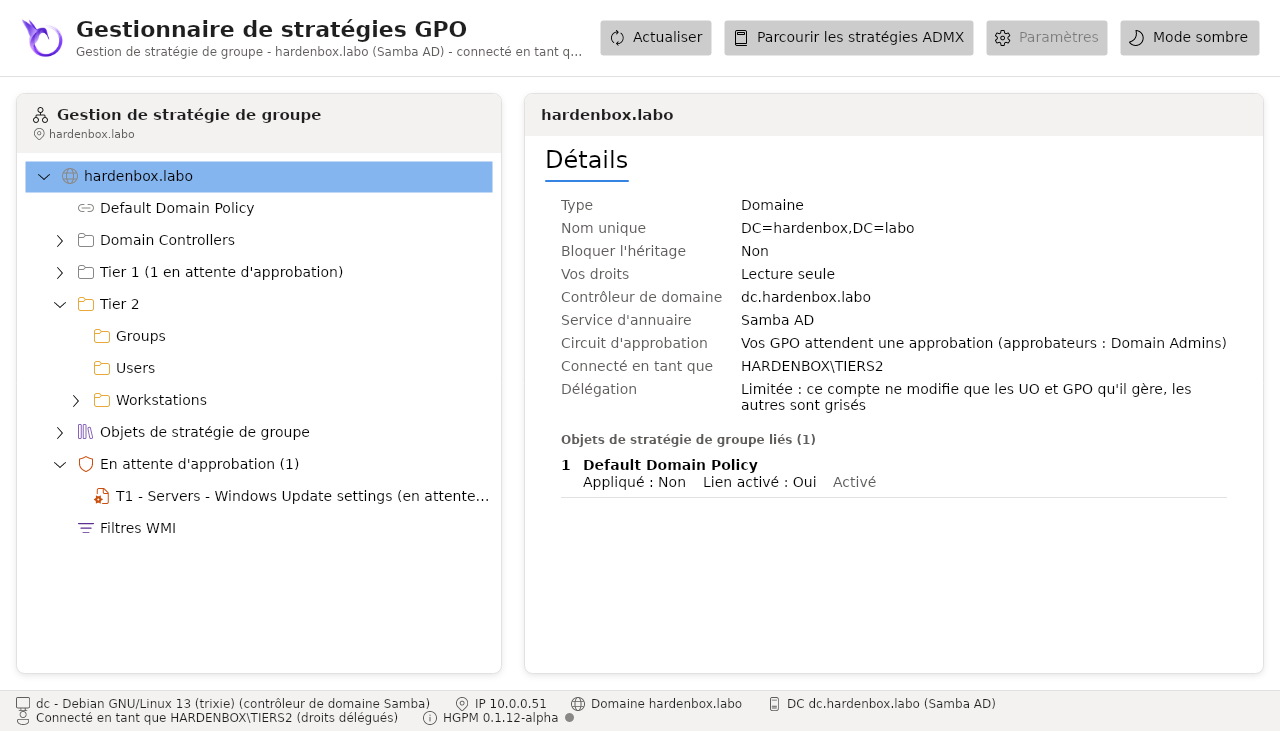
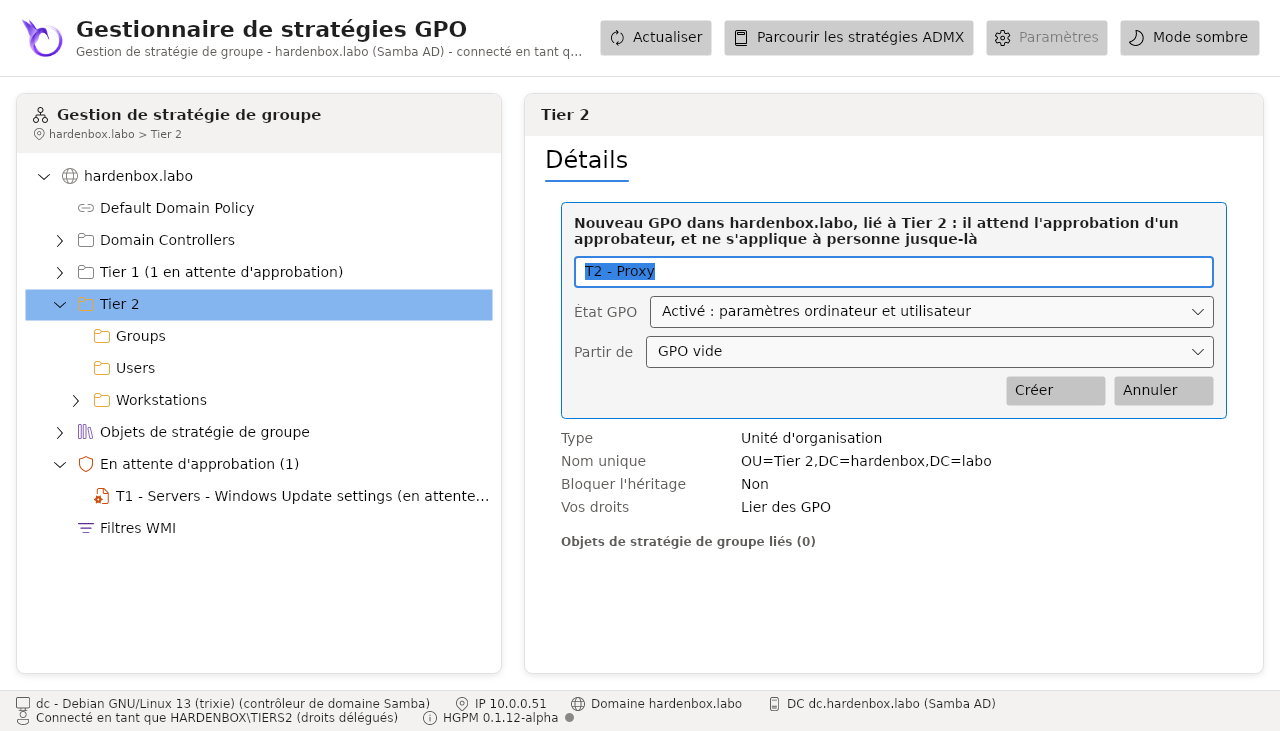
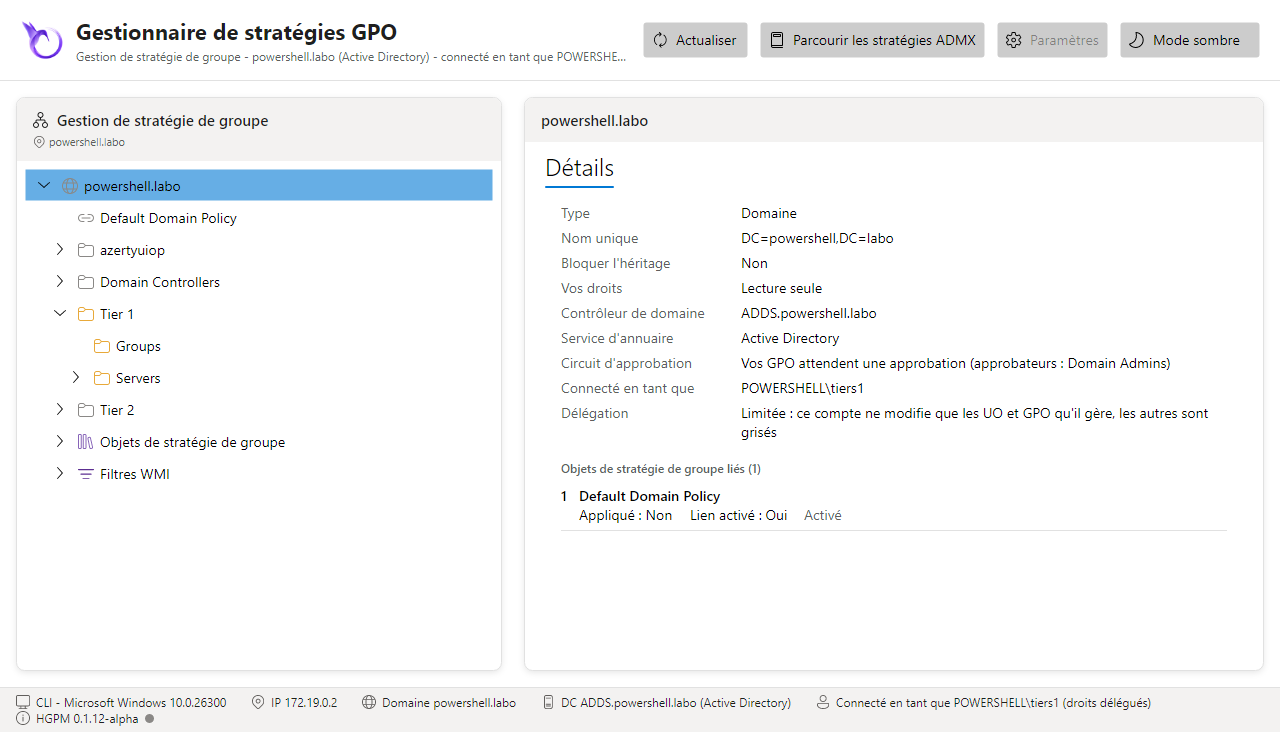
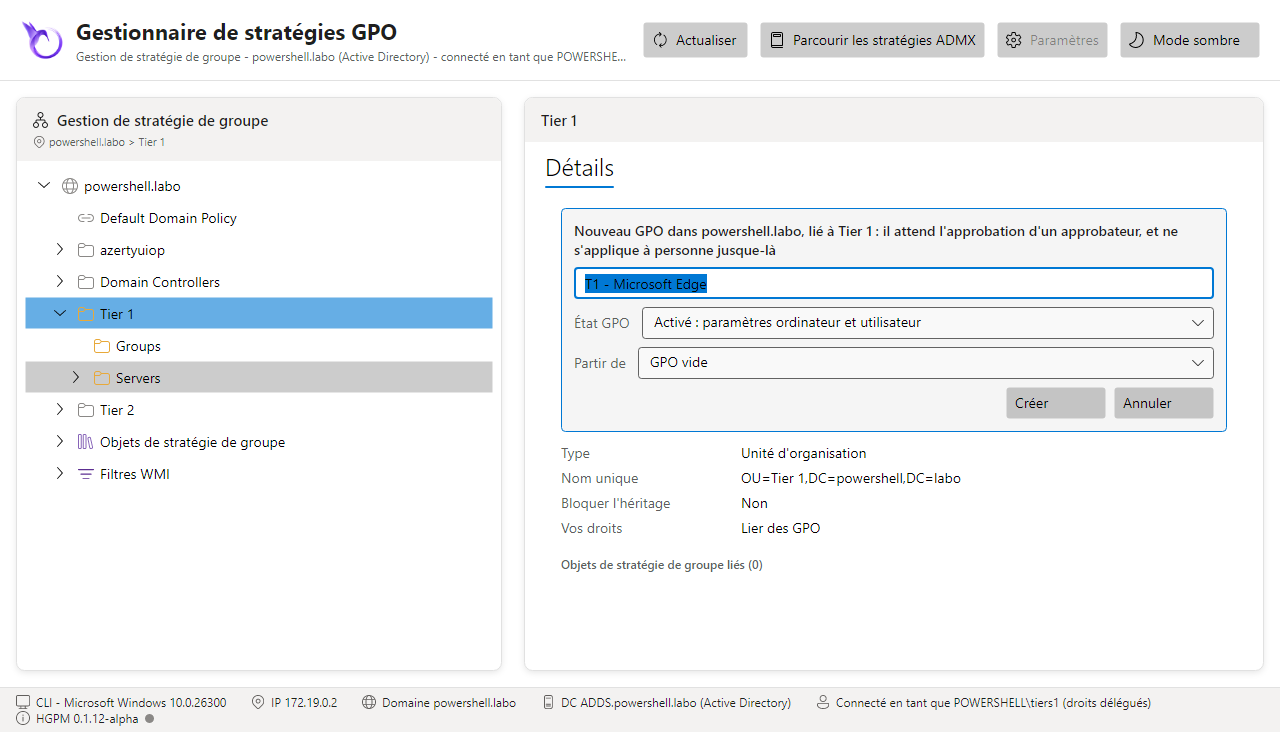
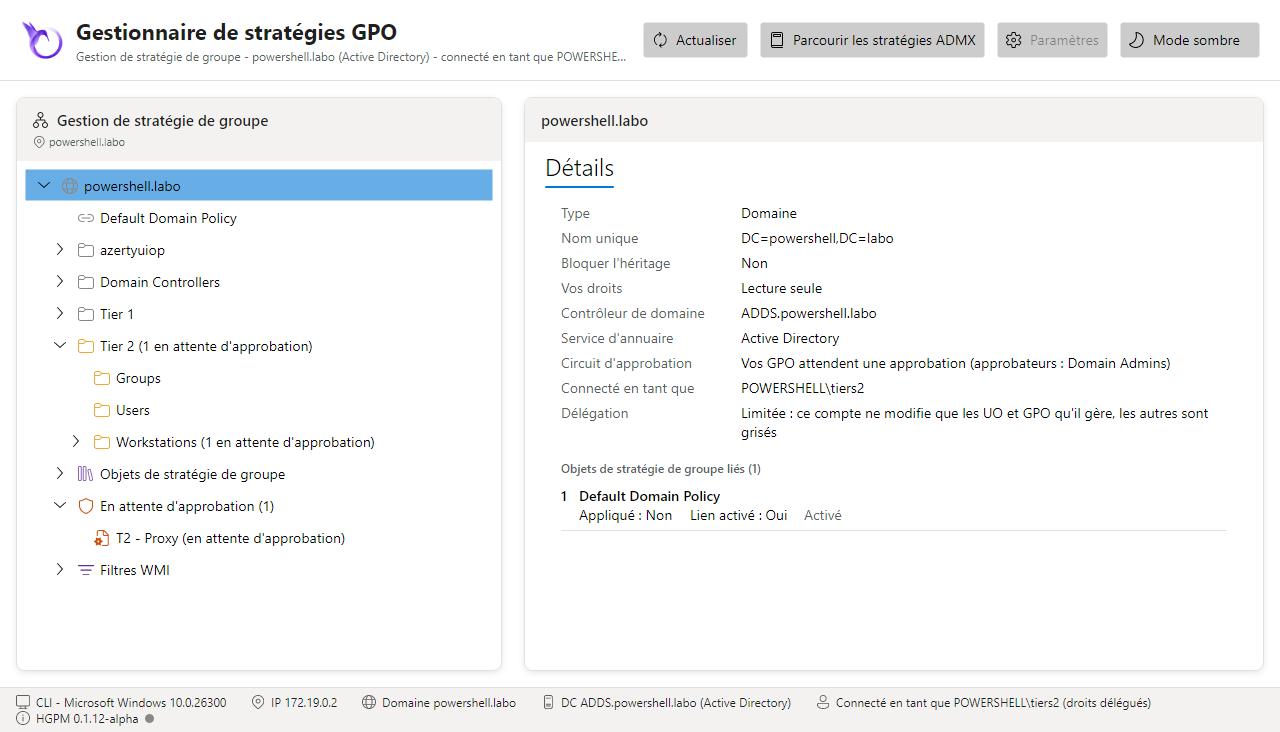
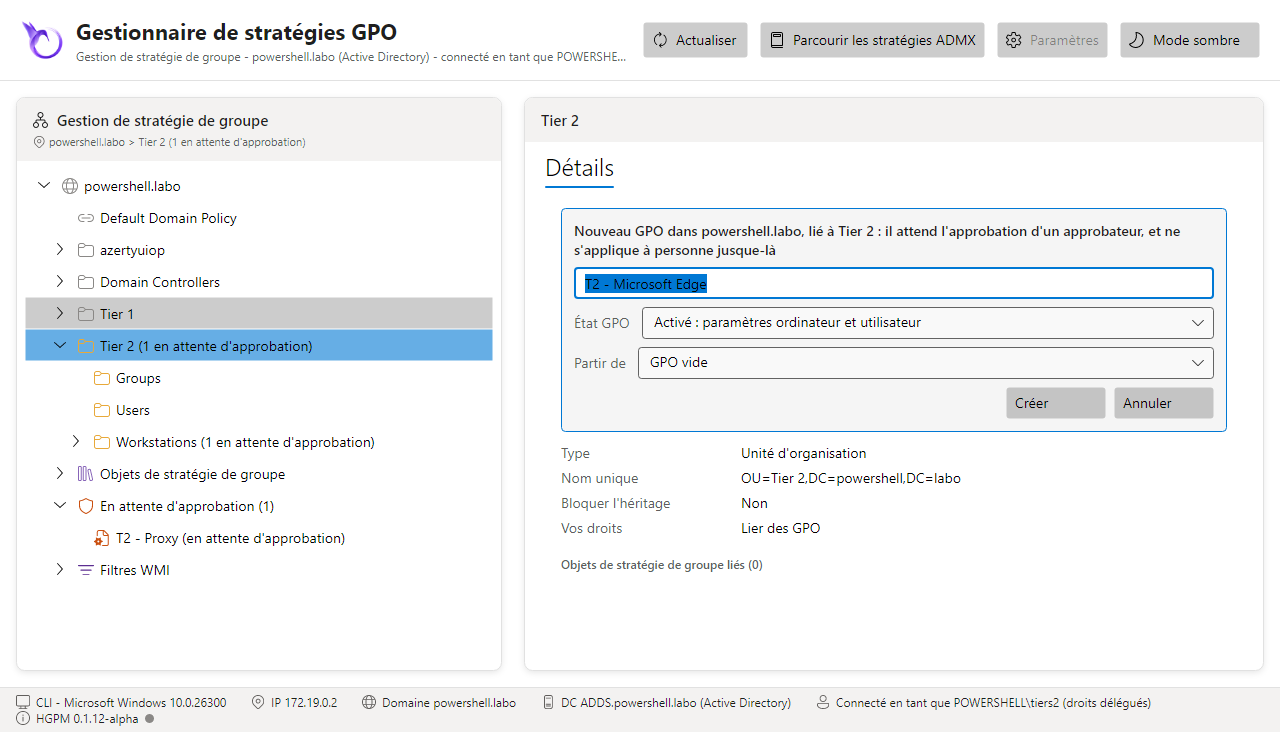
Connectez-vous en tiers1 ou tiers2 (Linux : kinit tiers1 ; Windows : une session du compte, ou
runas /user:POWERSHELL\Tiers1), puis Show-GPOManagerAvalonia : la console montre tout le
domaine, grisé sauf les OU de son tier, et les GPO qu'il crée attendent une approbation.
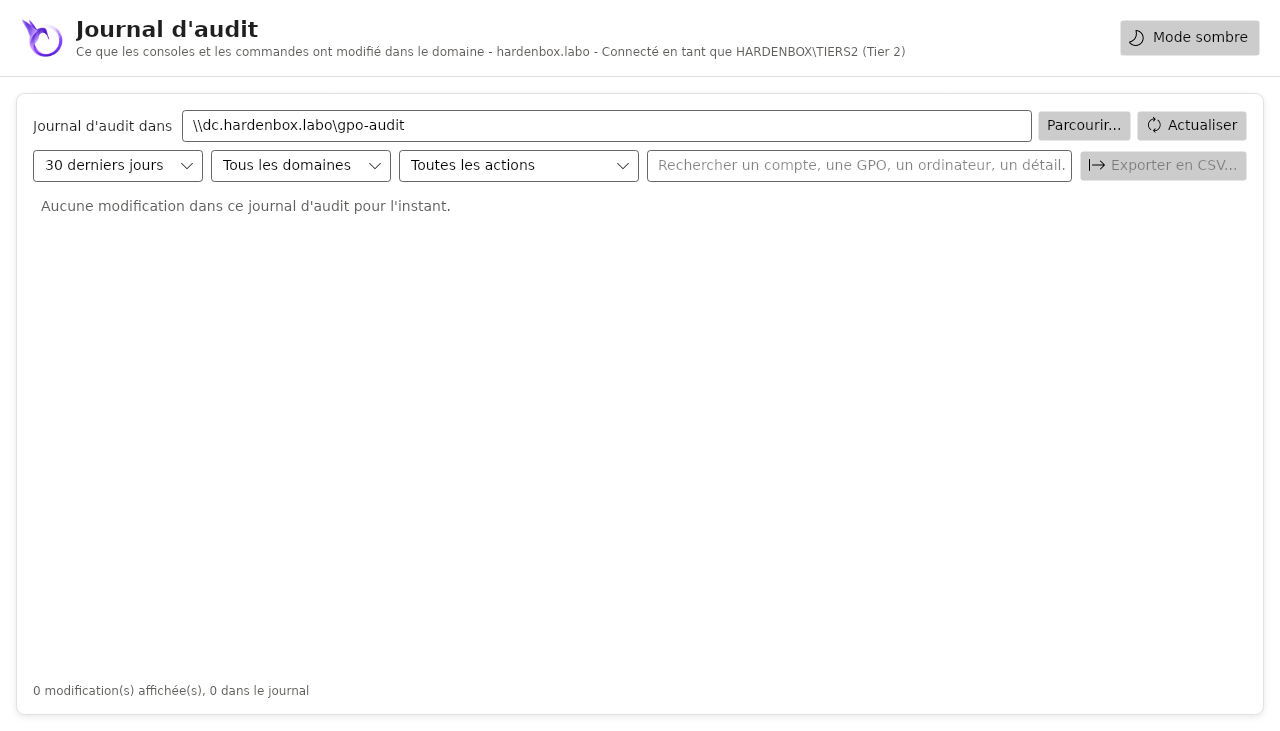
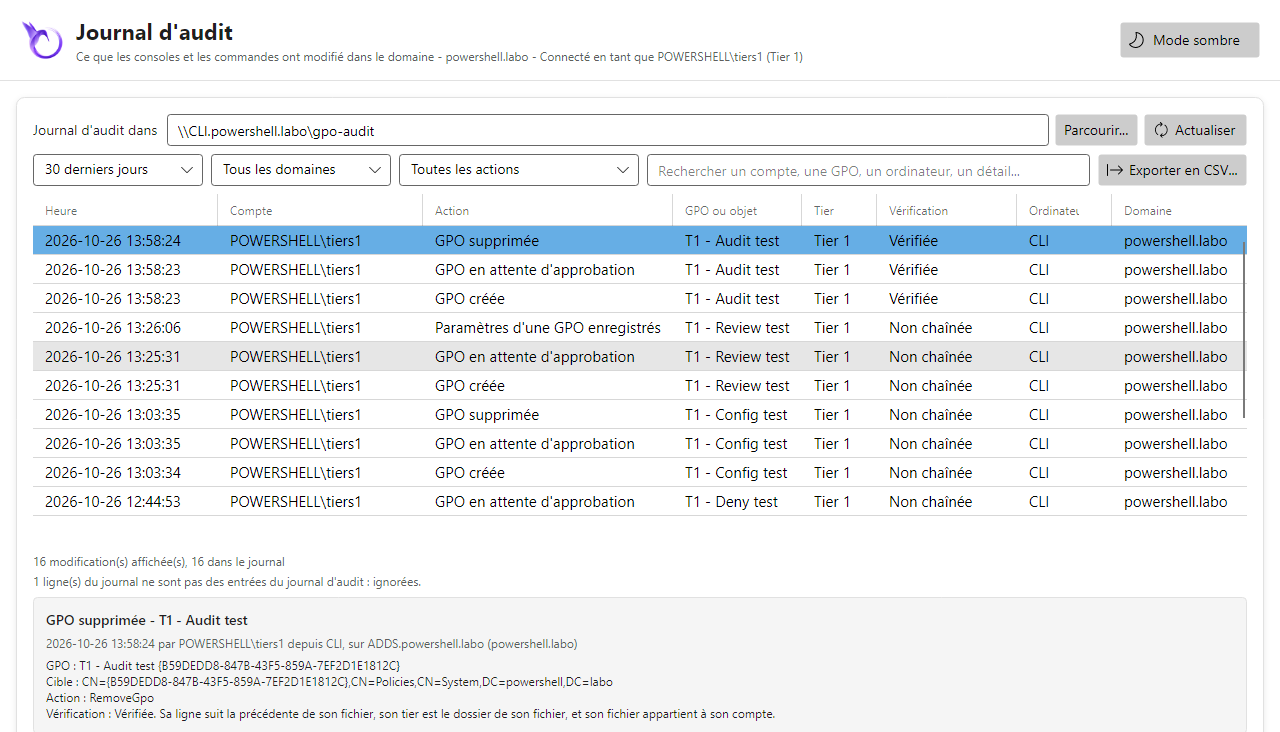
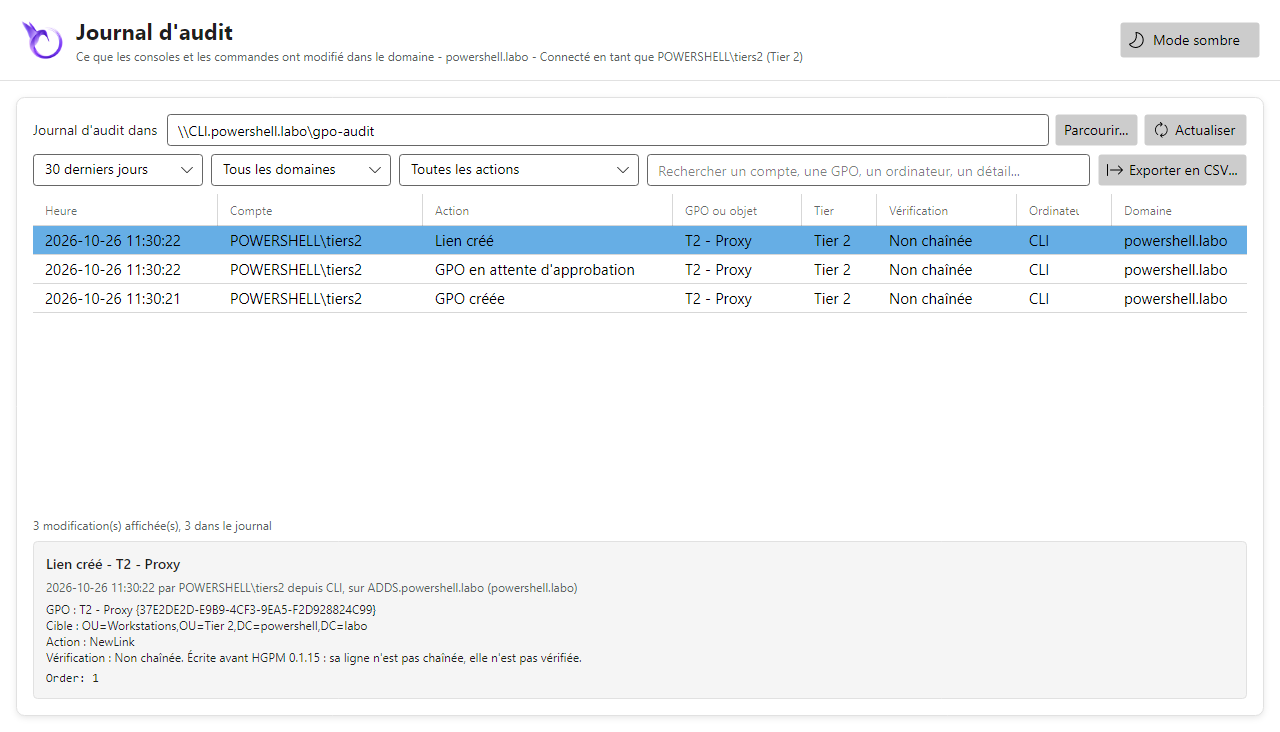
Paramètres est grisé, l'onglet Historique et les GPO supprimées n'y sont pas (les sauvegardes sont
pour le Tier 0), et le journal d'audit ne montre que les modifications de son tier : vide pour un
compte qui n'a encore rien modifié.
Seulement Lier un objet de stratégie de groupe existant... dans le menu de son UO
Le technicien ne crée pas de GPO : les droits du workflow manquent (le script a été lancé
avant que Workflow.Creators soit réglé, ou avec -WhatIf). En administrateur du domaine,
Initialize-PSGPOWorkflow dit ce qui manque (Missing), Initialize-PSGPOWorkflow -Apply
l'ajoute ; le technicien rouvre sa console.
Tier 1 (tiers1)
Tier 2 (tiers2)
Tier 1 (Tiers1)
Tier 2 (Tiers2)
Les tests d'intégration du module tournent sur un tel contrôleur de domaine, ces scripts compris (sur le domaine de la CI) : voir Tests.