Audit log
Show-AuditLogAvalonia (or the Audit Log tile of Start-HGPM) shows the audit log of HGPM:
each change the domain accepted, from a console or a command, newest first. Who, when, from which
computer, on which domain controller, what and on which GPO, OU or setting. It needs no right on the
domain: only the read of the folder of the log.
Show-AuditLogAvalonia
Show-AuditLogAvalonia -Path \\files\gpo-audit                # another folder
Show-AuditLogAvalonia -Server dc.hardenbox.labo -Language fr-FR
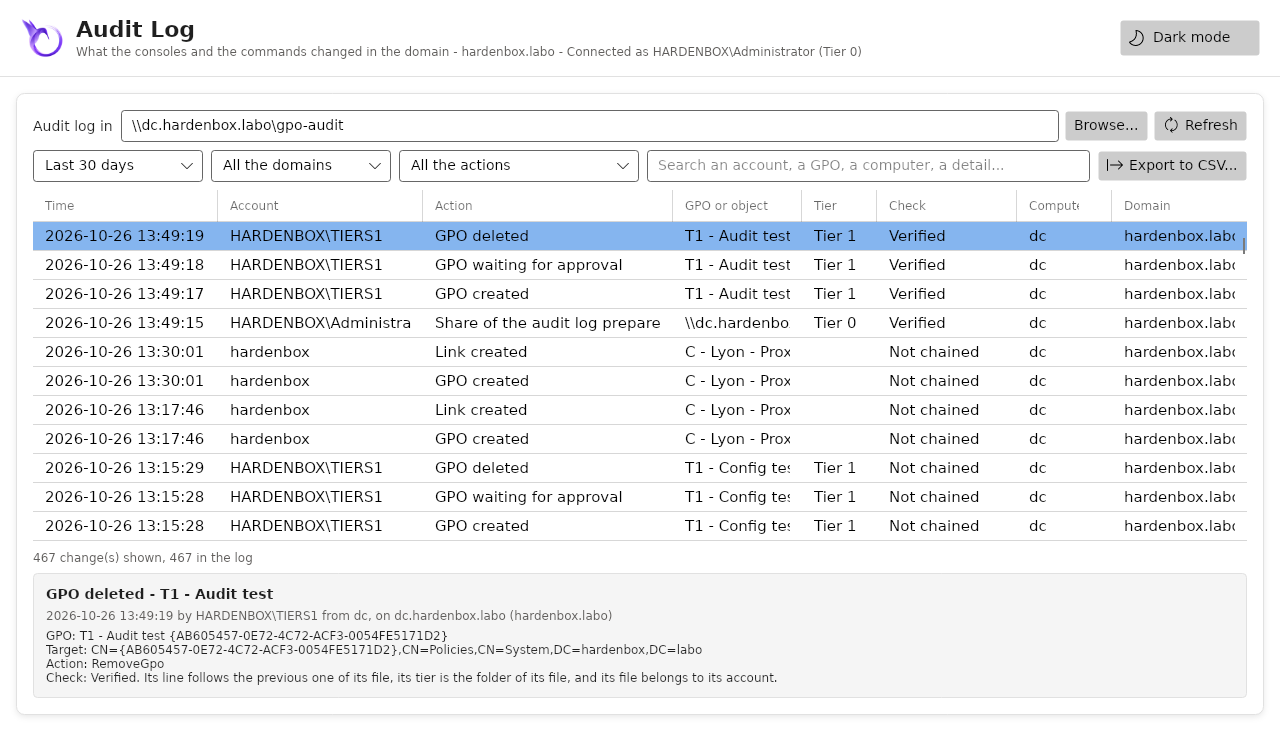
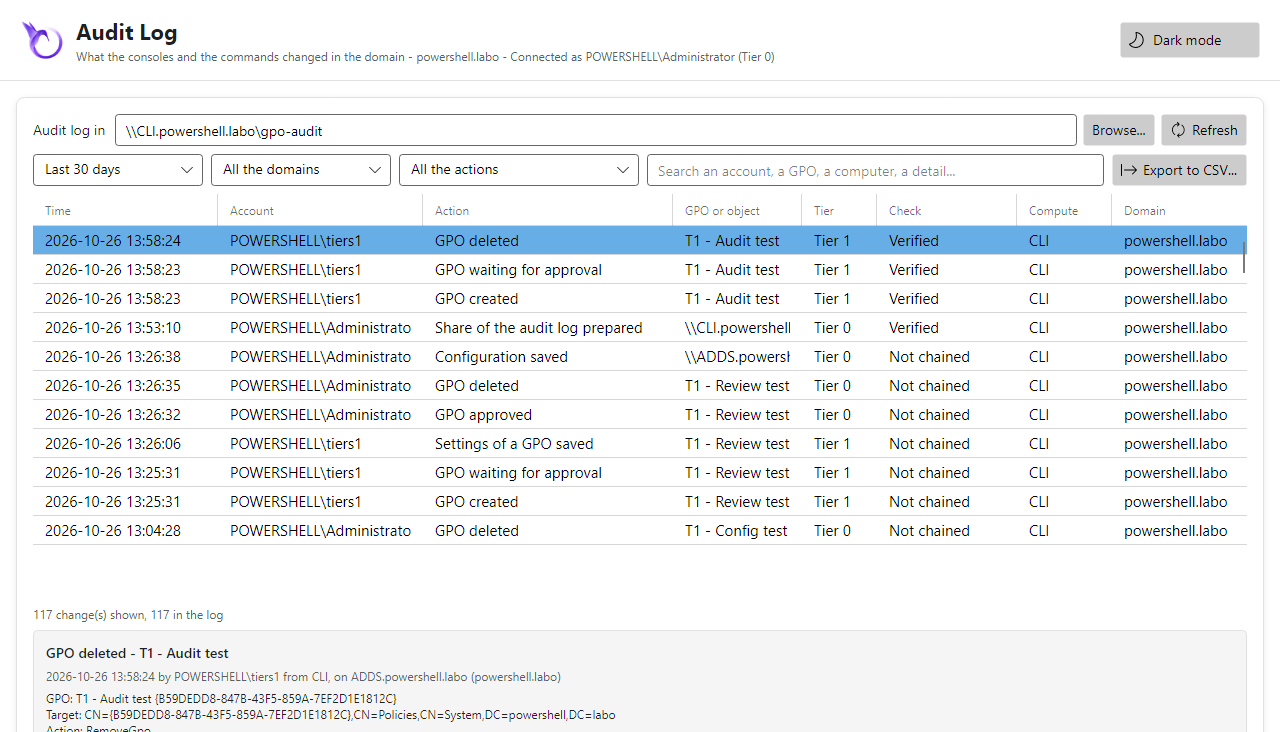
The changes
| Column | |
|---|---|
| Time | when, in the time of the computer (the log keeps UTC) |
| Account | the account of the directory that made the change |
| Action | what, by its name: GPO created, Link changed, Settings of a GPO saved, GPO approved... |
| GPO or object | the GPO, else the OU, the domain or the configuration |
| Tier | the folder of the central log it is in: Tier 0, 1, 2, Unassigned |
| Check | whether the change is the one its account wrote: Verified, Altered, Tier differs, Owner differs, Not chained (below) |
| Computer, Domain | from where, on which domain |
- The period: the last 24 hours, 7 days, 30 days (at first) or everything.
- The domain and the action: those the log holds.
- The search reads every text of a change, its details included: each word must be found
(
registry.pol tiers1). - The details of the selected change: everything the log keeps of it, as the domain controller, the GPO and its identifier, and its details (the options of a link changed, the file saved with its SHA-256 and its new version, the rights of the creators at an approval...).
- Export to CSV...: the changes shown, as they are filtered, the time in UTC (ISO 8601), the details as JSON.
Where the log is
The folder is Audit.Path of the configuration of the domain: the window
reads the domain once shown (-Server, else the domain of the computer). Without a domain, or when
the configuration sets no folder, it is the folder Audit of the backups of the account, which
only its console writes. Browse... and Refresh read another folder, or the same one again.
The log is on by default: Audit.Enabled = $false in the configuration of the domain stops it,
the changes still made. See the audit log for what each line holds.
# The same changes in a script
Get-PSGPOAuditLog -After (Get-Date).AddDays(-7) -Action SaveGpoFile, ApproveGpo |
    Export-Csv .\audit.csv -NoTypeInformation
The central log, a folder per tier
A log the consoles share is on a share of a file server, Audit.Path of the configuration of
the domain. Not SYSVOL: it is copied to every domain controller (DFSR), the log would grow on each
of them, and two domain controllers adding to the same file would lose lines; Samba does not copy
SYSVOL at all.
The share has a folder per tier, and the permissions of the roles:
| Folder | Writes there (its own file) | Reads it |
|---|---|---|
Tier0 |
the approvers of the workflow (Workflow.Approvers), Domain Admins |
Tier 0, the readers |
Tier1 |
the groups of Audit.Tiers.Tier1 |
Tier 1, Tier 0, the readers |
Tier2 |
the groups of Audit.Tiers.Tier2 |
Tier 2, Tier 0, the readers |
Unassigned |
a user of the domain in no tier (Domain Users, not the computers) | Tier 0, the readers |
Archive |
the retention (Audit.Purgers) |
Tier 0, the readers |
| the share itself | nobody | listed by the groups of the tiers and the readers; any other account only goes through it, to Unassigned |
- Each account adds its changes to its own file:
<tier>\<domain>-<yyyy-MM>-<account>-<computer>.jsonl. No two consoles write the same file. Its owner only appends to it: it neither writes over it, deletes it nor changes its permissions; nobody but the administrators does. - Tier 0 reads every tier, an account of Tier 1 or Tier 2 the changes of its tier only, the
readers (
Audit.Readers, the auditors) everything, without writing. The window shows what the account can read, and the tier of each change. - The tier of an account is read in its groups when the domain is read: an administrator of the
domain or an approver is Tier 0, then the groups of
Audit.Tiers.
1. The share
On a Windows file server, as an administrator:
Download windows/New-PSGPOShare.ps1
.\New-PSGPOShare.ps1 -Name gpo-audit                     # \\<server>\gpo-audit, D:\Shares\gpo-audit
.\New-PSGPOShare.ps1 -Name gpo-audit -Path E:\Shares\GPO-Audit -WhatIf
windows/New-PSGPOShare.ps1
#Requires -Version 5.1
#Requires -RunAsAdministrator
<#
.SYNOPSIS
    Creates a share of HGPM on a Windows file server: the central audit log or the central backups.
.DESCRIPTION
    A folder and its SMB share. The share lets the authenticated users change files and the
    administrators do everything: the NTFS permissions decide, written by
    Initialize-PSGPOAuditShare (the audit log, a folder per tier) or Initialize-PSGPOBackupShare
    (the backups, Tier 0 only) from the roles of the configuration of the domain. Until then the
    folder is for the administrators only.

    Run it as an administrator of the file server (not a domain controller: SYSVOL is copied to
    every domain controller), once per share, then from a console of a domain administrator:

        Initialize-PSGPOAuditShare -Path \\<server>\gpo-audit
        Initialize-PSGPOBackupShare -Path \\<server>\gpo-backups

    and Audit.Path or Backup.Path in the Settings of the console. What is there is kept: the script
    can run again.
.PARAMETER Name
    Name of the share: gpo-audit, gpo-backups.
.PARAMETER Path
    The folder of the share; D:\Shares\<Name> by default.
.EXAMPLE
    .\New-PSGPOShare.ps1 -Name gpo-audit
.EXAMPLE
    .\New-PSGPOShare.ps1 -Name gpo-backups -Path E:\Shares\GPO-Backups -WhatIf
.LINK
    https://jm2k69.github.io/PSGPOTools/en/features/audit-log/
#>
[CmdletBinding(SupportsShouldProcess)]
param(
    [string]$Name = 'gpo-audit',
    [string]$Path
)

$ErrorActionPreference = 'Stop'
if (-not $Path) { $Path = "D:\Shares\$Name" }

if (-not (Test-Path -LiteralPath $Path -PathType Container)) {
    if ($PSCmdlet.ShouldProcess($Path, 'Create the folder')) {
        $null = New-Item -ItemType Directory -Path $Path
        # The administrators and SYSTEM only, until Initialize-PSGPO...Share writes the roles.
        $acl = [System.Security.AccessControl.DirectorySecurity]::new()
        $acl.SetSecurityDescriptorSddlForm('D:P(A;OICI;FA;;;SY)(A;OICI;FA;;;BA)')
        Set-Acl -LiteralPath $Path -AclObject $acl
    }
}

if (Get-SmbShare -Name $Name -ErrorAction SilentlyContinue) {
    Write-Output "The share $Name exists: kept."
} elseif ($PSCmdlet.ShouldProcess("\\$env:COMPUTERNAME\$Name", 'Create the share')) {
    # Share permissions: change for the accounts of the domain, the NTFS permissions decide.
    $null = New-SmbShare -Name $Name -Path $Path -FullAccess 'BUILTIN\Administrators' -ChangeAccess 'NT AUTHORITY\Authenticated Users' `
        -FolderEnumerationMode AccessBased -Description "HGPM: $Name"
    Write-Output "Share \\$env:COMPUTERNAME\$Name created: $Path"
}
On a Samba server (a member server, or the domain controller of a lab), as root:
Download linux/New-PSGPOShare.sh
sudo ./New-PSGPOShare.sh                             # //<server>/gpo-audit, /srv/gpo-audit
sudo ./New-PSGPOShare.sh gpo-audit /srv/gpo-audit
linux/New-PSGPOShare.sh
#!/usr/bin/env bash
# Creates a share of HGPM on a Samba server (an AD domain controller or a member server): the
# central audit log (gpo-audit) or the central backups of the GPOs (gpo-backups). A folder, and a
# section of smb.conf whose permissions are the NT ACLs that Initialize-PSGPOAuditShare or
# Initialize-PSGPOBackupShare write (acl_xattr), not those of the file system.
#
#   sudo ./New-PSGPOShare.sh                                  # gpo-audit, /srv/gpo-audit
#   sudo ./New-PSGPOShare.sh gpo-backups /srv/gpo-backups
#
# Then, from a console with the Kerberos ticket of a domain administrator (kinit administrator):
#
#   Initialize-PSGPOAuditShare -Path //<server>/gpo-audit -Server <domain controller>
#   Initialize-PSGPOBackupShare -Path //<server>/gpo-backups -Server <domain controller>
#
# and Audit.Path or Backup.Path in the Settings of the console (the configuration of the domain).
# What is there is kept: the script can run again.
#
# https://jm2k69.github.io/PSGPOTools/en/features/audit-log/
set -euo pipefail

share="${1:-gpo-audit}"
folder="${2:-/srv/$share}"
config="$(smbd -b | awk '/CONFIGFILE:/ { print $2 }')"
config="${config:-/etc/samba/smb.conf}"

if [ "$(id -u)" -ne 0 ]; then
    echo "Run it as root: sudo $0 $*" >&2
    exit 1
fi

# The folder: every account of the domain reaches it, the NT ACLs decide what each does there.
# The sticky bit: an account cannot delete the file of another one, even from the server.
mkdir -p "$folder"
chmod 1777 "$folder"

# The share: NT ACLs kept in extended attributes, the POSIX ACLs left aside.
if grep -q "^\[$share\]" "$config"; then
    echo "[$share] is already in $config: kept."
else
    cp "$config" "$config.$(date +%Y%m%d-%H%M%S).bak"
    cat >> "$config" <<EOF

[$share]
    path = $folder
    read only = no
    vfs objects = acl_xattr
    acl_xattr:ignore system acls = yes
    map acl inherit = yes
    store dos attributes = yes
    comment = HGPM: $share
EOF
    echo "[$share] added to $config."
fi

testparm -s "$config" > /dev/null
smbcontrol all reload-config
echo "Share //$(hostname -f)/$share ready: $folder"
2. The roles, in the configuration of the domain
In Settings of the console (an administrator of the domain), or Configuration.psd1:
Audit = @{
    Path = '\\files.contoso.com\gpo-audit'
    Tiers = @{ Tier1 = 'GPO-Tier1-Admins'; Tier2 = 'GPO-Tier2-Admins' }
    Readers = 'GPO-Auditors'
}
3. The folders and their permissions
Initialize-PSGPOAuditShare makes the folders of the tiers and writes their permissions from the
roles. Again each time the groups of the tiers change: the files are kept.
Initialize-PSGPOAuditShare -WhatIf
Initialize-PSGPOAuditShare                                   # Audit.Path of the configuration
Initialize-PSGPOAuditShare -Path //files.contoso.com/gpo-audit -Server dc.contoso.com    # Linux
4. The logs of the consoles, moved into it
The changes the consoles wrote before, in the folder Audit of the backups of their account:
Import-PSGPOAuditLog -Path "$HOME/PSGPOTools Backups/Audit" -WhatIf
Import-PSGPOAuditLog -Path "$HOME/PSGPOTools Backups/Audit" -Remove
Each change goes to the file of its account, computer and month, in the folder of the tier of its
account; a change already there is not written twice, and -Remove deletes the files read.
A log you can trust
The log is evidence: a technician must not change what it did, nor write in the name of another.
- Append only: the owner of a file has
FILE_APPEND_DATA, notFILE_WRITE_DATA(0x12019d). Windows appends at the end of the file whatever the writer asks; Samba refuses to open it to write (smbclient put,del: access denied), but lets a handle opened to append write anywhere in it. On Linux the console appends with the Python bindings of Samba, notsmbclient getandput(the owner cannot write the file, and each line copied the whole file). - Chained lines: each line starts with
Seq(1, 2...) andPrevHash, the SHA-256 of the previous line of its file. A line changed or removed in the middle breaks the chain: the next line is Altered. - Checked when read: the Check column says Verified when the line follows the previous
one, its tier is the folder of its file (Tier differs otherwise: a line of Tier 0 written in
the folder of Tier 1), and its file belongs to its account (
AccountSid, Owner differs otherwise), or to the account that imported it (ImportedBy). The lines written before 0.1.15 are Not chained. - Nothing lost: the change goes to the log of the system
first, then to the share. A share that cannot be reached keeps the change in
audit-waiting.jsonl, in the folder of the technical log, written with the next change (a warning says how many wait). - A file of its name someone else made (a technician of the same tier can create a file in its folder): the change goes to a file of a new name next to it, and a warning says so.
Initialize-PSGPOAuditSharemakes the files already on the share append-only too (Samba does not pass the permissions of a folder to its files; Windows does).
The chain shows a line changed, not a whole file rewritten with a new chain: the Samba limit above needs a deliberate tool. The log of the system, sent to a SIEM, keeps a copy of each change out of reach of the technicians. Hardening says what was tested.
Retention and archives
The central log keeps Audit.RetentionMonths months (13 by default; 0 keeps everything): this
month and the ones before it. Invoke-PSGPOAuditRetention puts the files of an older month, from
every tier, in Archive\audit-<yyyy-MM>.zip (their folder in it), checks the archive holds them,
then deletes them; a month already archived gets the files written since. The folder Archive has
the permissions of the share: Tier 0 and the readers read it. The retention is written to the log
itself (PurgeAuditLog).
Only the administrators of the domain and the purgers delete files of the share. Plan it as a
purger, not as an administrator: put a dedicated account in a group of Audit.Purgers, then run
Initialize-PSGPOAuditShare again. The purgers read every tier, delete the files of the old
months and write the archives, with no other right in the domain.
A group managed service account: Windows keeps its password, the task stores none.
# Once, as an administrator of the domain (the KDS root key exists already when gMSAs are used)
New-ADServiceAccount -Name hgpm-purge -DNSHostName hgpm-purge.contoso.com -PrincipalsAllowedToRetrieveManagedPassword 'ADMIN-SERVER$'
Add-ADGroupMember -Identity 'GPO-Audit-Purgers' -Members 'hgpm-purge$'   # Audit.Purgers = 'GPO-Audit-Purgers'
Install-ADServiceAccount hgpm-purge                                       # on ADMIN-SERVER

Invoke-PSGPOAuditRetention -WhatIf
# Each month, as the gMSA: -LogonType Password with no password, Windows gets it
$action = New-ScheduledTaskAction -Execute 'pwsh.exe' -Argument '-NoProfile -Command "Import-Module HGPM; Invoke-PSGPOAuditRetention"'
$principal = New-ScheduledTaskPrincipal -UserId 'CONTOSO\hgpm-purge$' -LogonType Password
Register-ScheduledTask -TaskName 'HGPM audit retention' -Action $action -Principal $principal -Trigger (New-ScheduledTaskTrigger -Weekly -WeeksInterval 4 -DaysOfWeek Sunday -At 3am)
A dedicated account of the domain, in a group of Audit.Purgers; its keytab readable by the
account that runs the retention only.
# Once, on a domain controller of Samba, as root
samba-tool user add hgpm-purge --random-password
samba-tool group addmembers GPO-Audit-Purgers hgpm-purge
samba-tool domain exportkeytab /root/hgpm-purge.keytab --principal=hgpm-purge
# Copied to the computer of the retention, for the account hgpm only
sudo install -o hgpm -g hgpm -m 600 hgpm-purge.keytab /etc/hgpm/hgpm-purge.keytab

# Each month
echo '0 3 1 * * hgpm kinit -k -t /etc/hgpm/hgpm-purge.keytab hgpm-purge && pwsh -NoProfile -Command "Import-Module HGPM; Invoke-PSGPOAuditRetention -Server dc.contoso.com"' | sudo tee /etc/cron.d/hgpm-audit-retention
The log of the system, for a SIEM
With Log.SystemLog (on by default), each change of the audit log and each error of the technical
log also goes to the log of the system, where a SIEM collects it (the changes made with other tools:
audit on the domain controllers):
| Windows | Linux | |
|---|---|---|
| Where | the event log Application, source HGPM | syslog / journald, tag hgpm (logger) |
| A change | Information, the event ID of its action | user.notice, [<event ID>] |
| A warning, an error | Warning 2000, Error 3000 | user.warning, user.err |
The posture (Test-PSGPOSecurityPosture -SystemLog) |
4000 a summary (Information; Warning with a High finding), Warning 4001 each High finding | [4000], [4001] |
| Once per computer | Register-PSGPOEventSource, as an administrator |
nothing |
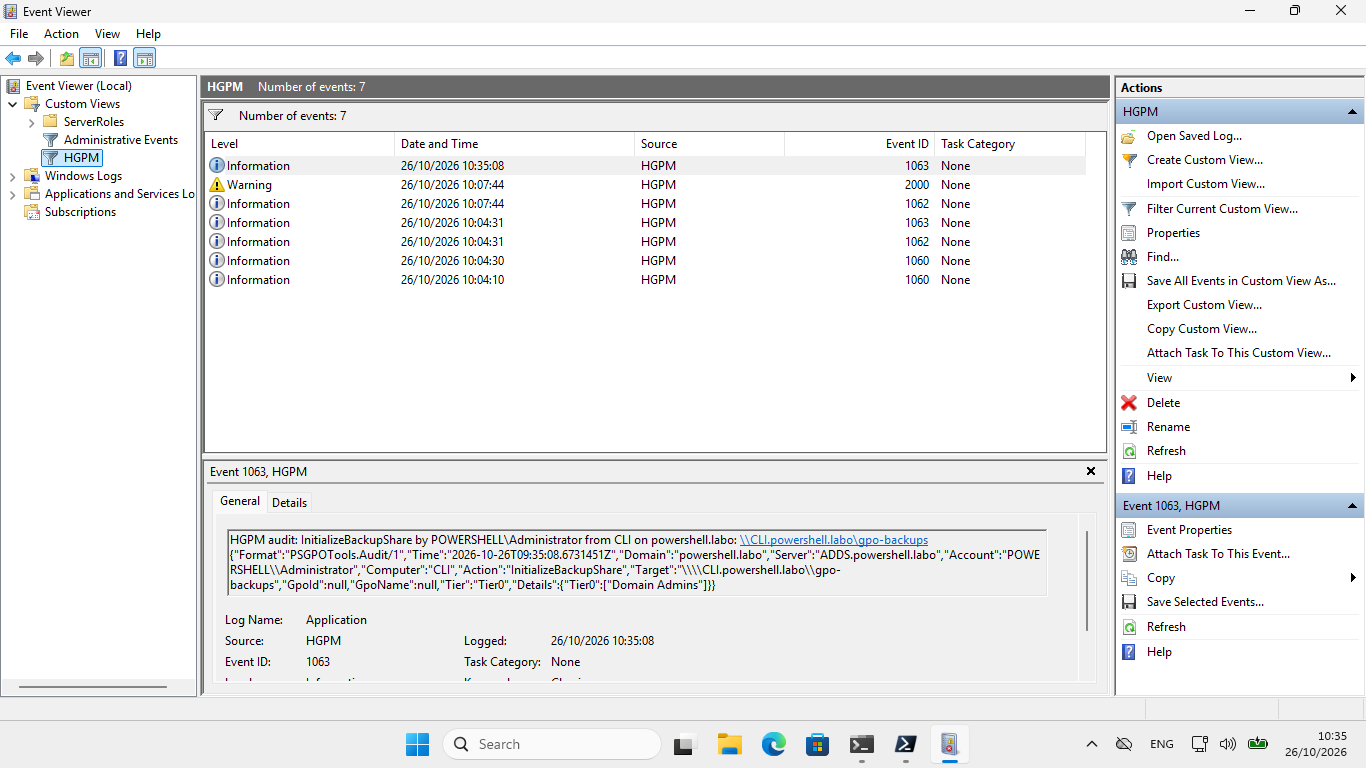
The message says what, by whom, from where and on what, then the entry of the audit log as JSON:
HGPM audit: ApproveGpo by HARDENBOX\Administrator from dc on hardenbox.labo: T1 - Servers - Proxy - CN={AFE8...}
{"Format":"PSGPOTools.Audit/1","Time":"2026-10-24T15:44:02Z","Domain":"hardenbox.labo",...}
| Event ID | Action | Event ID | Action |
|---|---|---|---|
| 1001 | NewGpo | 1023 | SetBlockInheritance |
| 1002 | RenameGpo | 1030 | SetGpoPermission |
| 1003 | SetGpoStatus | 1031 | SetGpoSecurityFiltering |
| 1004 | RemoveGpo | 1032 | NewFilteringGroups |
| 1005 | RemoveDeletedGpoBackup | 1040 | SetWmiFilter |
| 1006 | RestoreGpo | 1041 | NewWmiFilter |
| 1007 | ImportGpo | 1042 | EditWmiFilter |
| 1008 | SaveGpoFile | 1043 | RemoveWmiFilter |
| 1009 | ImportPolicyRuleSet | 1044 | SetWmiFilterPermission |
| 1010 | PendingGpo | 1050 | NewPasswordPolicy |
| 1011 | ApproveGpo | 1051 | SetPasswordPolicy |
| 1020 | NewLink | 1052 | RemovePasswordPolicy |
| 1021 | SetLink | 1060 | SaveConfiguration |
| 1022 | RemoveLink | 1061 | InstallAdmx |
| 1062 | InitializeAuditShare | 1063 | InitializeBackupShare |
| 1012 | SetGpoComment | 1064 | PurgeAuditLog |
| 1013 | SaveStarterGpo | 1014 | RemoveStarterGpo |
| 2000, 3000 | a warning, an error | ||
| 4000 | the posture: a summary | 4001 | the posture: a High finding |
Register-PSGPOEventSource                                                # Windows, once, as an administrator
Get-WinEvent -FilterHashtable @{ LogName = 'Application'; ProviderName = 'HGPM' } -MaxEvents 20
The technical log
What goes wrong where a console runs, to find the cause afterwards: the errors of LDAP, of
SYSVOL, of the windows, and the commands of the system (samba-tool, smbclient, python3,
secedit, auditpol) that fail, with the command, its exit code and what it wrote. It is the log
of the computer and of its user, not of the domain:
| Where | %LOCALAPPDATA%\PSGPOTools\Logs (Windows), ~/.local/share/PSGPOTools/Logs (Linux) |
| Files | hgpm-<yyyy-MM-dd>.log, an entry per line, its details indented below it |
| What | Log.Level: Error, Warning (by default), Information (the commands that fail), Verbose (every command) |
| How long | Log.RetentionDays days (30), deleted when the console first writes there |
2026-10-26T09:14:03.512Z ERROR       LDAP         LDAP connection to dc.hardenbox.labo:389 failed: ...
    Exception: System.DirectoryServices.Protocols.LdapException: The LDAP server is unavailable.
2026-10-26T09:15:40.077Z INFORMATION smbclient    Exit code 1.
    Command: smbclient //dc.hardenbox.labo/gpo-audit --use-kerberos=required -c 'ls'
    Error: NT_STATUS_ACCESS_DENIED listing \*
To find a problem: Log.Level = 'Verbose' in Settings, the problem again, then the file of
the day.