WMI filter creator
Show-WmiFilterCreatorAvalonia (or the WMI Filter Creator tile of Start-HGPM) writes the WMI
filters of the GPOs: from ready-made queries or a query builder, each query checked as it is
typed, the filter tested on the computer, then exported to a .mof file in the format of GPMC or
created in the domain. It needs no domain to write, check and export a filter, on Windows as on
Linux.
Show-WmiFilterCreatorAvalonia
Show-WmiFilterCreatorAvalonia -Path C:\Exports\Workstations.mof     # a .mof of GPMC or HGPM
Show-WmiFilterCreatorAvalonia -Server dc.contoso.com -Language fr-FR
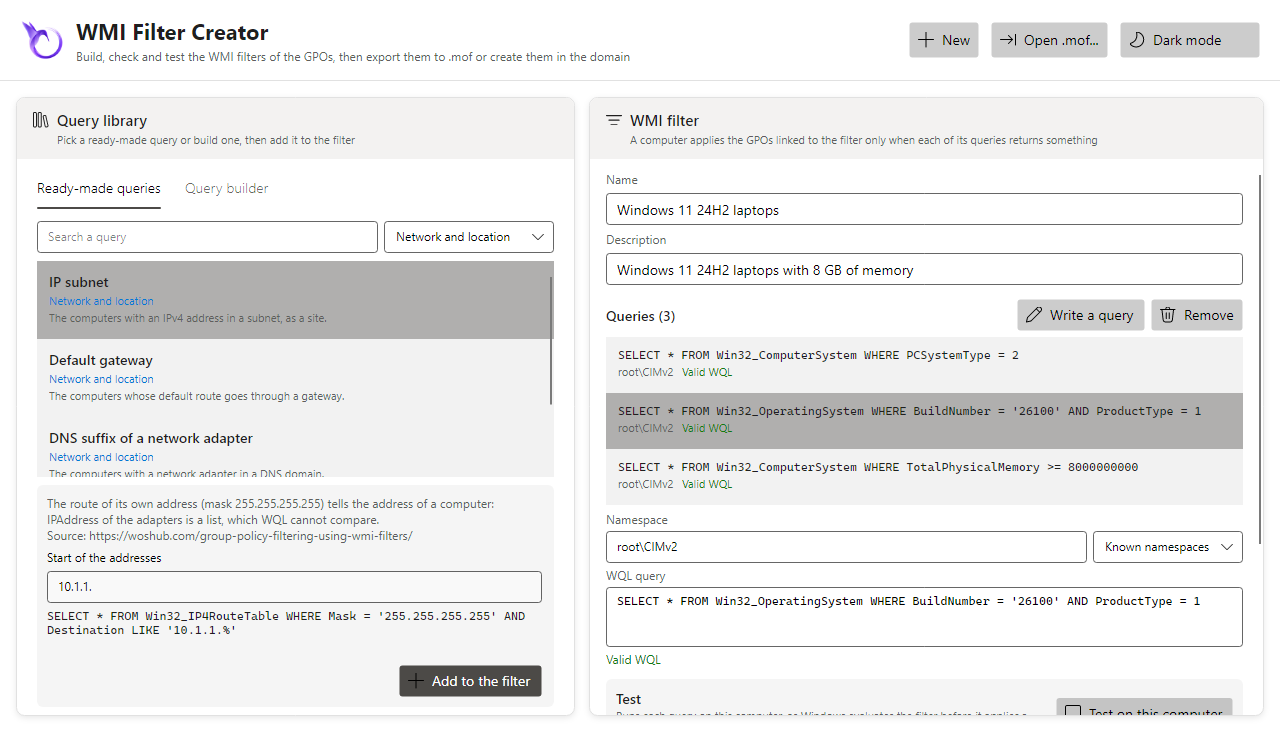
A WMI filter is true when each of its queries returns at least one instance on the computer that applies the GPO (WMI filters and Linux clients): the queries of the filter are joined with AND, an OR is written inside one query.
Ready-made queries
The library holds more than sixty queries, by category, each with its pitfalls and its source (Microsoft Learn first, then the community: woshub, the Ask the Directory Services Team blog, the PowerShell Gallery):
| Category | Queries |
|---|---|
| Operating system | workstations, member servers, domain controllers, servers, all but domain controllers, Windows 10, Windows 11, a release of Windows 11 (21H2 to 26H2), a version of Windows Server (2016 to 2025), a minimum build, Windows before Windows 10 |
| Edition and language | edition (SKU), Server Core, 64-bit, 32-bit, ARM64 processor, language of the installation |
| Domain and name | members of a domain, computers of a domain, name of the computer (pattern), PDC emulator |
| Hardware | laptops, desktops, a battery, manufacturer, model, minimum memory, free space on a drive, processor cores, maker of the processor, UEFI firmware |
| Virtual machines | hypervisor present, Hyper-V or Azure, Azure, VMware, VirtualBox, KVM/QEMU/Proxmox, Nutanix AHV, Xen, Amazon EC2, physical computers |
| Security | TPM enabled, TPM 2.0, BitLocker on or off for a drive, virtualization-based security, code integrity policy enforced, antivirus registered |
| Network and location | IP subnet, default gateway, DNS suffix of a network adapter, time zone |
| Software and services | program installed, MSI program installed (slow), service installed or running, update installed, optional feature, role of Windows Server, environment variable |
| Files | file exists, minimum version of a file, folder exists |
| Time and state | working days, hours of the day, normal boot |
A query with parameters (a build, a memory in GB, a subnet, a path...) shows them under its note: the query is written as they are typed, a value that is not right says why. Add to the filter (or a double click) adds it; the first query added names a filter without a name.
The same queries are a command, for scripts:
Get-PSGPOWmiQueryTemplate | Format-Table Category, Id, Query
$Query = Get-PSGPOWmiQueryTemplate -Id Memory -Value @{ Memory = 16 }
New-PSGPOWmiFilter -Name '16 GB' -Query $Query.Query -Namespace $Query.Namespace
Query builder
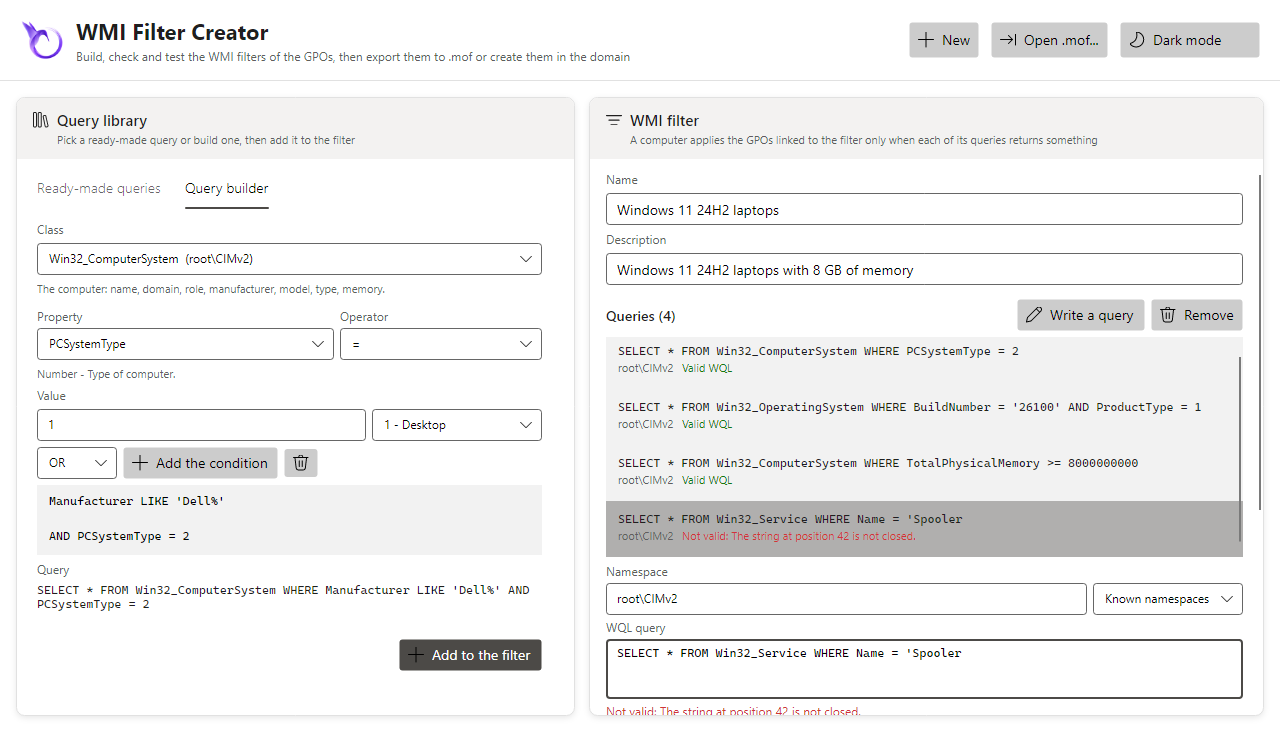
The Query builder tab writes a query from a class of the catalog (25 classes in their
namespace: Win32_OperatingSystem, Win32_ComputerSystem, Win32_Tpm,
Win32_EncryptableVolume, Win32_DeviceGuard...): a property, its known values (product type,
PC system type, domain role, SKU, language...), an operator (=, <>, <, >, LIKE,
NOT LIKE, IS NULL...) and a value. A text is quoted and escaped, a number checked, a boolean
written TRUE or FALSE; the conditions are joined with AND or OR.
Check of the queries
Each query of the filter is checked as it is typed, without WMI (on Linux too): SELECT, FROM
a class, WHERE conditions comparing a property with a value, joined with AND, OR, NOT and
parentheses. A query that is not valid says where (The string at position 42 is not closed); the
filter is exported or created only when each query is valid. A warning comes with a class of
another namespace than the one of the query, and with the classes that cost: Win32_Product
(it checks and repairs every MSI program each time it is read), CIM_DataFile read otherwise
than by its full name, root\SecurityCenter2 (it does not exist on Windows Server).
Test on this computer
Test on this computer (Windows) runs each query as Windows evaluates the filter before it applies a GPO, without blocking the window: each query is True (it returns something) or False (it returns nothing, or fails: a class or a namespace the computer does not have), and the filter is True when each query is. The TPM and BitLocker classes need an elevated session, as the system evaluates the GPOs.
Test-PSGPOWmiFilter does the same from the command line, on this computer or another one (CIM,
WinRM):
Test-PSGPOWmiFilter -Query 'SELECT * FROM Win32_OperatingSystem WHERE ProductType = 1'
Get-PSGPOWmiFilter -Name 'Windows 11' | Test-PSGPOWmiFilter -ComputerName PC042
Test-PSGPOWmiFilter -Path C:\Exports\Workstations.mof
Export, open, create
- Export .mof writes the filter in the format of GPMC (UTF-16,
MSFT_SomFilter), by default in the Documents folder, named after the filter; a file there is replaced once confirmed. Import... on WMI Filters creates it in a domain, in GPMC as in HGPM (Import-PSGPOWmiFilter). - Open .mof... opens a filter exported by GPMC or HGPM, to change it or start from it.
- Create in the domain creates the filter as New... on WMI Filters, with the rights of the
account (
-Server,-Credential, else the domain of the computer, read on the first creation). Link a GPO to it in Group Policy Management.
Export-PSGPOWmiFilter -InputObject exports a filter written without a domain:
$Queries = Get-PSGPOWmiQueryTemplate -Id Laptops, Windows11
[pscustomobject]@{ Name = 'Windows 11 laptops'; Queries = $Queries } | Export-PSGPOWmiFilter -Path C:\Exports
Good practices
- Keep the queries cheap: the filter runs at each refresh of Group Policy, for the computer and the user, and a filter that does not answer in 30 seconds is false.
- Prefer an OU to a WMI filter when the computers can be placed there: an OU costs nothing.
BuildNumberandVersionare texts: compare builds of five digits, and keepVersion LIKE '10.0%'before a comparison; Windows Server 2025 and Windows 11 24H2 share the build 26100,ProductTypetells them apart.IPAddressof the network adapters is a list, which WQL cannot compare: the subnet query reads the route of the address of the computer (Win32_IP4RouteTable).- Test the filter on a computer of each kind it targets, and on one it must not target.
- A Linux client joined with Samba does not evaluate WMI filters: target it by its OU (WMI filters and Linux clients).