Hardening
HGPM gives technicians of Tier 1 and Tier 2 the creation of GPOs, and approvers of Tier 0 the
power to make them apply. Each right a technician has is a way to make Tier 0 act for it: this
page lists what the console does not trust, what it does instead, and what was tested, by the
tests of the module (CI/tests/PSGPOTools.Hardening.tests.ps1 and others) and on both labs
(hardenbox.labo, Samba AD and powershell.labo, Active Directory).
| What a technician controls | What HGPM does |
|---|---|
the gPCFileSysPath of its GPO (it owns it while it waits) |
uses the folder of the GPO only, refuses a redirected GPO |
| the permissions of its GPO, outside the console | the approval rebuilds them from what an approved GPO may hold; the drift shows a change since |
| what is in its GPO until the approval | the approval approves what was reviewed, or nothing; it backs up the approved version, and the drift shows any change since |
| settings the console cannot show (a client-side extension it does not read, a file, a startup script) | listed where the GPO is reviewed, and reviewed before its approval |
the groups it may create (APPLY_<its GPO>) |
a group nobody of Tier 0 made is not proposed at the approval |
| the configuration of the roles | roles that overlap, or a group of every account, stop the workflow |
| a backup on a share it can write | the paths of the files of a backup are checked |
| an older console, a domain controller without the configuration | the configuration fails closed |
| its own file of the central audit log | append only, chained, checked when read; nothing lost when the share is down |
the central store, when the domain has none (it creates folders in Policies) |
the creators get no right until it exists; the posture says who owns it |
| a right given beside the workflow (Group Policy Creator Owners, a GPO or an OU of the domain controllers) | found each day, sent to the SIEM |
A GPO redirected to another folder
The threat
The gPCFileSysPath attribute of a GPO says where its folder is in SYSVOL
(\\<domain>\SysVol\<domain>\Policies\{GUID}): the computers read the settings of the GPO there.
While a GPO waits for its approval, its creator owns it, with full control: it can write this
attribute, outside the console (ldapmodify, ADSI Edit), and point it at any folder:
- the configuration of the console (
SYSVOL\<domain>\PSGPOTools), the folder of another GPO, or another share of a domain controller (C$); - at the approval, the approver, Tier 0, gives that folder the owner and the permissions of an approved GPO, with its own rights: with Edit settings, the groups of creators could then change the configuration of the console and name themselves approvers;
- once approved, the computers read the settings of the GPO from the folder of the creator, never approved;
- deleting the GPO,
samba-tool gpo delandRemove-GPOdelete the folder the attribute gives.
Up to 0.1.13, the console used the attribute as it was.
What the console does
- The folder of the GPO only: the console reads and writes
SysVoland<domain>\Policies\{GUID}of the GPO, whatever its case. A GPO whosegPCFileSysPathis another folder, share or server is redirected: the console neither reads, writes nor approves it, says so in red in the tree (redirected to another folder) and in its details (Redirected: where the computers read it from). - The deletion: the attribute is read again, set back to the folder of the GPO, then the GPO
is deleted:
samba-toolandRemove-GPOdelete its own folder, not the one of the creator. - After the approval: with Edit settings (
Workflow.CreatorRights = EditSettings), the groups of creators are denied writinggPCFileSysPath((OD;;WP;f30e3bc1-9ff0-11d1-b603-0000f80367c1;;<group>), first in the DACL). They still edit the settings: the Delegation tab shows them as Edit settings, and the deny stays when an administrator gives them another level.
A redirected GPO is deleted by an administrator of the domain, or its gPCFileSysPath set back to
its folder (ADSI Edit, ldbedit): it was not approved.
Tested
PSGPOTools.Hardening.tests.ps1, A GPO redirected to another folder:
- the folder of the GPO is used whatever the case of the server, share, domain and GUID, with or
without a final
\; - 7 redirections are refused: the configuration of the console, another GPO,
..in the path, another share (NETLOGON),C$of a domain controller, another server of the domain, a quote that would end a command ofsmbclient; - a redirected GPO is not approved, and is red in the tree and in its details;
- the approval with Edit settings adds the deny, first, kept when the level changes; not with Read only;
- the deletion sets the attribute back before
samba-tool gpo delorRemove-GPO.
On both labs, with a decoy folder SYSVOL\<domain>\HGPM-decoy (one file):
| Step | hardenbox.labo (Samba AD) | powershell.labo (Active Directory) |
|---|---|---|
tiers1 creates a GPO, which waits for its approval |
yes | yes |
tiers1 writes its gPCFileSysPath to the decoy (the threat) |
allowed | allowed |
| The administrator reads the domain: the GPO is redirected, red in the tree | yes | yes |
| Reading its files | refused | refused |
| Approving it | refused, it stays pending | refused, it stays pending |
| Deleting it | the attribute set back, then deleted | the attribute set back, then deleted |
| The decoy after the deletion | its file and its ACL unchanged | its file and its ACL unchanged |
| A second GPO approved with Edit settings: the deny | on the group of creators | on the group of creators |
| The Delegation tab | the group: Edit settings | the group: Edit settings |
tiers1 writes its gPCFileSysPath |
refused (insufficient access rights) | refused (insufficient access rights) |
tiers1 renames it (a setting it edits) |
allowed | allowed |
The configuration of the domain fails closed
The threat
The configuration of the domain (SYSVOL\<domain>\PSGPOTools\Configuration.psd1) sets the
approval workflow, the roles, the central audit log and the backups of Tier 0. Without it, the
defaults apply, and the default of Workflow.Enabled is $false: no GPO waits for an approval.
The domain still delegates the creation of GPOs to the creators (Initialize-PSGPOWorkflow), so a
GPO they create would apply at once. Up to 0.1.13, a console fell back to the defaults when the
configuration:
- could not be read, or held a wrong value;
- held a setting it did not know: a newer console wrote it (
Audit.Tierscame with 0.1.12), and the whole configuration was left out; - was not on the domain controller it reads: Samba does not replicate SYSVOL.
An administrator who opened the console on such a domain controller created an empty configuration there: the workflow off for every console reading it.
What the console does
| Case | Before (0.1.13) | Now |
|---|---|---|
| A setting the console does not know | the whole configuration left out, workflow off | that setting left out with a warning, the others used; kept when the console saves the configuration |
| The configuration cannot be read, or holds a wrong value | defaults, workflow off | not used; the accounts that are not administrators of the domain create no GPO (the approval workflow is unknown) |
The console is older than Console.MinimumVersion |
(no such setting) | not used; no GPO created by those accounts, the message says to update |
| No configuration on the domain controller, the creation of GPOs delegated | defaults, workflow off | no GPO created by those accounts, the message says to copy it there |
| The same, for an administrator opening the console | an empty configuration created | not created, a warning says where it is |
| No configuration, no delegation (the workflow never deployed) | defaults | defaults |
The administrators of the domain keep working in every case: they fix the configuration. The
delegation is read in the permissions of CN=Policies,CN=System: the right to create
groupPolicyContainer objects given to a group other than Domain Admins, Enterprise Admins,
Group Policy Creator Owners, Administrators or SYSTEM.
Console.MinimumVersion (reference) is the way to stop
older consoles: set it once every console is updated. The consoles older than 0.1.14 do not know
it: they leave out the whole configuration, as before. Update them first.
Tested
PSGPOTools.Configuration.tests.ps1 and PSGPOTools.Workflow.tests.ps1:
- a configuration that needs a newer console, holds a wrong minimum version, or a table where a value is expected, is not used, and says why;
- the settings a newer console wrote are left out with a warning, the others used, and they are kept when the configuration is saved; this console does not set them;
- the creation of GPOs stops when the configuration is not used, and when it is missing while the domain delegates the creation of GPOs; an administrator of the domain, and a domain without the delegation (Group Policy Creator Owners only), are not stopped;
- no empty configuration is created on a domain controller without it when the domain delegates the creation of GPOs.
On both labs, the configuration of the domain saved first and restored at the end, byte for byte;
tiers1, a creator, after each change:
| The configuration of the domain | hardenbox.labo (Samba AD) | powershell.labo (Active Directory) |
|---|---|---|
| As it is | workflow known, its GPO created waiting for approval | workflow known, its GPO created waiting for approval |
With Console.MinimumVersion = '99.0' |
the approval workflow is unknown: no GPO created | the approval workflow is unknown: no GPO created |
With a setting no console knows (Future.Mode) |
a warning; workflow known, its GPO created waiting for approval | a warning; workflow known, its GPO created waiting for approval |
| Removed from the domain controller | the domain delegates the creation of GPOs, but dc.hardenbox.labo has no configuration: no GPO created | the domain delegates the creation of GPOs, but ADDS.powershell.labo has no configuration: no GPO created |
| The administrator opens the console then | the configuration not created, a warning | the configuration not created, a warning |
| Restored | workflow known, its GPO created waiting for approval | the same bytes, read without a warning |
The approval
The threat
- What is approved is not what was reviewed: the creator owns its pending GPO until the end of the approval, and could change its settings, files or attributes between the review and the click, so that Tier 0 approves what nobody saw.
- A group made in advance: a technician who can create groups creates
APPLY_<its GPO>before the approval; the approval proposed it, and its members (the technician chooses them) would decide where the approved GPO applies. - Roles that overlap: an account in both
Workflow.CreatorsandWorkflow.Approversis an approver, so the GPOs it creates are approved at once; a group of every account (Domain Users, Authenticated Users) as creators or approvers; an owner of the approved GPOs that belongs to Tier 1, which could then change the permissions of every approved GPO.
What the console does
- The content reviewed is the content approved: the approval form takes a SHA-256 of the GPO
when it opens (
Get-PSGPOReviewStamp): the attributes that make it apply (versionNumber,flags, the client-side extensions, the WMI filter,gPCFileSysPath), read again from the domain, and every file of its SYSVOL folder.Approve-PSGPOtakes it before its confirmation. The approval gives the SYSVOL folder to Tier 0 first, so that the creator cannot write it anymore, then takes it again: if it differs, the GPO changed since it was reviewed, it is not approved and stays pending, its folder given to Tier 0. The approver reviews it again. - The groups proposed:
APPLY_<GPO>andDENY_<GPO>are proposed only when an approver or an administrator of the domain owns them. Otherwise the form says who owns it, proposes nobody (not Authenticated Users in its place) and does not create them;Approve-PSGPOrefuses without-ApplyTo. - The roles: the configuration refuses a group in both roles, and a group of every account (by name); the workflow checks them again by SID once found in the domain, with the owner of the approved GPOs, which must be an approver or an administrator of the domain. Wrong roles stop the workflow: nobody approves, the accounts that are not administrators create no GPO.
Tested
PSGPOTools.Hardening.tests.ps1, PSGPOTools.Workflow.tests.ps1 and
PSGPOTools.Configuration.tests.ps1:
- a GPO that changed since it was reviewed is not approved, nothing written in the directory once SYSVOL is given to Tier 0; the same content is approved;
- the stamp changes with the version, the WMI filter, a file of the GPO;
- a group an approver owns is proposed; a group a technician owns is not, and the form says why;
- the workflow stops on: an account in both roles, Domain Users as creators, Authenticated Users as approvers, the creators as owner of the approved GPOs; the configuration refuses a group in both roles, and Domain Users as creators.
The CI runs the approval with both accounts at each change, against its Samba domain controller
(Approval written to a domain controller, tests). On
both labs, tiers1 (creator) and the administrator (approver):
| Step | hardenbox.labo (Samba AD) | powershell.labo (Active Directory) |
|---|---|---|
tiers1 creates a GPO, the administrator opens its approval (the stamp) |
yes | yes |
tiers1 changes it then (its Registry.pol) |
allowed | allowed |
| The administrator approves it with the stamp of its review | refused: changed since it was reviewed, still pending | refused: changed since it was reviewed, still pending |
A group APPLY_<GPO> owned by tiers1 |
not proposed, Approve-PSGPO refuses |
not proposed, Approve-PSGPO refuses |
| The group deleted, the GPO reviewed again and approved | approved, owned by Domain Admins | approved, owned by Domain Admins |
GPO-Tier1-Admins in both roles: tiers1 |
the approval workflow is unknown: no GPO created | the approval workflow is unknown: no GPO created |
| The configuration restored | the same bytes | the same bytes |
What the approver sees
The threat
- A setting the console does not show: the computers apply every client-side extension a GPO declares, each with its own files or objects (Folder Redirection, Software Installation, IP Security, a vendor extension...). A technician adds one to its pending GPO; the approver reviews the settings the console lists, and approves the others unseen.
- A startup script: it runs as SYSTEM on every computer the GPO applies to. Its list
(
scripts.ini,psscripts.ini) was not read, and its file could change between two versions without a change shown.
What the console does
- What it does not interpret is listed: a client-side extension whose settings it does not
read (by its name when it knows it, by its GUID otherwise), and each file of the folder of the
GPO none of its readers reads (by its size and SHA-256; not its comments nor the ADM templates
copied there, which apply nothing). In the Settings tab, in a box of its own; in the details
of the GPO (Not interpreted, from its extensions, without reading SYSVOL); in its report
(
Get-PSGPOReport, Save report...); in a comparison of two backups, for the extensions. - The approval asks for it: the approval form lists them, and approves only once I reviewed
these settings with GPMC, or in the files of the GPO is checked;
Approve-PSGPOsays them in a warning and in its confirmation. They come from the same reading of the folder as the stamp of the review (the approval). - The scripts are read: each startup, shutdown, logon and logoff script with its parameters, whether the PowerShell scripts run first, and the file it runs in the GPO with its size and SHA-256: a change of its content shows when two backups are compared, and the editor shows its content before it is approved. A file of the folders of the scripts no script runs is listed too.
Tested
PSGPOTools.Report.tests.ps1 and PSGPOTools.Gui.tests.ps1: scripts.ini and psscripts.ini
read and written as the Group Policy editor writes them (UTF-16, numbered from 0, the other keys
kept); a script outside the GPO (\\server\share, a drive, %, ..) is not looked for in it;
a change of the file of a script shows in a comparison; the extensions and files not interpreted
listed in their order, the files that apply nothing left out; the approval form refuses until the
box is checked; the report as an object, XML and HTML.
On both labs, the administrator writes a GPO with scripts, tiers1 adds Folder Redirection to
its pending GPO, the administrator approves it:
| Step | hardenbox.labo (Samba AD) | powershell.labo (Active Directory) |
|---|---|---|
| A startup script, a PowerShell startup script run first, a logon script outside the GPO | written in SYSVOL in UTF-16, one increase of the version per configuration, the extension of the scripts declared | the same |
| Read back from the domain, the report (object, HTML, XML) | the 4 scripts, their files and SHA-256 | the same |
gpupdate on the member computer |
(no Windows member) | the computer registers both startup scripts, the PowerShell one first (PSScriptOrder=2) |
Get-GPOReport of GPMC |
the extension Scripts of both configurations, the 3 scripts, RunPSFirst |
|
| The file of a script changed between two backups | Compare-PSGPOBackup: Changed, its size and SHA-256 |
the same |
tiers1 adds Folder Redirection (fdeploy1.ini) to its pending GPO |
listed: the extension and the file | the same |
Approve-PSGPO -WhatIf, then the approval |
the warning and the confirmation say both; approved | the same |
| Cleaned up | both GPOs deleted | both GPOs deleted, gpupdate: no startup script left |
Approve-PSGPO -WhatIf on Linux did not read the GPO before (the temporary folder of its copy was
not made under -WhatIf): fixed, with a test.
The audit log
The threat
The audit log is evidence, written by the accounts it watches. Up to 0.1.14:
- the owner of a file could write over it (
FILE_WRITE_DATA): a technician rewrote or emptied its own lines; Account,TierandComputerare what the console wrote: a technician of Tier 2 could write a line "Tier 0, Administrator" in its file, the reader showed it as such;- any account of the domain, computers included, created files in
Unassigned; - a technician of the same tier could create the file of another account first (its name is known): that account got access denied, and its changes were lost;
- a share that could not be reached lost the change, for the central log and for the SIEM (the log of the system was written after the share);
- on Linux each line copied the whole file (
smbclient get, thenput).
What the console does
A log you can trust says it all: append only
(0x12019d), chained lines (Seq, PrevHash), a Check of each entry when read (Verified,
Altered, Tier differs, Owner differs, Not chained), the log of the system first, the
changes that wait in audit-waiting.jsonl, a file of a new name when its name is taken,
Unassigned for Domain Users only, and the imported lines marked ImportedBy.
Tested
PSGPOTools.Audit.tests.ps1:
- the change that cannot be written waits, and is written before the next one, in its order; a line whose folder is gone does not stop the others;
- the change goes to the log of the system even when the share cannot be written;
- each line is chained; a line changed or removed in the middle makes the next one Altered;
- a line of Tier 0 in the folder of Tier 1 is Tier differs; a file another account owns is Owner differs, unless that account imported it; a file of Administrators is right for a line of Tier 0 only;
- on Linux, the lines go in one call to the Python bindings, opened to append; a file of its name someone else made: a file of a new name (on Windows too);
- the owner of a file appends only (
0x12019d),Unassignedis for Domain Users.
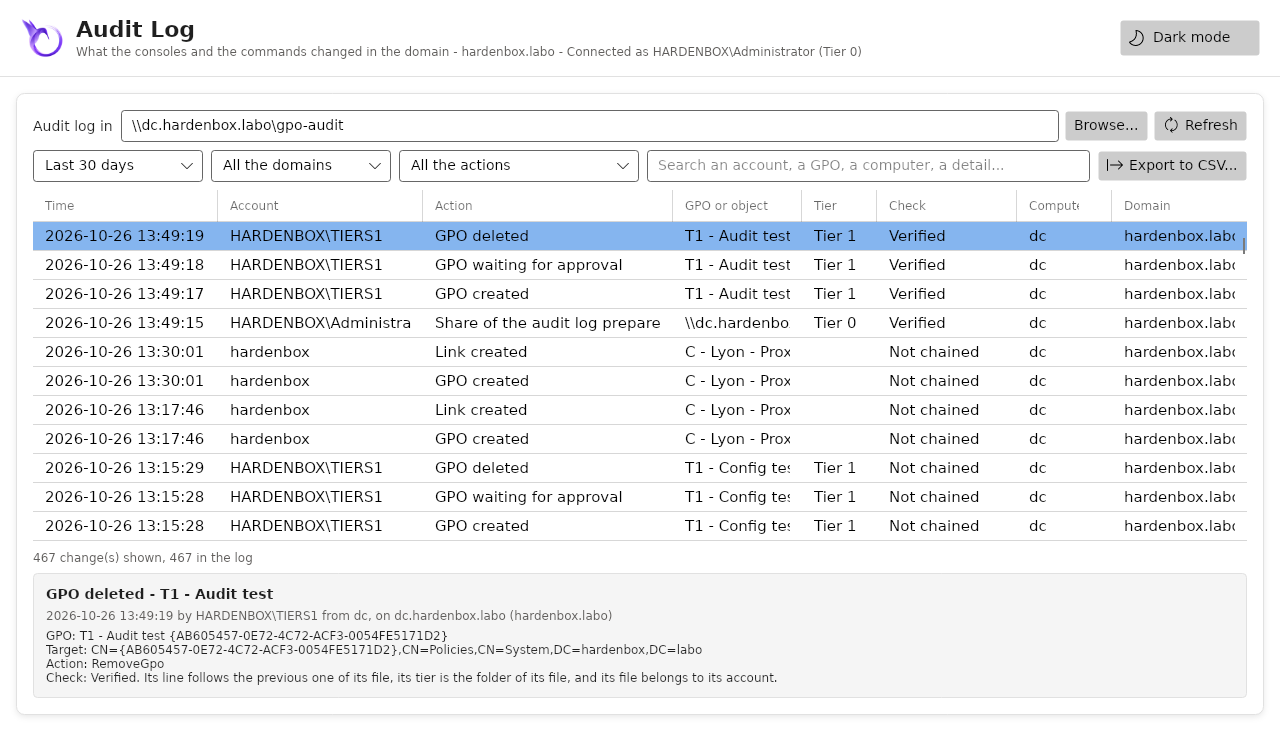
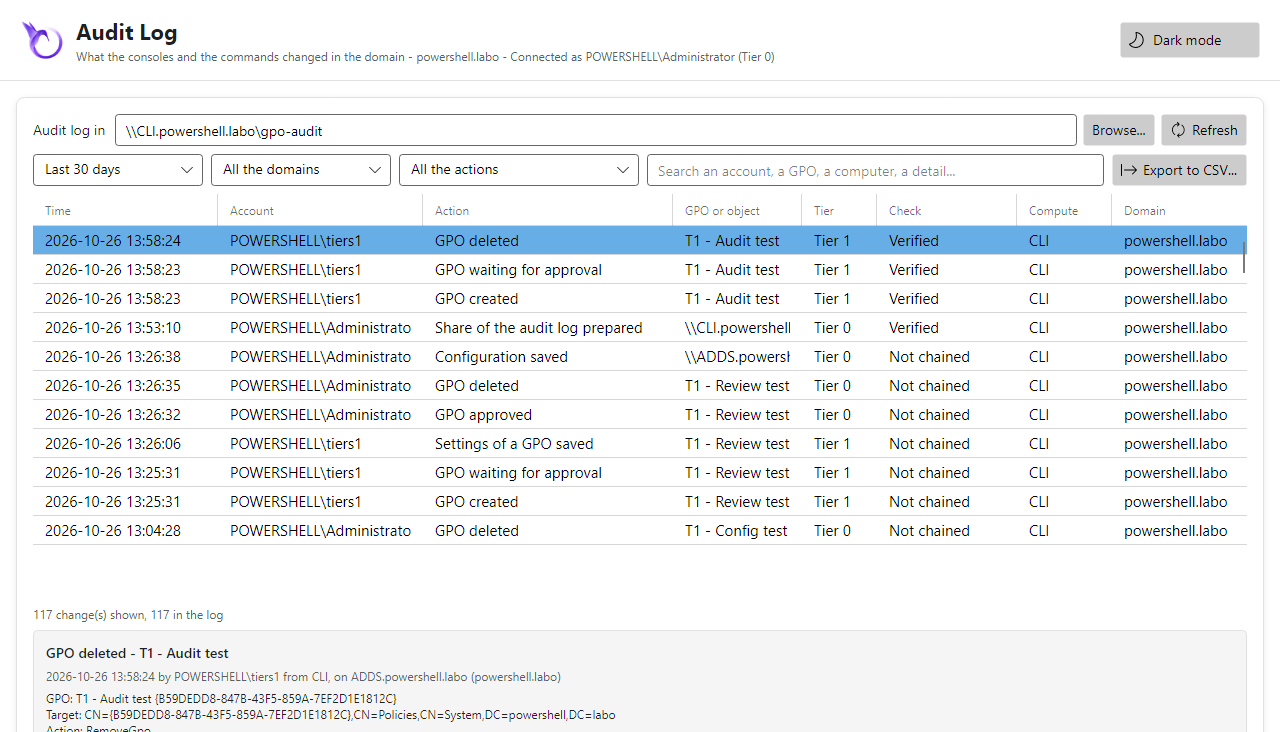
On both labs, after Initialize-PSGPOAuditShare (the files there made append-only too), tiers1
on its own file of this month:
| Step | hardenbox.labo (Samba AD) | powershell.labo (Active Directory) |
|---|---|---|
| A change (a GPO created then deleted): its 3 lines | chained, Verified | chained, Verified |
Its file written over (smbclient put; WriteAllText) |
refused | refused |
| Its file deleted | refused | refused |
| One byte written in the middle with a handle opened to append | written: the next line is Altered | appended at the end of the file instead |
| The file restored by the administrator | Verified again | (the byte removed) |
| The lines written before 0.1.15 | Not chained | Not chained |
Samba lets a handle opened with FILE_APPEND_DATA write anywhere in the file; Windows appends at
its end whatever offset the writer gives. The chain shows what Samba allows.
The domain controller and the versions
The threat
- Two domain controllers, two versions: a GPO is a container in the directory and a folder in
SYSVOL, each with its version (
versionNumber,Version=ofGPT.INI). A change made on a domain controller other than the PDC emulator, which GPMC uses, races with the changes made there; with Samba, which does not replicate SYSVOL, the files stay on the domain controller written. - A change cut halfway: the files were written first, then the version in the directory. When the directory refused it (the GPO changed meanwhile, a right, the server gone), SYSVOL kept the new files and a version ahead of the directory: the computers applied a change the console said was not saved. A computer could also read a file while it was being written.
- A Kerberos ticket that expired (Linux): SYSVOL and the directory refuse with errors that do not say it, after part of the change.
What the console does
- The PDC emulator: the domain is read from the PDC emulator (the
fSMORoleOwnerof the domain), found by the domain controller the computer reaches; the changes go there.-Serveranother domain controller warns, and the status bar says not the PDC emulator; Change Domain Controller... (right click on the domain) lists the domain controllers, the PDC emulator first, and reads the domain again from the one chosen. - A file written aside, then renamed over the former one (the UNC path on Windows,
putthenrename -fwithsmbclient): a computer reads the former file or the new one. - Put back as they were: the files of the GPO are read before the change; when a file cannot be written, or the directory refuses the new version, the files written are put back (or deleted when there were none), and the error says it. A restore from a backup does the same.
- The versions of both are shown in the details of a GPO, as GPMC (User version: 2 (AD), 2 (SYSVOL)), and a row says when they differ.
- The ticket is checked (
klist -s) before SYSVOL or the directory is reached from Linux: run kinit, nothing changed.
Tested
PSGPOTools.Hardening.tests.ps1 and PSGPOTools.Ldap.tests.ps1: the files put back in the order
they were written, a file that did not exist deleted, what could not be put back said; a restore
put back; the put and rename -f of smbclient, and the write over the file with an
smbclient that does not rename over a file; an expired ticket refused before any command; the
domain read from its PDC emulator found by another domain controller, -Server another one
warned, the domain controller found used when the PDC emulator cannot be reached; the domain
controllers listed, the PDC emulator first; the versions of both in the details, read once for a
version of the GPO. PSGPOTools.Gui.tests.ps1: Change Domain Controller... on the domain
only, the domain read again from the one chosen, the status bar updated.
On both labs (one domain controller each, so the PDC emulator), the administrator writes a
Registry.pol in a new GPO, then the directory refuses the next version (a former value that is
not the one in the directory):
| Step | hardenbox.labo (Samba AD) | powershell.labo (Active Directory) |
|---|---|---|
The domain read without -Server |
from dc.hardenbox.labo, the PDC emulator; the status bar says it |
from ADDS.powershell.labo, the PDC emulator; the same |
A Registry.pol saved |
no file left aside (smbclient), versions 1 (AD) and 1 (SYSVOL) |
no file left aside (UNC), the same versions |
| The details of the GPO | 0 (AD), 0 (SYSVOL), 1 (AD), 1 (SYSVOL) | the same |
| The directory refuses the next version | not saved... the files of the GPO were put back as they were; Registry.pol and GPT.INI the same bytes as before, version 1 in both |
the same |
| A ticket cache without ticket | The Kerberos ticket of this session... has expired: nothing written | (Windows: the session) |
| Cleaned up | the GPO deleted | the GPO deleted |
The health of the GPOs and their replication
The threat
- A domain controller behind the others: Active Directory replicates the directory, DFSR the SYSVOL of Windows, each at its own pace; Samba does not replicate SYSVOL. A computer applies the GPO of the domain controller it reaches: another version, or none, until they agree, and nothing said it.
- A GPO that cannot apply: its folder or its
GPT.INImissing, a version of SYSVOL that is not the one of the directory, a file of settings whose client-side extension the GPO does not declare (written by a script, a copy, a tool that does not declare it): the computers fail to apply it, or skip the settings, without a word in the console. - What is left behind: a folder of SYSVOL whose GPO was deleted elsewhere (or a conflict of the replication), a link to a GPO that no longer exists.
What the console does
Get-PSGPOReplicationStatus: each domain controller of the domain is read, its directory and its SYSVOL (one listing ofPolicies; on Linux, theGPT.INIof every GPO in onesmbclient), and compared to the baseline, the domain controller the domain was read from (its PDC emulator): one row per GPO and domain controller, InSync, DirectoryDiffers, SysvolDiffers, Missing, Extra, OrphanFolder or Unreachable, with its versions and what it means.Test-PSGPOHealth: on the baseline, a GPO redirected, without its folder or itsGPT.INI, or whose versions differ (errors); a file of settings (Registry.polwith entries,GptTmpl.inf,audit.csv,scripts.ini, the preferences) whose extension the GPO does not declare, a folder without a GPO, a link to a GPO of the domain that does not exist, a folder whose permissions are not those of its GPO in the directory (the permissions for this GPO in the SYSVOL folder are inconsistent of GPMC; the folders of the default GPOs of Windows, given to Administrators, are consistent); the other domain controllers that differ, or that cannot be read (warnings). Nothing returned: no problem.- The Status tab of the domain, as the one of GPMC: Detect Now shows the domain controllers (in sync, replication in progress, cannot be read) and the problems found; only then, as it reads every domain controller. The versions shown in the details of the GPOs are read again.
They only read: nothing is changed.
Tested
PSGPOTools.Health.tests.ps1: three domain controllers simulated (their directory, and their
SYSVOL through Read-PSGPOSysvolItem on Windows and smbclient on Linux): each state of the
replication with its versions, each problem of the baseline, a domain controller that cannot be
read, a baseline that cannot be read refused, -Name and -DomainController, nothing returned
for a healthy domain; the listing of smbclient (the folders of the GPOs and their files, a
folder refused, Policies refused), the files that hold settings. PSGPOTools.Gui.tests.ps1: the
Status tab on the domain only, filled on Detect Now, and why it is not read.
On both labs (one domain controller each), the administrator makes problems on purpose: a GPO
whose SYSVOL is ahead of the directory, with a Registry.pol whose extension is not declared; a
GPO without GPT.INI; a folder of Policies without a GPO:
| Step | hardenbox.labo (Samba AD) | powershell.labo (Active Directory) |
|---|---|---|
| The domain as it is | 7 GPOs InSync, no problem (0.4 s) | 6 GPOs InSync, no problem (0.7 s) |
| The GPO ahead of the directory | Error, Version: user 0, computer 0 in the directory, user 0, computer 1 in SYSVOL | the same |
Its Registry.pol |
Warning, Extension: (Registry Policy) for the computers | the same |
The GPO without GPT.INI |
Error, Folder: the folder of the GPO has no GPT.INI | the same |
| The folder without a GPO | Warning, OrphanFolder | the same |
| Anything else | nothing | nothing |
Get-PSGPOReplicationStatus |
the two GPOs SysvolDiffers, the folder OrphanFolder | the same |
| Cleaned up | the GPOs and the folder deleted, no problem left | the same |
The permissions of the folders: a test GPO whose folder gives tiers1 full control, its GPO not
(the DACLs read in one search, the folders in one connection on Linux):
| Step | hardenbox.labo (Samba AD) | powershell.labo (Active Directory) |
|---|---|---|
| The domain as it is | every folder consistent (0.6 s) | every folder consistent, the default GPOs of Windows included |
| The folder of the test GPO | Warning, Permissions: tiers1: the folder lets it change it, the GPO does not (0.4 s) | the same (0.4 s) |
| Undone | no finding | no finding |
The security posture
The threat
- Rights given beside the workflow: the workflow holds only if nobody else creates, changes
or links GPOs. A member of Group Policy Creator Owners creates GPOs that apply at once, and owns
them. A right on
CN=Policies, on a GPO linked to the domain or to the domain controllers, or on theirgPLink, given once for a migration or a tool and forgotten, gives the domain controllers to an account outside of Tier 0. - The central store taken first: the creators create folders in the
Policiesfolder of SYSVOL (the folders of their GPOs). Where the domain has no central store yet, a creator can createPolicies\PolicyDefinitionsand own it: every console of the domain then reads its ADMX files, which say what each policy writes, and where. - Nobody looking: these rights are in the descriptors of the directory and the ACLs of SYSVOL, read by nobody once given.
What the console does
Test-PSGPOSecurityPosturereads the owner and the DACL ofCN=Policies, of each GPO, of the domain and of each OU, the members of Group Policy Creator Owners, and the ACLs of thePoliciesfolder, of the central store and of the configuration of HGPM in SYSVOL. It says what an account outside of Tier 0 can do there (High): create GPOs beyond the creators, change a GPO that applies to the domain controllers, link GPOs to the domain, to their OU or to a site (its domain controllers apply them), own or change these folders; and what a group of every account can do anywhere. Medium: no central store while the creators create folders. Low: the workflow off, no central audit log, nothing to the log of the system. Tier 0 is the groups the domain protects (AdminSDHolder), the approvers, the owner of the approved GPOs, and the accounts in their groups. The attributes that count (gPLink,gPOptions, those of a GPO that change what applies) are read from the schema. It only reads: an account of no group runs it, a gMSA in a daily task.-SystemLog: a summary (event 4000) and each High finding (event 4001) to the log of the system, for a SIEM.Initialize-PSGPOWorkflowgives the creators nothing while the central store is missing: it stops, and says why (a script that delegates stops too). It does not create it: an empty central store hides the administrative templates of GPMC (Install-PSGPOAdmx -CentralStorefills it). Its last row says whether Tier 0 owns it, and how to take it back otherwise.
Tested
PSGPOTools.Posture.tests.ps1: a domain as the workflow leaves it, nothing found; each right too
wide in the directory and in SYSVOL found, with the account named; an account in a group of Domain
Admins is of Tier 0; a right on another attribute (the name of a GPO, msDS-KeyCredentialLink of
Key Admins) does not count, and every attribute counts when the schema cannot be read; the summary
and each High finding to the log of the system. PSGPOTools.Workflow.tests.ps1: without a
central store, -Apply changes nothing and stops, a script with it; it warns when the creators
create folders already; the owner of the central store named. PSGPOTools.Ldap.tests.ps1, on the Samba domain
controller of the CI: the script of the lab refused without a central store, then the delegation of
the lab, and no High finding.
On both labs, problems made on purpose, then undone:
| Step | hardenbox.labo (Samba AD) | powershell.labo (Active Directory) |
|---|---|---|
| The domain as it is | Medium, CentralStore: no central store while the creators create folders (0.5 s; the same as tiers2, an account of no other group) |
no finding (0.5 s): the central store exists, owned by Administrators |
Initialize-PSGPOWorkflow |
the central store Missing, and why | the central store Present [Administrators] |
tiers1 creates the central store |
High, CentralStore [tiers1]; Initialize-PSGPOWorkflow: Missing [tiers1], and how to take it back |
(the central store exists: no technician can create it) |
| Domain Users can change a GPO | High, GpoEditableByAll [Domain Users] | the same |
GPO-Tier1-Admins can link GPOs to the domain controllers OU |
High, Tier0Link [GPO-Tier1-Admins] | the same |
tiers1 in Group Policy Creator Owners |
High, GroupPolicyCreatorOwners [tiers1] | the same |
GPO-Tier1-Admins can link GPOs to the first site |
High, Tier0Link [Default-First-Site-Name (site)] | the same |
-SystemLog |
journald: [4000] ... 4 high, 0 medium, 0 low, four lines [4001] |
the event log: 4000 Warning ... 3 high, 0 medium, 0 low, three events 4001 |
| Undone | the finding of before only | no finding, as before |
The supply chain
The threat
- A package that is not the one tested: the release built the module again, on another runner, at another time; the tests ran another build. Nothing let anyone check that a module was built from the sources of its tag.
- A runtime changed after its install: the Avalonia assemblies, checked when they were downloaded, were then loaded from a folder that can be written to later (the folder of the module, the data folder of the user). A library replaced or added there runs in the console of an administrator of the domain.
- The tools of the CI changing by themselves: an action moved under its tag, a new version of Pester or of the site generator, a token of the tests that could write to the repository.
- Computers without internet: the only way to the runtime was a folder copied by hand, checked by nothing.
What the console does
- One build, reproducible: no date, the sources in the order of their names, LF line endings:
the same bytes from the same sources, on Windows and on Linux. The job
buildof the CI makes the module, the other jobs test that one, the Windows job builds it again and compares, and the release publishes that one (tests). - SHA256SUMS and an attestation: each release lists the SHA-256 of every file of the module and
of every archive, attested by GitHub (
actions/attest, Sigstore):gh attestation verifysays a file was built by the release workflow from the commit of the tag. - Authenticode, when the certificate is given: the scripts of the module signed and
timestamped, and the catalog
HGPM.catof all its files (Test-FileCatalog); the certificate is a secret of the environment of the release. - Offline archives: the module with the Avalonia runtime of each platform, for the computers without internet (offline installation).
- The runtime pinned file by file: the SHA-256 of each file of each runtime is in the module;
the console checks them each time it loads the runtime, and refuses a library added next to them,
before anything is loaded. The packages, from nuget.org, an internal feed or a folder
(
PSGPOTOOLS_NUGET_SOURCE), are checked against their SHA-512 as before. - The CI pinned and read-only: each action pinned to a commit (Dependabot proposes the new ones), Pester, PSScriptAnalyzer and the site generator to a version; the jobs of the tests read the repository only, the job that publishes has the rights it needs and the secrets of its environment.
Tested
PSGPOTools.Release.tests.ps1: the build gives the same bytes in two cultures, and the module of
the repository; no date, LF, no BOM, the sources in the order of their names; the package without
the runtime, with its license; its archive and SHA256SUMS, each line checked; a folder not empty
refused; on Windows, the scripts and the catalog signed with a certificate made for the test, the
catalog failing once a file changed; each action of the workflows pinned to a commit, the modules of
the tests to a version, the rights of each workflow, the release publishing the module of the tests.
PSGPOTools.AvaloniaInstall.tests.ps1: each file of each runtime pinned; a file that is not the one
pinned installs nothing; the packages from a folder (flat, as a feed, any case) and from a feed
(its index read); a download tried three times, then said; a runtime with a file changed, missing,
or a library added refused.
On both labs, the offline archive of the platform (made by CI/05_Package.ps1), installed as
the page says, without internet:
| Step | hardenbox.labo (Linux) | powershell.labo (Windows) |
|---|---|---|
The archive and each file of the module against SHA256SUMS |
the same (61 files) | the same (61 files) |
| The console opened, the runtime of the archive loaded | yes, from Avalonia/bin/linux-x64 |
yes, from Avalonia/bin/win-x64 |
A byte of Avalonia.Base.dll changed |
Avalonia.Base.dll differs: nothing of it is loaded, no assembly loaded | the same |
| A library added next to the runtime | libextra.so is not part of it, no assembly loaded | version.dll is not part of it, no assembly loaded |
The runtime from a folder of .nupkg files |
installed (15 packages) | (Linux only) |
| A package of that folder altered | SHA-512 differs: nothing is installed | (Linux only) |
Other guards
PSGPOTools.Hardening.tests.ps1 also tests:
| Guard | Why |
|---|---|
The paths of the files of a backup stay in the folder of the GPO (no .., no rooted path, no quote) |
a backup comes from a share others can write: a restore would write elsewhere, a quote would end a command of smbclient |
| A backup of another domain is never restored on a GPO of this domain with the same GUID (the default GPOs) | the GUIDs of the default GPOs are the same in every domain |
| Wildcards in the names given to the commands, and two GPOs with the same name | each is backed up and compared, not the first one found |
A GPO changed since it was read is not written over (versionNumber, gPLink compared in the same request) |
another console, or GPMC, changed it meanwhile |
| The approval writes SYSVOL, then the containers the GPO holds, then the GPO; a failure leaves it pending | its owner is what makes it approved: never approved with a folder its creator still owns |
| The permissions added while a GPO was pending are removed at the approval, and listed | the creator owned it, and could add any ACE |
SYSVOL with -Credential on Windows: the share reached once with that account |
the session of another account is never used by mistake |
| Reading a large domain: 2 000 GPOs and 1 000 OUs in a few seconds | the console stays usable on a large domain |
Run them:
Known limits
These were found by the same review, and are not fixed yet:
- while a GPO waits, its creator owns it, and can give "Apply Group Policy" back with another tool: the console says so in red, and the approval removes it, but does not prevent it (an ACE for OWNER RIGHTS would; the support of Samba is to check first);
- the creators that keep editing an approved GPO (
EditSettings) change it without a new approval: the drift shows each change; - on Samba, the owner of a file of the central audit log can still write in it with a tool that opens it to append: the chain shows a line changed, not a whole file written again with a new chain. The log of the system (SIEM) keeps a copy of each change;
Test-PSGPOSecurityPosturereads the groups of an account (tokenGroups): a group it cannot read counts as outside of Tier 0 (a finding to check, never one missed);Test-PSGPOHealthcompares the domain controllers to the baseline, it does not replicate them: a domain controller behind stays behind until the replication (or a copy of SYSVOL with Samba) catches up;- a change made with another tool than HGPM is not in its audit log: the drift shows what changed, the domain controllers who changed it.