Password policies (PSO)
Show-PSOManagerAvalonia opens the second console of HGPM: the fine-grained password policies
of the domain (password settings objects, PSO), as the Active Directory Administrative Center
manages them, for Windows and Samba AD domains, from Windows or Linux.
# The domain of the computer (Windows session, or a Kerberos ticket on Linux)
Show-PSOManagerAvalonia

# Linux, Samba AD
kinit administrator@HARDENBOX.LABO
Show-PSOManagerAvalonia -Server dc.hardenbox.labo
A PSO replaces, for the users it applies to, the password policy of the domain (the one the
Default Domain Policy sets): minimum length, history, complexity, ages, lockout. It is an
msDS-PasswordSettings object of CN=Password Settings Container,CN=System of the domain; Samba AD
has the same schema since 4.9 (functional level 2008 or later), so the console reads and writes it
over LDAP, the same way on both. A step-by-step use, on the tiers of the lab:
password policies of the tiers.
Password Settings
The view it opens on: the PSOs by order of priority (the lowest precedence first), each with its settings in short, the number of users and groups it directly applies to, and a padlock when it is protected from accidental deletion. The password policy of the domain shows under the list: it applies to every account no PSO applies to.
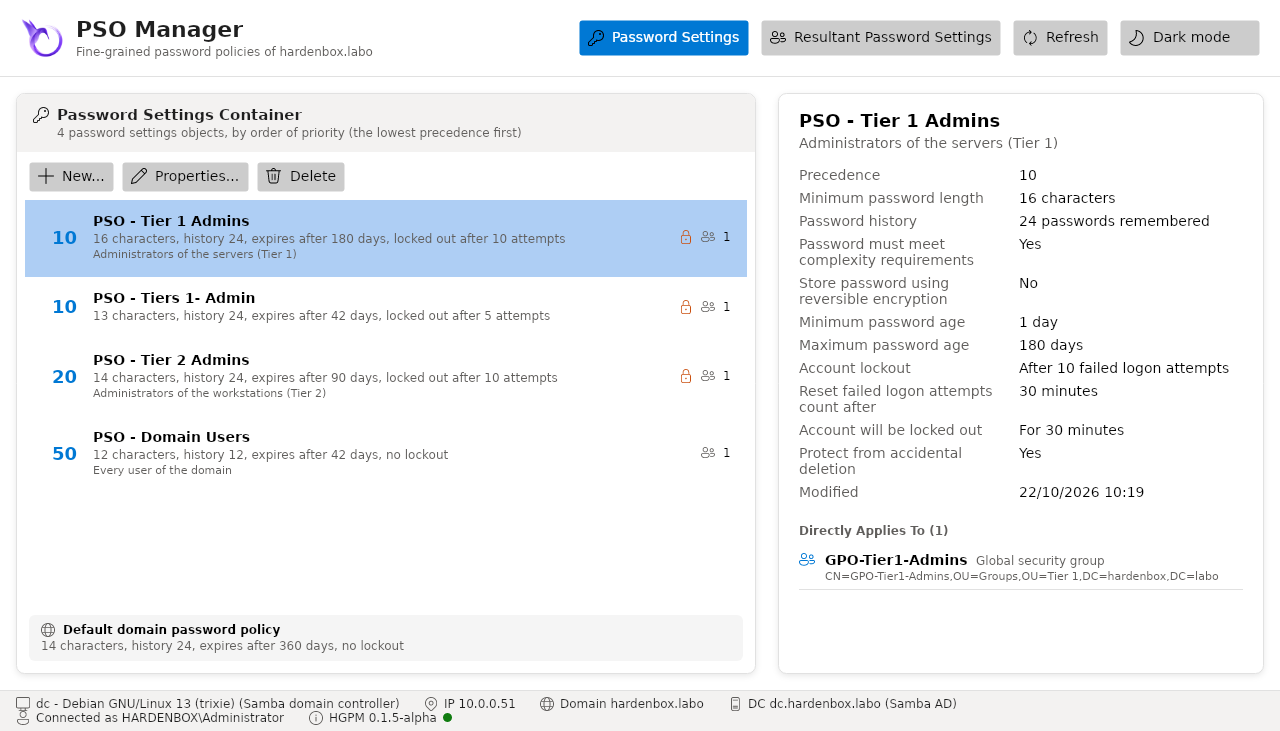
The details of the selected PSO: its settings, when it was changed, and the users and groups it
directly applies to (msDS-PSOAppliesTo), with the kind and scope of each group.
| Button | Does |
|---|---|
| New... | creates a PSO in its window (greyed when the account cannot create PSOs) |
| Properties... (or a double click) | changes the PSO in its window |
| Delete | deletes the PSO once confirmed; one protected from accidental deletion is kept |
| Refresh (F5) | reads the PSOs again from the domain controller |
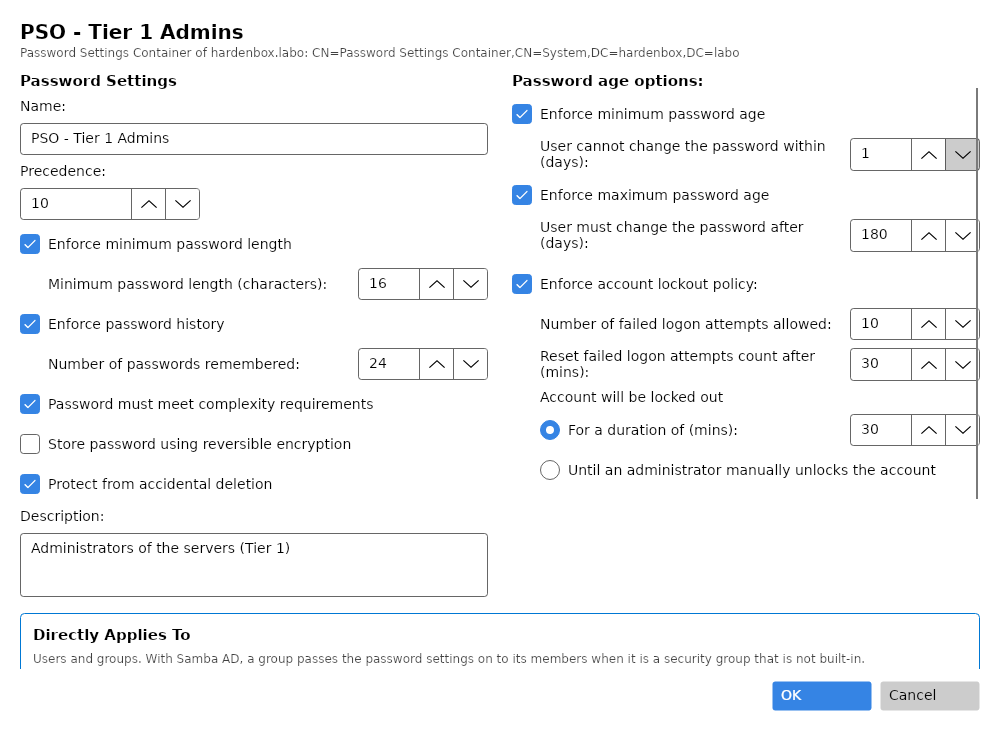
The window of a PSO
The fields of Create Password Settings of the Administrative Center:
| Field | Stored in | |
|---|---|---|
| Name, Precedence | cn, msDS-PasswordSettingsPrecedence |
of several PSOs, the lowest precedence wins |
| Enforce minimum password length | msDS-MinimumPasswordLength |
unchecked: 0 |
| Enforce password history | msDS-PasswordHistoryLength |
unchecked: 0 |
| Password must meet complexity requirements | msDS-PasswordComplexityEnabled |
|
| Store password using reversible encryption | msDS-PasswordReversibleEncryptionEnabled |
to be avoided |
| Protect from accidental deletion | the DACL of the PSO | Everyone denied Delete and Delete subtree on it, Delete all child objects on its container |
| Enforce minimum / maximum password age | msDS-MinimumPasswordAge, msDS-MaximumPasswordAge |
unchecked maximum: the password never expires |
| Enforce account lockout policy | msDS-LockoutThreshold, msDS-LockoutObservationWindow, msDS-LockoutDuration |
Until an administrator manually unlocks the account: no duration |
| Description | description |
|
| Directly Applies To | msDS-PSOAppliesTo |
users and groups, searched in the domain |
OK checks the settings as the domain controllers do (a precedence of 1 or more, a minimum age shorter than the maximum age, a reset of the failed attempts no longer than the lockout...), then writes the PSO. A setting is changed only if the domain still has the value the console read: a PSO another console changed meanwhile is refused, Refresh then change it again. A duration shown in whole days or minutes keeps its exact value when it is not changed: opening a PSO and clicking OK changes nothing.
Resultant Password Settings
Search a user or a group, select it: every PSO that concerns it, by order of priority, how it reaches the account (directly, or through which groups, nested ones included), the one that applies and why the others do not.
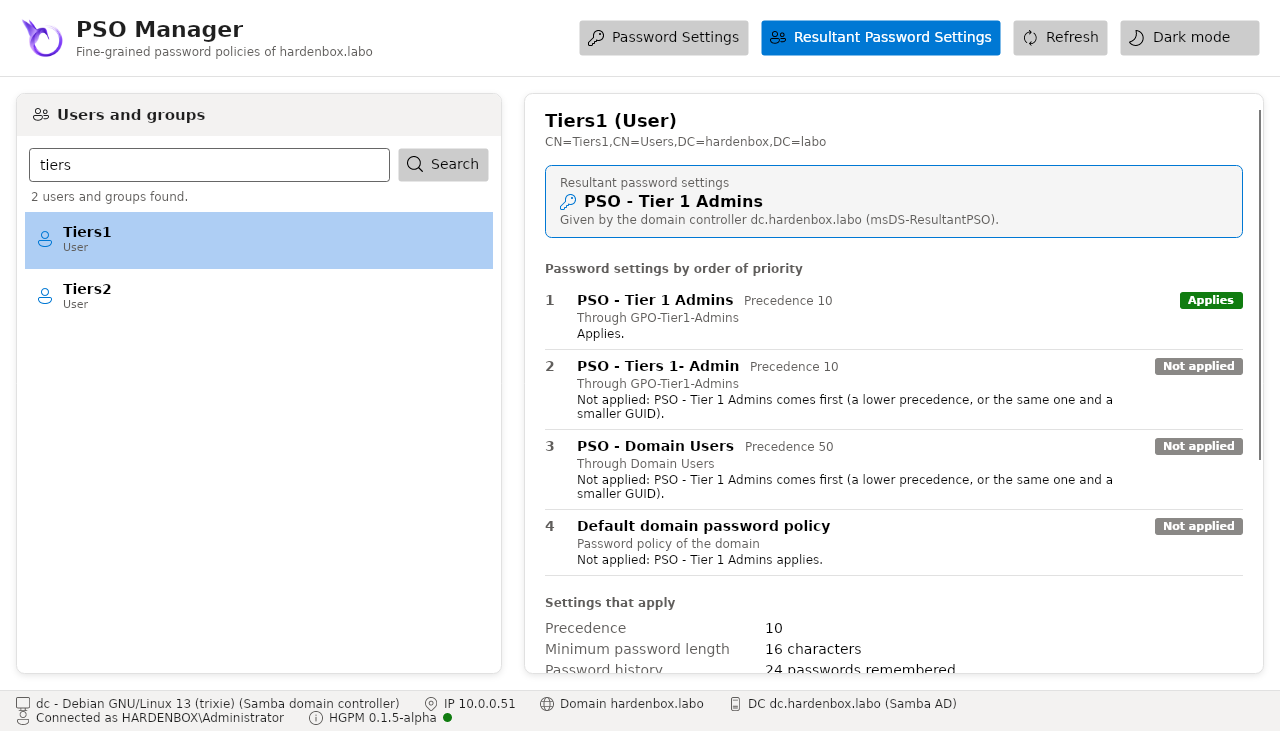
Which PSO applies to a user:
- The PSOs applied directly to the user win over those of its groups.
- Without one, the PSOs applied to its groups, nested ones included.
- Of several, the lowest precedence wins; with the same precedence, the smallest
objectGUID. - Without any, the password policy of the domain applies.
The groups that pass a PSO on to their members differ between the domain controllers:
| Domain controller | Groups that pass a PSO on |
|---|---|
| Windows | the global security groups only (a PSO applied to a domain local or universal group applies to nobody) |
| Samba AD | every security group but the built-in ones |
Samba AD and Windows do not apply the same PSO
A PSO applied to a domain local or universal security group applies to its members on a Samba AD domain, and to nobody on a Windows domain. The same groups and the same PSOs can then give another password policy to the same user, for instance after a migration from Samba AD to Windows, or with Windows and Samba domain controllers side by side.
- Apply the PSOs to users, or to global security groups: both domain controllers pass them on.
- Check the result in Resultant Password Settings: the PSO in the frame is the one the domain controller you read applies; a PSO Ignored reaches the account through a group that does not pass it on there.
On the Windows domain powershell.labo of the lab, a PSO of precedence 5 applied to the domain
local group VPN Users is ignored for tiers1, its member: the PSO of its global group applies.
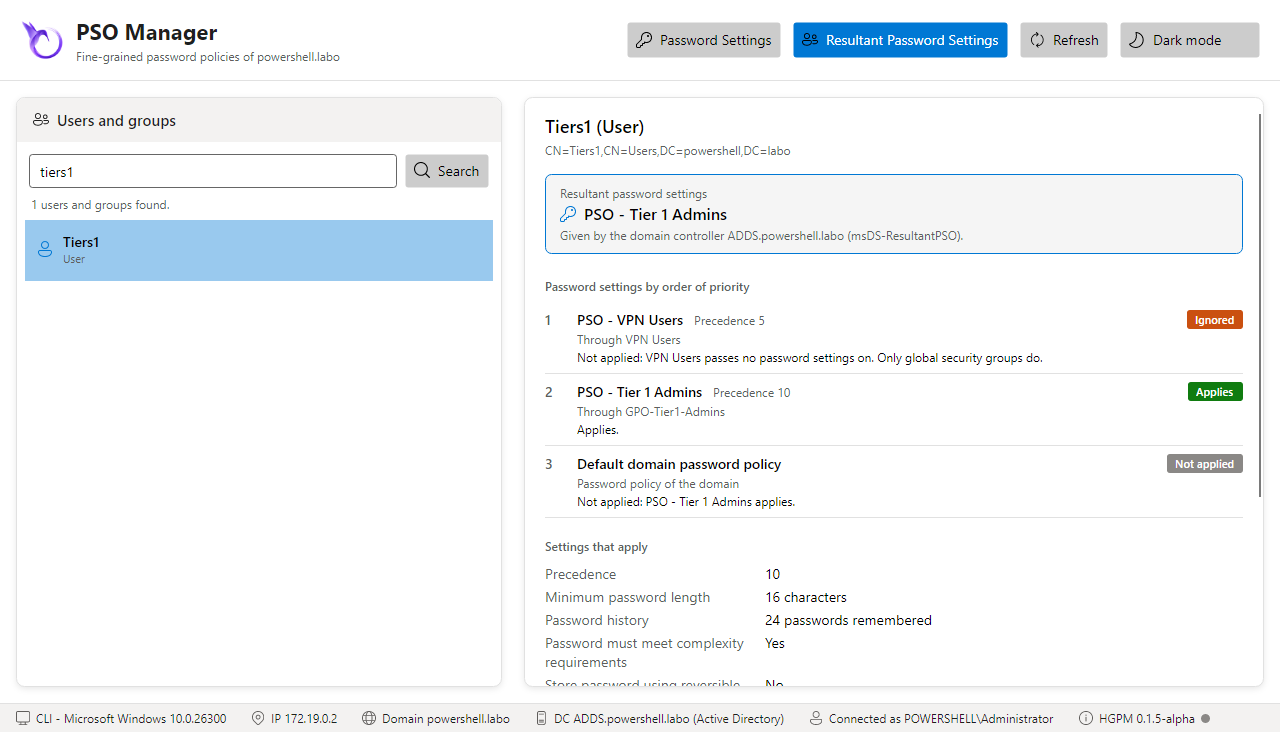
The status of each PSO says it: Applies, Not applied (another one comes first, or one
applied directly wins), Ignored (applied through a group that passes no PSO on). For a user, the
domain controller has the last word: the console shows the PSO it applies (msDS-ResultantPSO),
and says it when it differs from the order of priority of the PSOs the account can read.
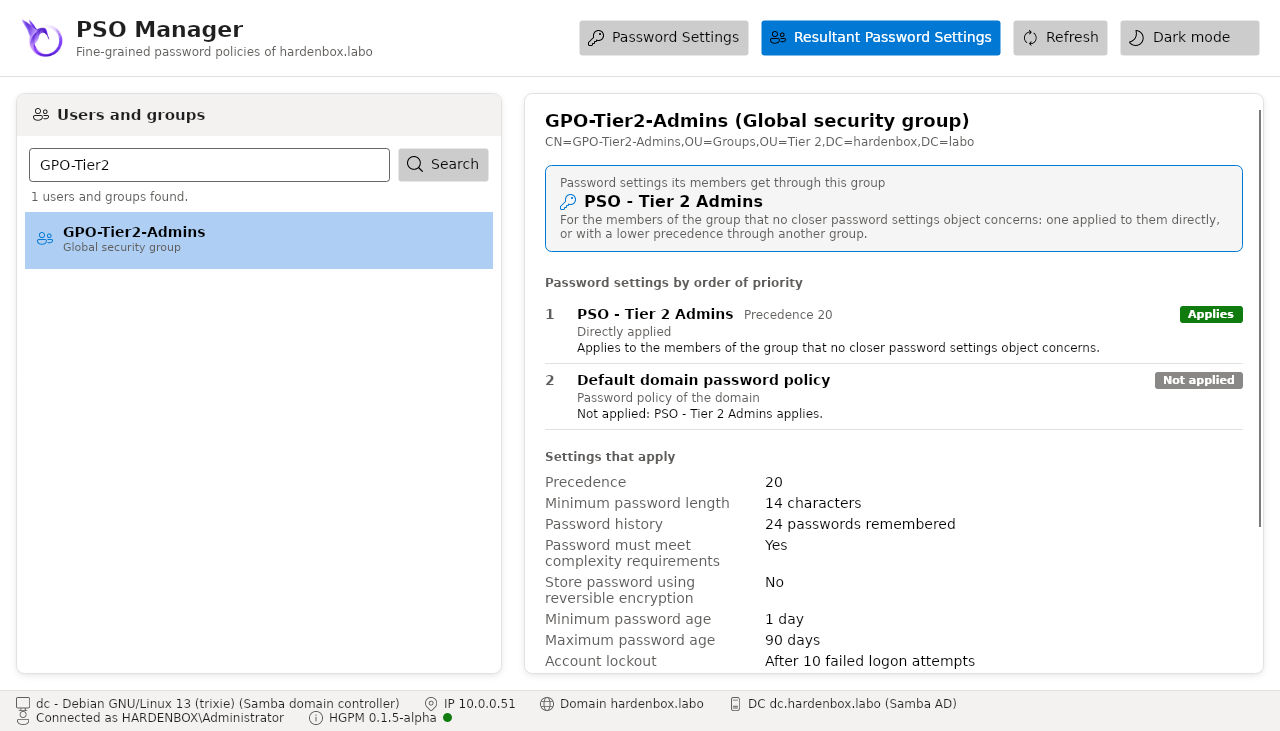
For a group, the view shows the PSO its members get through it, when no closer PSO concerns them.
Rights
By default, only the administrators of the domain read and change the PSOs: another account sees
an empty container, and New... is greyed. The changes go to the audit log of HGPM
(Get-PSGPOAuditLog): NewPasswordPolicy, SetPasswordPolicy (what changed, the subjects added
and removed), RemovePasswordPolicy.
The commands
The same, from the command line:
| Command | |
|---|---|
Get-PSGPOFineGrainedPasswordPolicy |
the PSOs, by order of priority |
Get-PSGPODefaultPasswordPolicy |
the password policy of the domain |
New-PSGPOFineGrainedPasswordPolicy |
creates a PSO, with the settings of the Administrative Center by default |
Set-PSGPOFineGrainedPasswordPolicy |
changes, renames, protects a PSO |
Remove-PSGPOFineGrainedPasswordPolicy |
deletes a PSO |
Add-PSGPOFineGrainedPasswordPolicySubject |
applies a PSO to users and groups |
Remove-PSGPOFineGrainedPasswordPolicySubject |
stops applying it |
Get-PSGPOResultantPasswordPolicy |
the PSO that applies to a user, and why |
A duration is a TimeSpan (180.00:00:00 is 180 days); a MaxPasswordAge of zero means that the
passwords never expire, a LockoutDuration of zero that the account stays locked until an
administrator unlocks it.