The lab
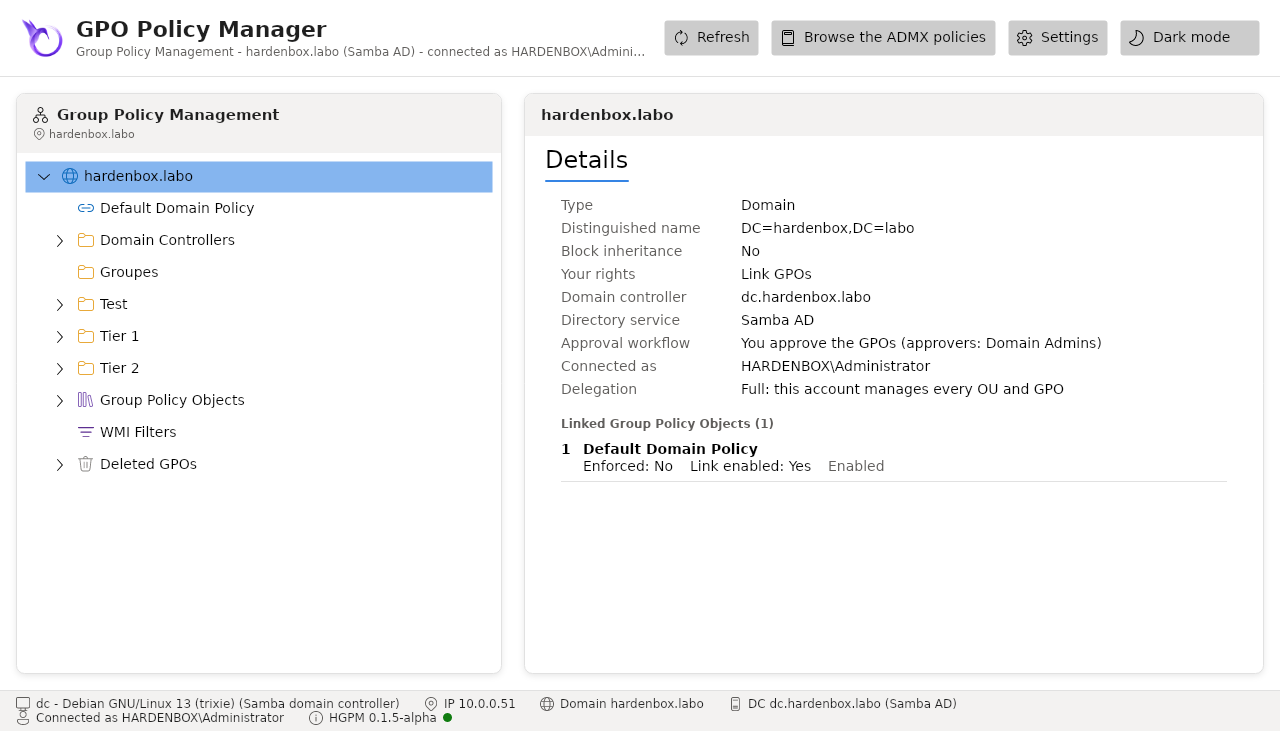
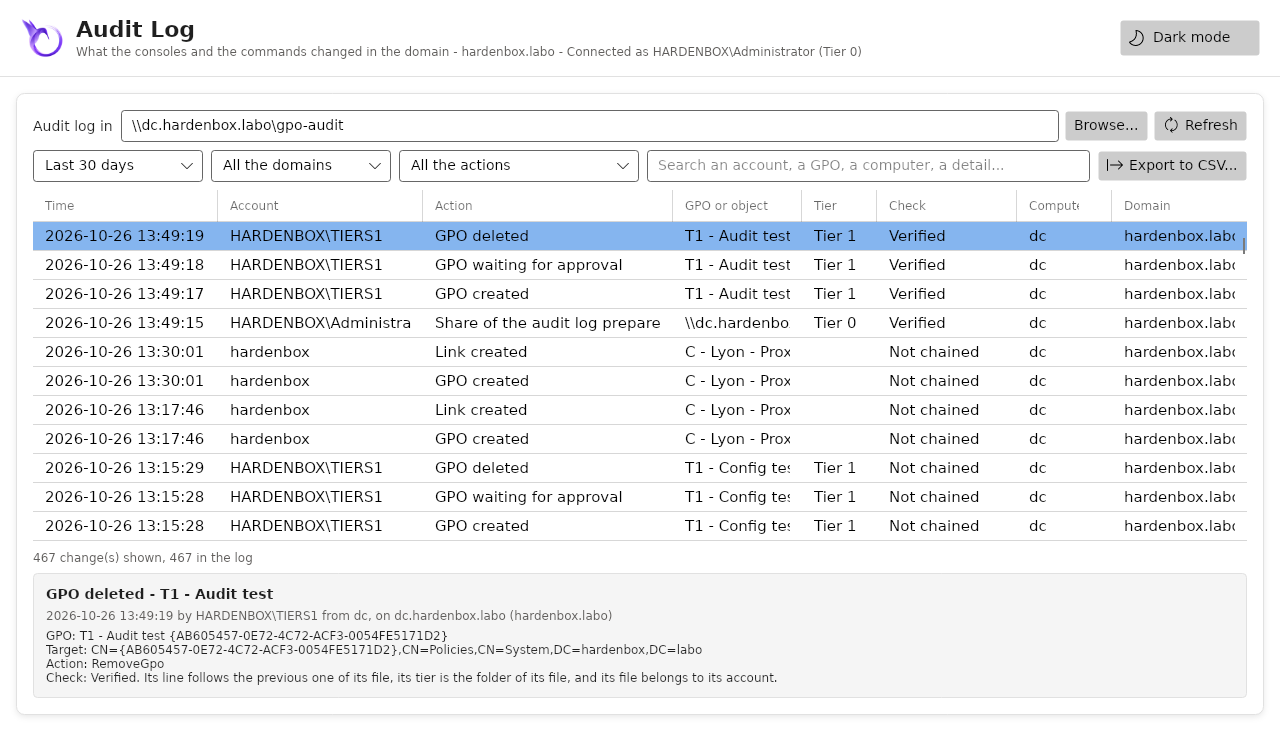
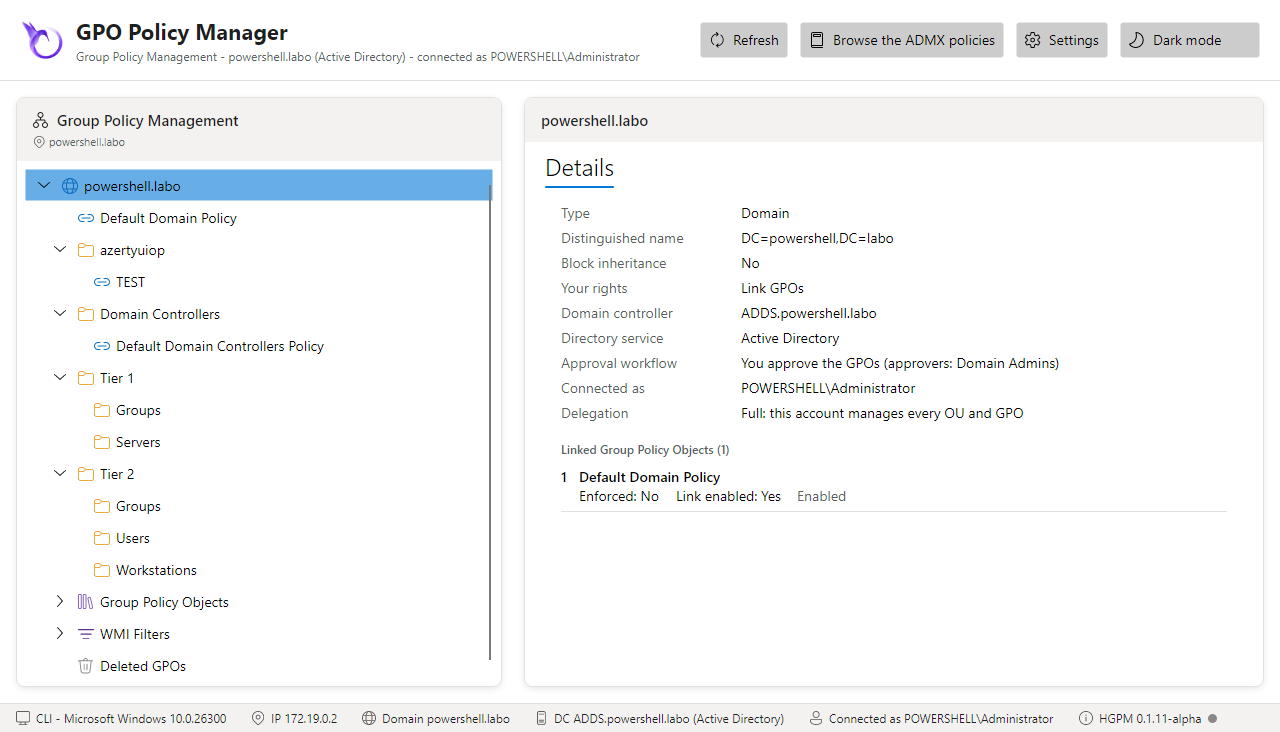
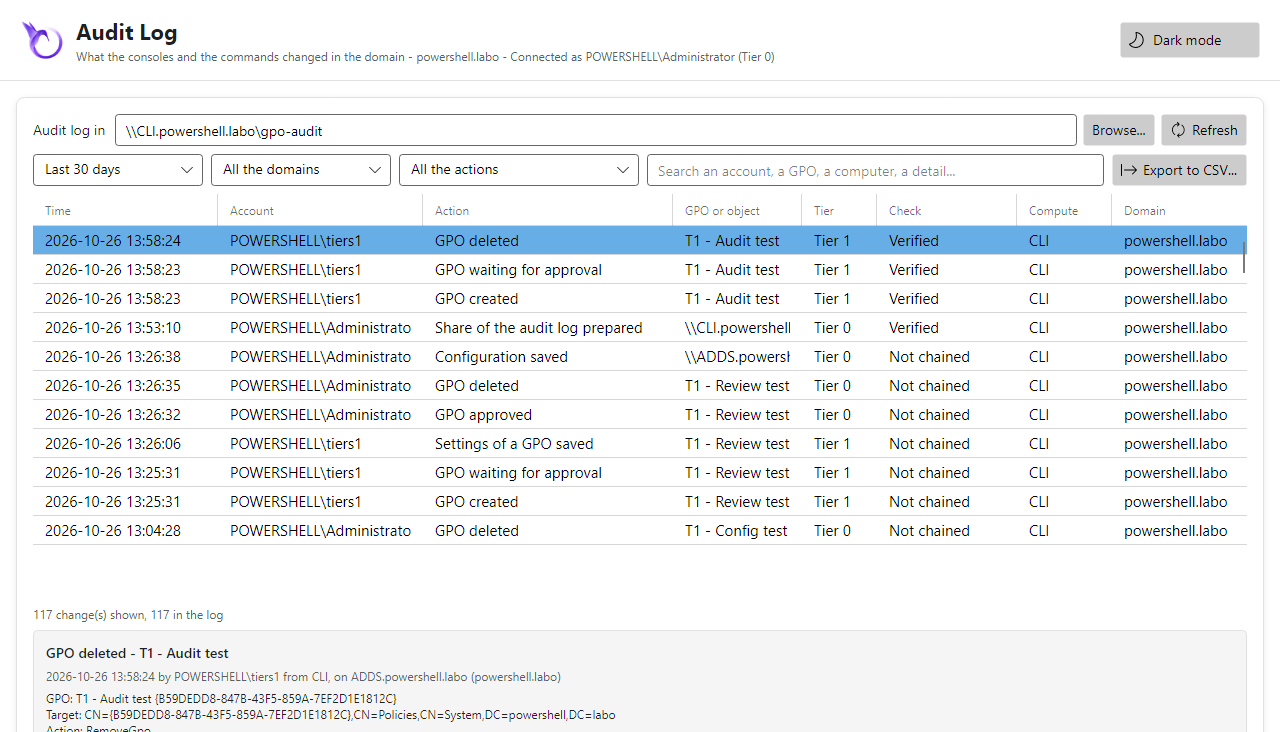
The screenshots and the tests of this documentation come from two domains built the same way, one on Linux with Samba AD, one on Windows with Active Directory: the same tiers, groups, delegation, approval workflow and central shares.
| hardenbox.labo (Samba AD) | powershell.labo (Active Directory) | |
|---|---|---|
| Domain controller | dc.hardenbox.labo, Debian 13, Samba 4.22 |
ADDS.powershell.labo, Windows Server |
| Console | on the domain controller itself, Linux, PowerShell 7 | CLI, Windows 11 member of the domain, PowerShell 7, RSAT Group Policy Management tools |
| Account of the console | a Kerberos ticket of administrator (Tier 0) or of tiers1 (Tier 1): kinit changes it |
the session of Administrator (Tier 0), or of tiers1 |
| OUs | Tier 1 (Servers, Groups), Tier 2 (Workstations, Users, Groups), Test, Groupes, Domain Controllers |
Tier 1 (Servers, Groups), Tier 2 (Workstations, Users, Groups), azertyuiop, Domain Controllers |
| Groups | GPO-Tier1-Admins (member tiers1), GPO-Tier2-Admins (member tiers2) |
GPO-Tier1-Admins (member Tiers1), GPO-Tier2-Admins (member Tiers2) |
| Delegation | each group links GPOs to its own OU (write gPLink and gPOptions) |
the same |
| GPOs | Default Domain Policy, Default Domain Controllers Policy, T1 - Servers - Baseline, T2 - Workstations - Baseline... |
Default Domain Policy, Default Domain Controllers Policy, TEST |
| Approval workflow | enabled: approvers Domain Admins, creators GPO-Tier1-Admins, GPO-Tier2-Admins |
the same |
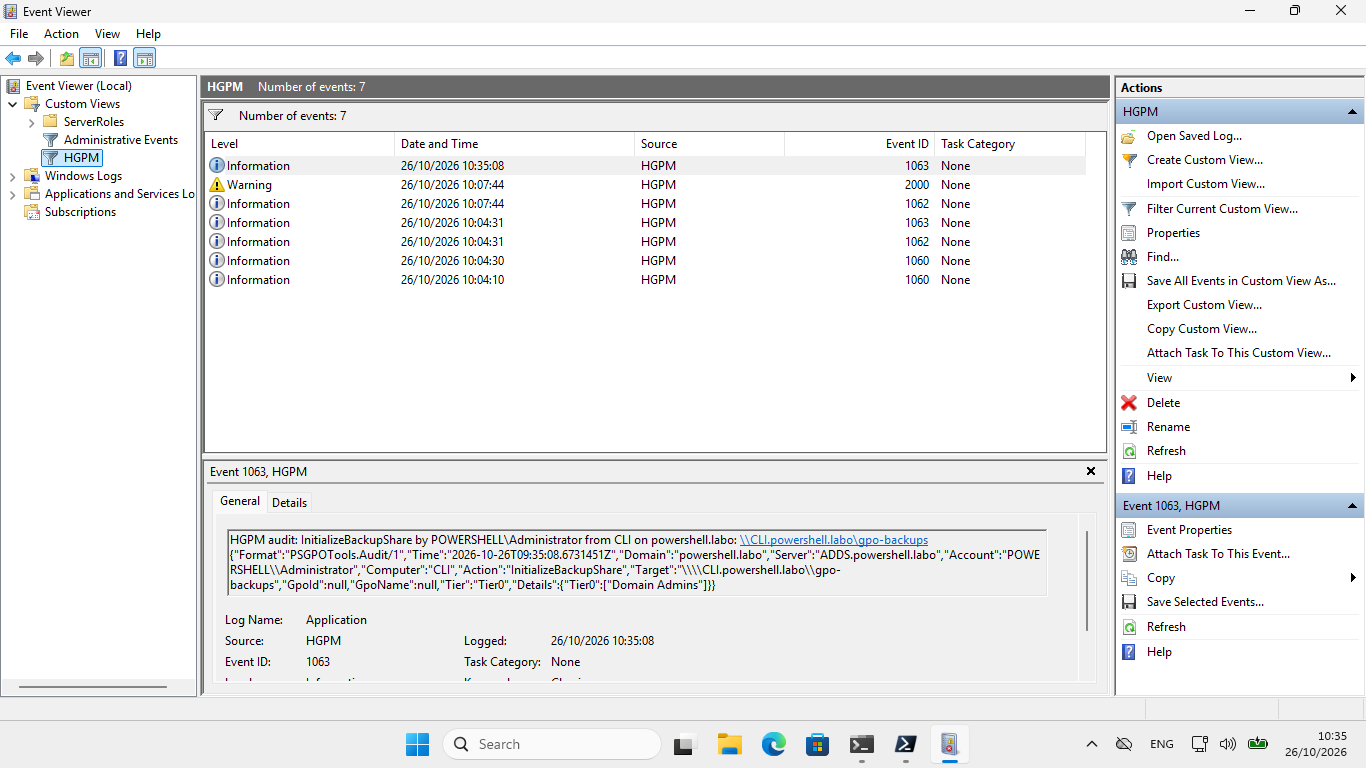
| Central audit log | \\dc.hardenbox.labo\gpo-audit (Samba share on the domain controller) |
\\CLI.powershell.labo\gpo-audit (C:\Shares\gpo-audit) |
| Central backups | \\dc.hardenbox.labo\gpo-backups, mounted on /mnt/gpo-backups |
\\CLI.powershell.labo\gpo-backups (C:\Shares\gpo-backups) |
| Log of the system | journald (journalctl -t hgpm) |
the event log Application, source HGPM |
Make your own
A lab that shows everything needs a domain (Samba AD or Active Directory), a computer with the
console (a member, or the domain controller), and the tiering of hardenbox.labo: two scripts
create it in any domain, whose distinguished name they read from the domain controller. Both can
run again (what is there is kept), and -WhatIf shows what they would change.
- Windows: LDAP with the identity of the session (System.DirectoryServices, part of Windows, no RSAT), Active Directory or Samba AD, in a session of a domain administrator (a logon with its password: a key-based SSH session has no Kerberos ticket to give the domain controller).
- Linux:
samba-tool, with a Kerberos ticket of a domain administrator (kinit administrator); no password is asked.
A test domain only
The accounts tiers1 and tiers2 get the password of the lab, H@rdenB0x! (-Password gives
another one).
1. The tiers, their groups and their technicians
New-PSGPOTierLab.ps1 creates OU=Tier 1 (Servers, Groups) and OU=Tier 2
(Workstations, Users, Groups), the groups GPO-Tier1-Admins and GPO-Tier2-Admins in the
Groups OU of their tier, and the accounts tiers1 and tiers2 in CN=Users, each a member of
the group of its tier.
Download windows/New-PSGPOTierLab.ps1
windows/New-PSGPOTierLab.ps1
#Requires -Version 7.4
<#
.SYNOPSIS
    Creates the tiering of the HGPM lab from Windows: the OUs of Tier 1 and Tier 2, their
    groups, and a technician account per tier.
.DESCRIPTION
    In the domain of the computer, or of the domain controller -Server, whatever its name (its
    distinguished name is read from the RootDSE of the domain controller):

        OU=Tier 1       OU=Servers, OU=Groups (group GPO-Tier1-Admins)
        OU=Tier 2       OU=Workstations, OU=Users, OU=Groups (group GPO-Tier2-Admins)
        CN=Users        tiers1, member of GPO-Tier1-Admins; tiers2, member of GPO-Tier2-Admins

    What is there is kept: the script can run again, and an account that exists keeps its
    password. -WhatIf shows what it would create.

    LDAP with the Kerberos identity of the session (System.DirectoryServices, part of Windows):
    no RSAT needed, Active Directory or Samba AD. Run it in a session of a domain administrator.
    For a test domain only: the accounts get the password of the lab.
.PARAMETER Server
    A domain controller of the domain; the domain of the computer by default.
.PARAMETER Password
    The password of tiers1 and tiers2; the one of the lab by default.
.EXAMPLE
    .\New-PSGPOTierLab.ps1
.EXAMPLE
    .\New-PSGPOTierLab.ps1 -Server ADDS.powershell.labo -WhatIf
.LINK
    https://jm2k69.github.io/PSGPOTools/en/getting-started/lab/
#>
[CmdletBinding(SupportsShouldProcess)]
param(
    [string]$Server,
    [securestring]$Password = (ConvertTo-SecureString -String 'H@rdenB0x!' -AsPlainText -Force)
)

$ErrorActionPreference = 'Stop'
if (-not $IsWindows) { throw 'This script is for Windows: on Linux, take the Linux one (samba-tool).' }

# The tiering: an OU per tier, the OUs below it, the group of its technicians and their account.
$tiers = @(
    @{ Ou = 'Tier 1'; Children = 'Servers', 'Groups'; Group = 'GPO-Tier1-Admins'; User = 'tiers1'; Name = 'Tiers1' }
    @{ Ou = 'Tier 2'; Children = 'Workstations', 'Users', 'Groups'; Group = 'GPO-Tier2-Admins'; User = 'tiers2'; Name = 'Tiers2' }
)

# An object of the directory, on the domain controller, with Kerberos, signed and sealed (the
# password of an account is only set over a sealed connection).
# The members of a DirectoryEntry are read through psbase: PowerShell adapts the object to its
# LDAP attributes, and .Children or .Properties would be $null.
$prefix = if ($Server) { "LDAP://$Server/" } else { 'LDAP://' }
function Get-Entry {
    param([string]$DistinguishedName)
    # [NullString]::Value, not $null: PowerShell would pass an empty user name and password, an
    # anonymous bind; a null one is the identity of the session.
    [System.DirectoryServices.DirectoryEntry]::new("$prefix$DistinguishedName", [NullString]::Value, [NullString]::Value, [System.DirectoryServices.AuthenticationTypes]'Secure, Signing, Sealing')
}
# A value in an LDAP filter, its special characters escaped (RFC 4515).
function ConvertTo-FilterValue {
    param([string]$Value)
    $Value.Replace('\', '\5c').Replace('*', '\2a').Replace('(', '\28').Replace(')', '\29').Replace("`0", '\00')
}
# Is there an object of this distinguished name? Searched for: binding an object that is not
# there does not always fail.
function Test-Entry {
    param([string]$DistinguishedName)
    $searcher = [System.DirectoryServices.DirectorySearcher]::new((Get-Entry $domainDN), "(distinguishedName=$(ConvertTo-FilterValue $DistinguishedName))", [string[]]'distinguishedName')
    $null -ne $searcher.FindOne()
}
# The distinguished name of the account or group of a sAMAccountName, $null when there is none.
function Find-Account {
    param([string]$Name)
    $searcher = [System.DirectoryServices.DirectorySearcher]::new((Get-Entry $domainDN), "(sAMAccountName=$(ConvertTo-FilterValue $Name))", [string[]]'distinguishedName')
    $found = $searcher.FindOne()
    if ($found) { "$($found.Properties['distinguishedname'][0])" }
}

$rootDse = Get-Entry 'RootDSE'
$domainDN = "$($rootDse.psbase.Properties['defaultNamingContext'].Value)"
if (-not $domainDN) { throw "No distinguished name of the domain read from $(if ($Server) { $Server } else { 'the domain of the computer' })." }
$domainName = ($domainDN -split ',' | ForEach-Object { $_ -replace '^DC=' }) -join '.'
$usersDN = "CN=Users,$domainDN"
Write-Host "Domain $domainName ($domainDN), domain controller $($rootDse.psbase.Properties['dnsHostName'].Value)"

foreach ($tier in $tiers) {
    $tierDN = "OU=$($tier.Ou),$domainDN"

    # The OU of the tier, then the OUs below it.
    foreach ($ou in @(@{ Name = $tier.Ou; Parent = $domainDN }) + @($tier.Children | ForEach-Object { @{ Name = $_; Parent = $tierDN } })) {
        $dn = "OU=$($ou.Name),$($ou.Parent)"
        if (Test-Entry $dn) { Write-Host "  $dn is there"; continue }
        if (-not $PSCmdlet.ShouldProcess($dn, 'Create the OU')) { continue }
        $entry = (Get-Entry $ou.Parent).psbase.Children.Add("OU=$($ou.Name)", 'organizationalUnit')
        $entry.psbase.CommitChanges()
        Write-Host "  $dn created"
    }

    # The group of the technicians of the tier, in its Groups OU: global security group.
    $groupDN = Find-Account $tier.Group
    if ($groupDN) { Write-Host "  group $($tier.Group) is there" }
    elseif ($PSCmdlet.ShouldProcess("CN=$($tier.Group),OU=Groups,$tierDN", 'Create the global security group')) {
        $entry = (Get-Entry "OU=Groups,$tierDN").psbase.Children.Add("CN=$($tier.Group)", 'group')
        $entry.psbase.Properties['sAMAccountName'].Value = $tier.Group
        $entry.psbase.Properties['groupType'].Value = [int](0x2 -bor 0x80000000)
        $entry.psbase.Properties['description'].Value = "Technicians of $($tier.Ou)"
        $entry.psbase.CommitChanges()
        $groupDN = "CN=$($tier.Group),OU=Groups,$tierDN"
        Write-Host "  group $($tier.Group) created"
    }

    # The account of the technician, in the Users container of the domain, as in the lab:
    # created disabled, given its password, then enabled.
    $userDN = Find-Account $tier.User
    if ($userDN) { Write-Host "  account $($tier.User) is there, its password kept" }
    elseif ($PSCmdlet.ShouldProcess("CN=$($tier.Name),$usersDN", 'Create the account')) {
        $entry = (Get-Entry $usersDN).psbase.Children.Add("CN=$($tier.Name)", 'user')
        $entry.psbase.Properties['sAMAccountName'].Value = $tier.User
        $entry.psbase.Properties['userPrincipalName'].Value = "$($tier.User)@$domainName"
        $entry.psbase.Properties['givenName'].Value = $tier.Name
        $entry.psbase.Properties['displayName'].Value = $tier.Name
        $entry.psbase.Properties['description'].Value = "Technician of $($tier.Ou)"
        $entry.psbase.CommitChanges()
        $entry.psbase.Invoke('SetPassword', (ConvertFrom-SecureString -SecureString $Password -AsPlainText))
        # NORMAL_ACCOUNT, enabled.
        $entry.psbase.Properties['userAccountControl'].Value = 0x200
        $entry.psbase.CommitChanges()
        $userDN = "CN=$($tier.Name),$usersDN"
        Write-Host "  account $($tier.User) created"
    }

    # The technician in the group of the tier.
    $member = $groupDN -and $userDN -and @((Get-Entry $groupDN).psbase.Properties['member'] | ForEach-Object { "$_" }) -contains $userDN
    if ($member) { Write-Host "  $($tier.User) is a member of $($tier.Group)" }
    elseif ($PSCmdlet.ShouldProcess($tier.Group, "Add $($tier.User)")) {
        $group = Get-Entry $groupDN
        $null = $group.psbase.Properties['member'].Add($userDN)
        $group.psbase.CommitChanges()
        Write-Host "  $($tier.User) added to $($tier.Group)"
    }
}
Write-Host 'Next: Grant-PSGPOTierDelegation.ps1, the rights of the groups on GPOs.'
Download linux/New-PSGPOTierLab.ps1
./New-PSGPOTierLab.ps1 -Server dc.hardenbox.labo
./New-PSGPOTierLab.ps1 -Server dc.hardenbox.labo -WhatIf
linux/New-PSGPOTierLab.ps1
#Requires -Version 7.4
<#
.SYNOPSIS
    Creates the tiering of the HGPM lab from Linux: the OUs of Tier 1 and Tier 2, their
    groups, and a technician account per tier.
.DESCRIPTION
    In the domain of the domain controller -Server, whatever its name (its distinguished name is
    read from the domain controller):

        OU=Tier 1       OU=Servers, OU=Groups (group GPO-Tier1-Admins)
        OU=Tier 2       OU=Workstations, OU=Users, OU=Groups (group GPO-Tier2-Admins)
        CN=Users        tiers1, member of GPO-Tier1-Admins; tiers2, member of GPO-Tier2-Admins

    What is there is kept: the script can run again, and an account that exists keeps its
    password. -WhatIf shows what it would create.

    Needs samba-tool (Samba AD, or Active Directory over LDAP) and a Kerberos ticket of a domain
    administrator (kinit administrator): no password is asked. For a test domain only: the
    accounts get the password of the lab.
.PARAMETER Server
    The domain controller of the domain.
.PARAMETER Password
    The password of tiers1 and tiers2; the one of the lab by default.
.EXAMPLE
    ./New-PSGPOTierLab.ps1 -Server dc.hardenbox.labo
.EXAMPLE
    ./New-PSGPOTierLab.ps1 -Server dc.hardenbox.labo -WhatIf
.LINK
    https://jm2k69.github.io/PSGPOTools/en/getting-started/lab/
#>
[CmdletBinding(SupportsShouldProcess)]
param(
    [Parameter(Mandatory)] [string]$Server,
    [securestring]$Password = (ConvertTo-SecureString -String 'H@rdenB0x!' -AsPlainText -Force)
)

$ErrorActionPreference = 'Stop'

# The tiering: an OU per tier, the OUs below it, the group of its technicians and their account.
$tiers = @(
    @{ Ou = 'Tier 1'; Children = 'Servers', 'Groups'; Group = 'GPO-Tier1-Admins'; User = 'tiers1'; Name = 'Tiers1' }
    @{ Ou = 'Tier 2'; Children = 'Workstations', 'Users', 'Groups'; Group = 'GPO-Tier2-Admins'; User = 'tiers2'; Name = 'Tiers2' }
)

# The distinguished name of the domain, from the RootDSE of the domain controller (read without
# an account).
function Get-DomainDistinguishedName {
    param([string]$Server)
    Add-Type -AssemblyName System.DirectoryServices.Protocols
    $connection = [System.DirectoryServices.Protocols.LdapConnection]::new([System.DirectoryServices.Protocols.LdapDirectoryIdentifier]::new($Server, 389))
    try {
        $connection.AuthType = [System.DirectoryServices.Protocols.AuthType]::Anonymous
        $connection.SessionOptions.ProtocolVersion = 3
        $request = [System.DirectoryServices.Protocols.SearchRequest]::new('', '(objectClass=*)', [System.DirectoryServices.Protocols.SearchScope]::Base, 'defaultNamingContext')
        "$($connection.SendRequest($request).Entries[0].Attributes['defaultNamingContext'][0])"
    } finally {
        $connection.Dispose()
    }
}

# samba-tool on the domain controller, with the Kerberos ticket of the session: its output, or
# $null when it fails and -AllowFailure is given.
function Invoke-SambaTool {
    param([string[]]$Argument, [switch]$AllowFailure)
    # Kerberos only, never a password prompt.
    $output = & samba-tool @Argument -H "ldap://$Server" --use-kerberos=required --no-pass 2>&1
    if ($LASTEXITCODE -ne 0) {
        if ($AllowFailure) { return $null }
        throw "samba-tool $($Argument -join ' ') failed: $($output -join ' ')"
    }
    $output | ForEach-Object { "$_" }
}

if (-not (Get-Command samba-tool -ErrorAction SilentlyContinue)) {
    throw 'samba-tool is needed (Debian/Ubuntu: apt install samba-common-bin), with a Kerberos ticket of a domain administrator (kinit administrator).'
}
$domainDN = Get-DomainDistinguishedName -Server $Server
if (-not $domainDN) { throw "No distinguished name of the domain read from $Server." }
Write-Host "Domain $domainDN, domain controller $Server"

foreach ($tier in $tiers) {
    $tierDN = "OU=$($tier.Ou),$domainDN"

    # The OU of the tier, then the OUs below it.
    $existing = @(Invoke-SambaTool 'ou', 'list', '--full-dn')
    foreach ($dn in @($tierDN) + @($tier.Children | ForEach-Object { "OU=$_,$tierDN" })) {
        if ($existing -contains $dn) { Write-Host "  $dn is there"; continue }
        if (-not $PSCmdlet.ShouldProcess($dn, 'Create the OU')) { continue }
        $null = Invoke-SambaTool 'ou', 'add', $dn
        Write-Host "  $dn created"
    }

    # The group of the technicians of the tier, in its Groups OU.
    if ($null -ne (Invoke-SambaTool 'group', 'show', $tier.Group -AllowFailure)) { Write-Host "  group $($tier.Group) is there" }
    elseif ($PSCmdlet.ShouldProcess("CN=$($tier.Group),OU=Groups,$tierDN", 'Create the global security group')) {
        $null = Invoke-SambaTool 'group', 'add', $tier.Group, "--groupou=OU=Groups,OU=$($tier.Ou)", "--description=Technicians of $($tier.Ou)"
        Write-Host "  group $($tier.Group) created"
    }

    # The account of the technician, in the Users container of the domain, as in the lab.
    if ($null -ne (Invoke-SambaTool 'user', 'show', $tier.User -AllowFailure)) { Write-Host "  account $($tier.User) is there, its password kept" }
    elseif ($PSCmdlet.ShouldProcess("CN=$($tier.Name),CN=Users,$domainDN", 'Create the account')) {
        $plain = ConvertFrom-SecureString -SecureString $Password -AsPlainText
        $null = Invoke-SambaTool 'user', 'create', $tier.User, $plain, "--given-name=$($tier.Name)", "--description=Technician of $($tier.Ou)"
        Write-Host "  account $($tier.User) created"
    }

    # The technician in the group of the tier.
    if (@(Invoke-SambaTool 'group', 'listmembers', $tier.Group -AllowFailure) -contains $tier.User) { Write-Host "  $($tier.User) is a member of $($tier.Group)" }
    elseif ($PSCmdlet.ShouldProcess($tier.Group, "Add $($tier.User)")) {
        $null = Invoke-SambaTool 'group', 'addmembers', $tier.Group, $tier.User
        Write-Host "  $($tier.User) added to $($tier.Group)"
    }
}
Write-Host 'Next: Grant-PSGPOTierDelegation.ps1, the rights of the groups on GPOs.'
2. Their rights on GPOs
Grant-PSGPOTierDelegation.ps1 gives each group:
- Link GPOs to the OU of its tier and the OUs below it, as the Delegation tab of GPMC: read
and write of
gPLinkandgPOptions; - the creation of GPOs, through the approval workflow: a fine
delegation, never Group Policy Creator Owners, whose members create GPOs outside the workflow.
Initialize-PSGPOWorkflow -Applygives them the right to creategroupPolicyContainerobjects inCN=Policies,CN=Systemand their folder in thePoliciesfolder of SYSVOL; their GPOs wait for the approval of a domain administrator.
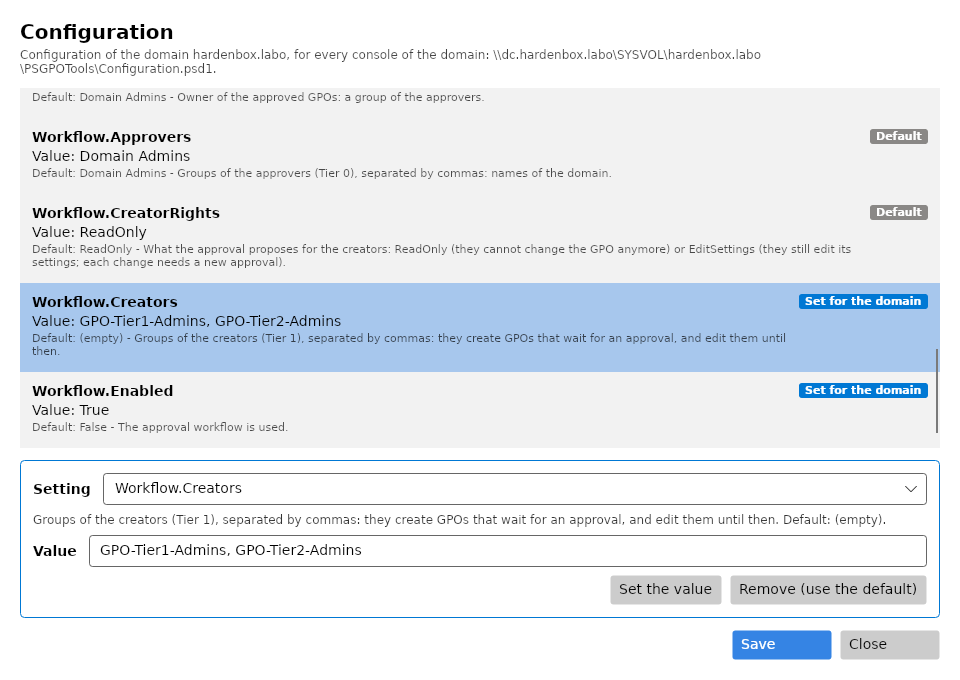
First, enable the workflow of the domain with both groups as its creators: in the console, as a
domain administrator, Settings: Workflow.Enabled = True, Workflow.Creators =
GPO-Tier1-Admins, GPO-Tier2-Admins, Save (step by step in
Approval workflow). Without it,
the script stops before changing anything, and says what it read.
The central store of the domain must exist too (Install-PSGPOAdmx -CentralStore, or a copy of a
PolicyDefinitions folder): without it, the creators get no right, as one of them could create it
and own it (hardening).
Download windows/Grant-PSGPOTierDelegation.ps1
windows/Grant-PSGPOTierDelegation.ps1
#Requires -Version 7.4
<#
.SYNOPSIS
    Delegates from Windows, finely, to the technicians of Tier 1 and Tier 2 of the HGPM lab the
    creation of GPOs, and the links of GPOs to the OUs of their tier.
.DESCRIPTION
    After New-PSGPOTierLab.ps1, for each tier, to its group (GPO-Tier1-Admins with tiers1,
    GPO-Tier2-Admins with tiers2):

    - Link GPOs, as the Delegation tab of GPMC gives it on an OU: read and write of gPLink and
      gPOptions on the OU of the tier and the OUs below it.
    - The creation of GPOs, through the approval workflow of HGPM: a fine delegation,
      never Group Policy Creator Owners (which creates GPOs outside the workflow). The
      configuration of the domain must have the workflow enabled with both groups as its
      creators (the console: Settings, Workflow); Initialize-PSGPOWorkflow -Apply then gives
      them the right to create groupPolicyContainer objects in CN=Policies,CN=System and
      their folder in the Policies folder of SYSVOL. The GPOs they create wait for the
      approval of a domain administrator.

    What is there is kept: the script can run again. -WhatIf shows what it would change.

    LDAP with the Kerberos identity of the session (System.DirectoryServices, part of Windows):
    no RSAT needed, Active Directory or Samba AD. Run it in a session of a domain administrator;
    the HGPM module for the workflow.
.PARAMETER Server
    A domain controller of the domain; the domain of the computer by default.
.EXAMPLE
    .\Grant-PSGPOTierDelegation.ps1
.EXAMPLE
    .\Grant-PSGPOTierDelegation.ps1 -Server ADDS.powershell.labo -WhatIf
.LINK
    https://jm2k69.github.io/PSGPOTools/en/getting-started/lab/
#>
[CmdletBinding(SupportsShouldProcess)]
param(
    [string]$Server
)

$ErrorActionPreference = 'Stop'
if (-not $IsWindows) { throw 'This script is for Windows: on Linux, take the Linux one (samba-tool).' }

$tiers = @(
    @{ Ou = 'Tier 1'; Group = 'GPO-Tier1-Admins' }
    @{ Ou = 'Tier 2'; Group = 'GPO-Tier2-Admins' }
)
# The attributes of the links of an OU (schema of Active Directory).
$linkAttributes = [ordered]@{ gPLink = [guid]'f30e3bbe-9ff0-11d1-b603-0000f80367c1'; gPOptions = [guid]'f30e3bbf-9ff0-11d1-b603-0000f80367c1' }
$readWrite = [System.DirectoryServices.ActiveDirectoryRights]'ReadProperty, WriteProperty'

# An object of the directory, on the domain controller, with Kerberos, signed and sealed.
# The members of a DirectoryEntry are read through psbase: PowerShell adapts the object to its
# LDAP attributes, and .Children or .Properties would be $null.
$prefix = if ($Server) { "LDAP://$Server/" } else { 'LDAP://' }
function Get-Entry {
    param([string]$DistinguishedName)
    # [NullString]::Value, not $null: PowerShell would pass an empty user name and password, an
    # anonymous bind; a null one is the identity of the session.
    [System.DirectoryServices.DirectoryEntry]::new("$prefix$DistinguishedName", [NullString]::Value, [NullString]::Value, [System.DirectoryServices.AuthenticationTypes]'Secure, Signing, Sealing')
}
function Find-Account {
    param([string]$Name)
    $searcher = [System.DirectoryServices.DirectorySearcher]::new((Get-Entry $domainDN), "(sAMAccountName=$Name)", [string[]]'distinguishedName')
    $found = $searcher.FindOne()
    if ($found) { "$($found.Properties['distinguishedname'][0])" }
}

$rootDse = Get-Entry 'RootDSE'
$domainDN = "$($rootDse.psbase.Properties['defaultNamingContext'].Value)"
if (-not $domainDN) { throw "No distinguished name of the domain read from $(if ($Server) { $Server } else { 'the domain of the computer' })." }
if (-not $Server) { $Server = "$($rootDse.psbase.Properties['dnsHostName'].Value)" }
Write-Host "Domain $domainDN, domain controller $Server"

# The workflow first: without it, nothing is changed.
$groups = @($tiers | ForEach-Object { $_.Group })
if (-not (Get-Module HGPM)) { Import-Module HGPM -ErrorAction Stop }
# Read only: -WhatIf is for the changes.
$configuration = & { $WhatIfPreference = $false; Get-PSGPOConfiguration -Server $Server }
$workflow = $configuration.Configuration.Workflow
$creators = @("$($workflow.Creators)" -split ',' | ForEach-Object { $_.Trim() } | Where-Object { $_ })
if (-not $workflow.Enabled -or @($groups | Where-Object { $creators -notcontains $_ }).Count) {
    # What was read, and from where: a configuration that cannot be read is the defaults (no workflow).
    $read = if ($configuration.DomainFileExists) { "read from $($configuration.DomainPath): Enabled = $($workflow.Enabled), Creators = '$($workflow.Creators)'" }
        else { "no configuration of the domain in $($configuration.DomainPath)" }
    if ($configuration.Problem) { $read += " ($($configuration.Problem))" }
    throw "The approval workflow of the domain must be enabled, with $($groups -join ' and ') as its creators ($read): in the console, Settings, Workflow (Enabled, Creators = '$($groups -join ', ')'), then run this script again."
}

foreach ($tier in $tiers) {
    $ouDN = "OU=$($tier.Ou),$domainDN"
    $groupDN = Find-Account $tier.Group
    if (-not $groupDN) { throw "No group $($tier.Group): run New-PSGPOTierLab.ps1 first." }
    $sid = [System.Security.Principal.SecurityIdentifier]::new([byte[]](Get-Entry $groupDN).psbase.Properties['objectSid'].Value, 0)

    # Link GPOs: read and write of gPLink and gPOptions, on the OU and the OUs below it.
    foreach ($attribute in $linkAttributes.GetEnumerator()) {
        $ou = Get-Entry $ouDN
        $present = @($ou.psbase.ObjectSecurity.GetAccessRules($true, $false, [System.Security.Principal.SecurityIdentifier]) | Where-Object {
                $_.IdentityReference -eq $sid -and $_.AccessControlType -eq 'Allow' -and $_.ObjectType -eq $attribute.Value -and
                $_.InheritanceType -eq 'All' -and ($_.ActiveDirectoryRights -band $readWrite) -eq $readWrite
            }).Count
        if ($present) { Write-Host "  $($tier.Group) writes $($attribute.Key) of $ouDN"; continue }
        if (-not $PSCmdlet.ShouldProcess($ouDN, "Let $($tier.Group) write $($attribute.Key), on this OU and the OUs below it")) { continue }
        $ou.psbase.ObjectSecurity.AddAccessRule([System.DirectoryServices.ActiveDirectoryAccessRule]::new($sid, $readWrite,
                [System.Security.AccessControl.AccessControlType]::Allow, $attribute.Value, [System.DirectoryServices.ActiveDirectorySecurityInheritance]::All))
        # The DACL only: the owner and the audit are left as they are.
        $ou.psbase.Options.SecurityMasks = [System.DirectoryServices.SecurityMasks]::Dacl
        $ou.psbase.CommitChanges()
        Write-Host "  $($tier.Group) now writes $($attribute.Key) of $ouDN"
    }
}

# The creation of GPOs: the right to create GPOs, in the directory and in SYSVOL: what is missing, added.
Initialize-PSGPOWorkflow -Server $Server -Apply -WhatIf:$WhatIfPreference | Format-Table Target, Account, State -AutoSize
Write-Host 'Next: log on as tiers1 (or tiers2), then open the console: Show-GPOManagerAvalonia.'
Download linux/Grant-PSGPOTierDelegation.ps1
Import-Module HGPM
./Grant-PSGPOTierDelegation.ps1 -Server dc.hardenbox.labo -WhatIf
./Grant-PSGPOTierDelegation.ps1 -Server dc.hardenbox.labo
linux/Grant-PSGPOTierDelegation.ps1
#Requires -Version 7.4
<#
.SYNOPSIS
    Delegates from Linux, finely, to the technicians of Tier 1 and Tier 2 of the HGPM lab the
    creation of GPOs, and the links of GPOs to the OUs of their tier.
.DESCRIPTION
    After New-PSGPOTierLab.ps1, for each tier, to its group (GPO-Tier1-Admins with tiers1,
    GPO-Tier2-Admins with tiers2):

    - Link GPOs, as the Delegation tab of GPMC gives it on an OU: read and write of gPLink and
      gPOptions on the OU of the tier and the OUs below it.
    - The creation of GPOs, through the approval workflow of HGPM: a fine delegation,
      never Group Policy Creator Owners (which creates GPOs outside the workflow). The
      configuration of the domain must have the workflow enabled with both groups as its
      creators (the console: Settings, Workflow); Initialize-PSGPOWorkflow -Apply then gives
      them the right to create groupPolicyContainer objects in CN=Policies,CN=System and
      their folder in the Policies folder of SYSVOL. The GPOs they create wait for the
      approval of a domain administrator.

    What is there is kept: the script can run again. -WhatIf shows what it would change.

    Needs samba-tool and a Kerberos ticket of a domain administrator (kinit administrator); the
    HGPM module for the workflow.
.PARAMETER Server
    The domain controller of the domain.
.EXAMPLE
    ./Grant-PSGPOTierDelegation.ps1 -Server dc.hardenbox.labo
.EXAMPLE
    ./Grant-PSGPOTierDelegation.ps1 -Server dc.hardenbox.labo -WhatIf
.LINK
    https://jm2k69.github.io/PSGPOTools/en/getting-started/lab/
#>
[CmdletBinding(SupportsShouldProcess)]
param(
    [Parameter(Mandatory)] [string]$Server
)

$ErrorActionPreference = 'Stop'

$tiers = @(
    @{ Ou = 'Tier 1'; Group = 'GPO-Tier1-Admins' }
    @{ Ou = 'Tier 2'; Group = 'GPO-Tier2-Admins' }
)
# The attributes of the links of an OU (schema of Active Directory).
$linkAttributes = [ordered]@{ gPLink = 'f30e3bbe-9ff0-11d1-b603-0000f80367c1'; gPOptions = 'f30e3bbf-9ff0-11d1-b603-0000f80367c1' }

# The distinguished name of the domain, from the RootDSE of the domain controller (read without
# an account).
function Get-DomainDistinguishedName {
    param([string]$Server)
    Add-Type -AssemblyName System.DirectoryServices.Protocols
    $connection = [System.DirectoryServices.Protocols.LdapConnection]::new([System.DirectoryServices.Protocols.LdapDirectoryIdentifier]::new($Server, 389))
    try {
        $connection.AuthType = [System.DirectoryServices.Protocols.AuthType]::Anonymous
        $connection.SessionOptions.ProtocolVersion = 3
        $request = [System.DirectoryServices.Protocols.SearchRequest]::new('', '(objectClass=*)', [System.DirectoryServices.Protocols.SearchScope]::Base, 'defaultNamingContext')
        "$($connection.SendRequest($request).Entries[0].Attributes['defaultNamingContext'][0])"
    } finally {
        $connection.Dispose()
    }
}

function Invoke-SambaTool {
    param([string[]]$Argument, [switch]$AllowFailure)
    # Kerberos only, never a password prompt.
    $output = & samba-tool @Argument -H "ldap://$Server" --use-kerberos=required --no-pass 2>&1
    if ($LASTEXITCODE -ne 0) {
        if ($AllowFailure) { return $null }
        throw "samba-tool $($Argument -join ' ') failed: $($output -join ' ')"
    }
    $output | ForEach-Object { "$_" }
}

if (-not (Get-Command samba-tool -ErrorAction SilentlyContinue)) {
    throw 'samba-tool is needed (Debian/Ubuntu: apt install samba-common-bin), with a Kerberos ticket of a domain administrator (kinit administrator).'
}
$domainDN = Get-DomainDistinguishedName -Server $Server
if (-not $domainDN) { throw "No distinguished name of the domain read from $Server." }
Write-Host "Domain $domainDN, domain controller $Server"

# The workflow first: without it, nothing is changed.
$groups = @($tiers | ForEach-Object { $_.Group })
if (-not (Get-Module HGPM)) { Import-Module HGPM -ErrorAction Stop }
# Read only: -WhatIf is for the changes.
$configuration = & { $WhatIfPreference = $false; Get-PSGPOConfiguration -Server $Server }
$workflow = $configuration.Configuration.Workflow
$creators = @("$($workflow.Creators)" -split ',' | ForEach-Object { $_.Trim() } | Where-Object { $_ })
if (-not $workflow.Enabled -or @($groups | Where-Object { $creators -notcontains $_ }).Count) {
    # What was read, and from where: a configuration that cannot be read is the defaults (no workflow).
    $read = if ($configuration.DomainFileExists) { "read from $($configuration.DomainPath): Enabled = $($workflow.Enabled), Creators = '$($workflow.Creators)'" }
        else { "no configuration of the domain in $($configuration.DomainPath)" }
    if ($configuration.Problem) { $read += " ($($configuration.Problem))" }
    throw "The approval workflow of the domain must be enabled, with $($groups -join ' and ') as its creators ($read): in the console, Settings, Workflow (Enabled, Creators = '$($groups -join ', ')'), then run this script again."
}

foreach ($tier in $tiers) {
    $ouDN = "OU=$($tier.Ou),$domainDN"
    $sid = "$(@(Invoke-SambaTool 'group', 'show', $tier.Group, '--attributes=objectSid' -AllowFailure) -match '^objectSid: ' | Select-Object -First 1)" -replace '^objectSid: '
    if (-not $sid) { throw "No group $($tier.Group): run New-PSGPOTierLab.ps1 first." }

    # Link GPOs: read and write of gPLink and gPOptions, on the OU and the OUs below it (CI).
    foreach ($attribute in $linkAttributes.GetEnumerator()) {
        $ace = "(OA;CI;RPWP;$($attribute.Value);;$sid)"
        $acl = (@(Invoke-SambaTool 'dsacl', 'get', "--objectdn=$ouDN") -join '').ToLowerInvariant()
        if ($acl.Contains($ace.ToLowerInvariant())) { Write-Host "  $($tier.Group) writes $($attribute.Key) of $ouDN"; continue }
        if (-not $PSCmdlet.ShouldProcess($ouDN, "Let $($tier.Group) write $($attribute.Key), on this OU and the OUs below it")) { continue }
        $null = Invoke-SambaTool 'dsacl', 'set', "--objectdn=$ouDN", "--sddl=$ace"
        Write-Host "  $($tier.Group) now writes $($attribute.Key) of $ouDN"
    }
}

# The creation of GPOs: the right to create GPOs, in the directory and in SYSVOL: what is missing, added.
Initialize-PSGPOWorkflow -Server $Server -Apply -WhatIf:$WhatIfPreference | Format-Table Target, Account, State -AutoSize
Write-Host 'Next: kinit tiers1 (or tiers2), then open the console: Show-GPOManagerAvalonia.'
3. The console as a technician
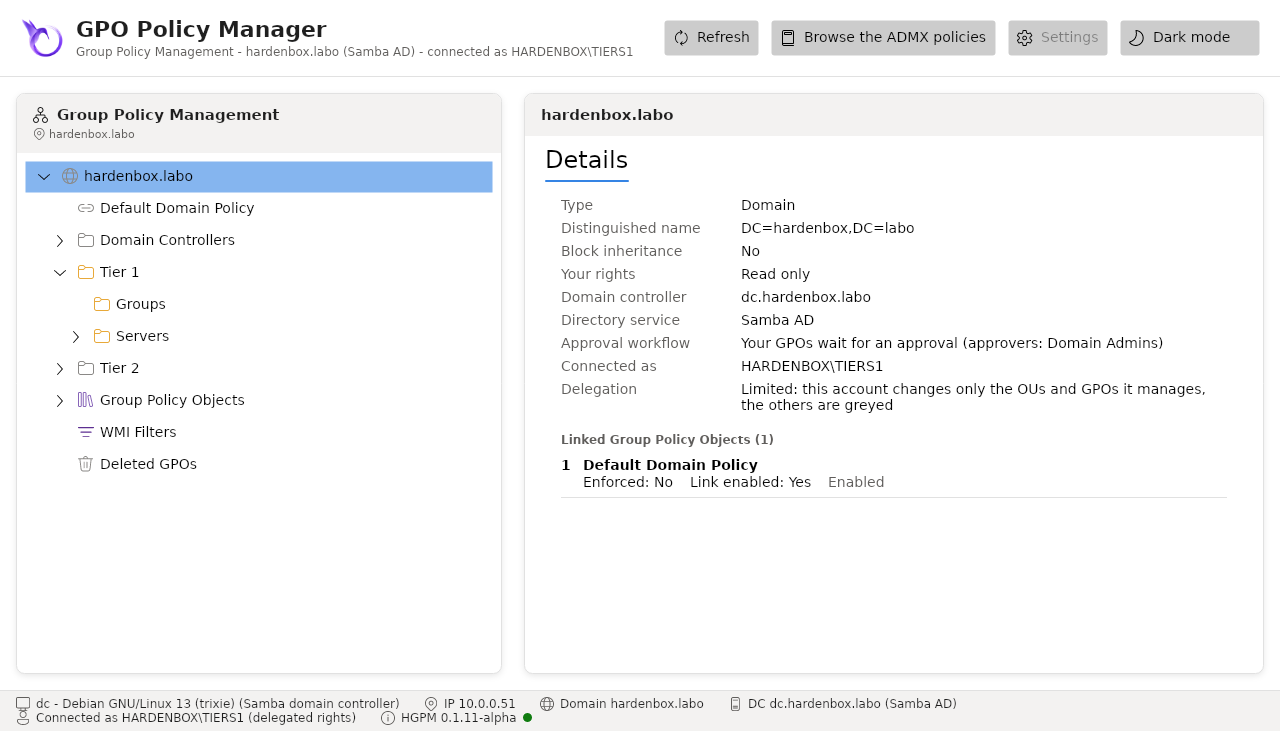
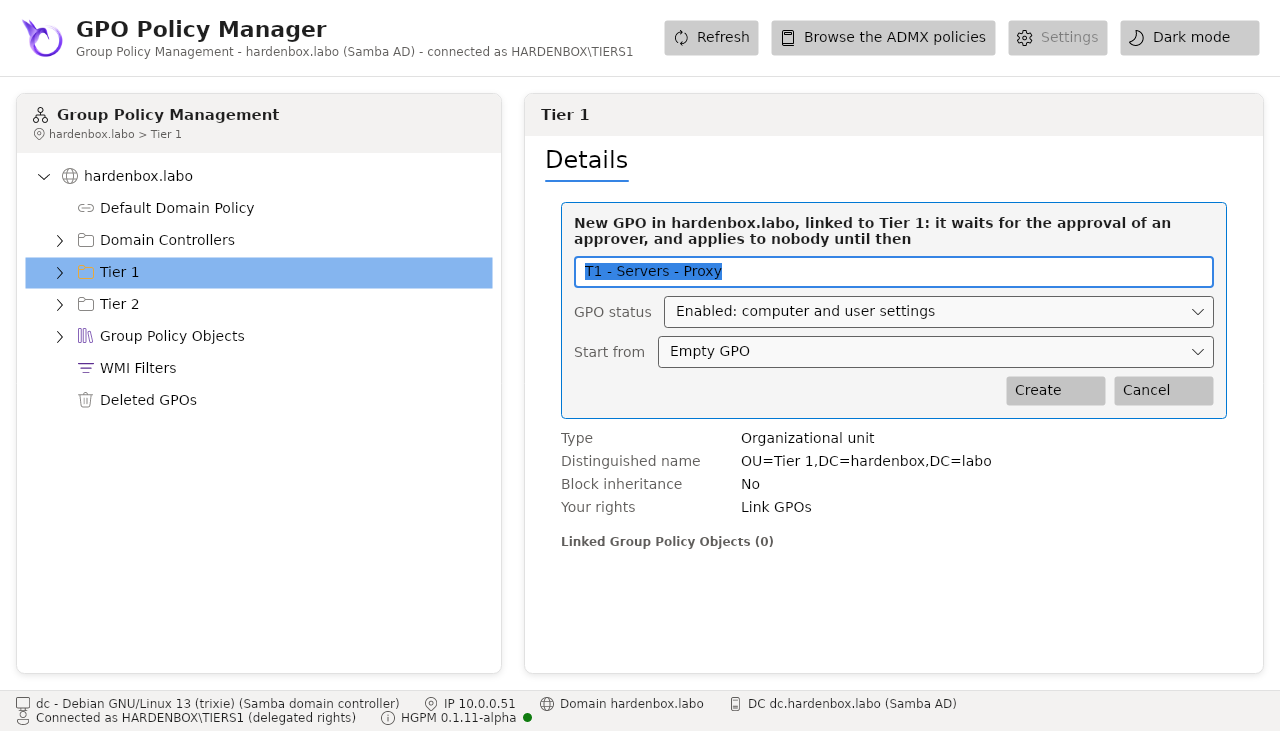
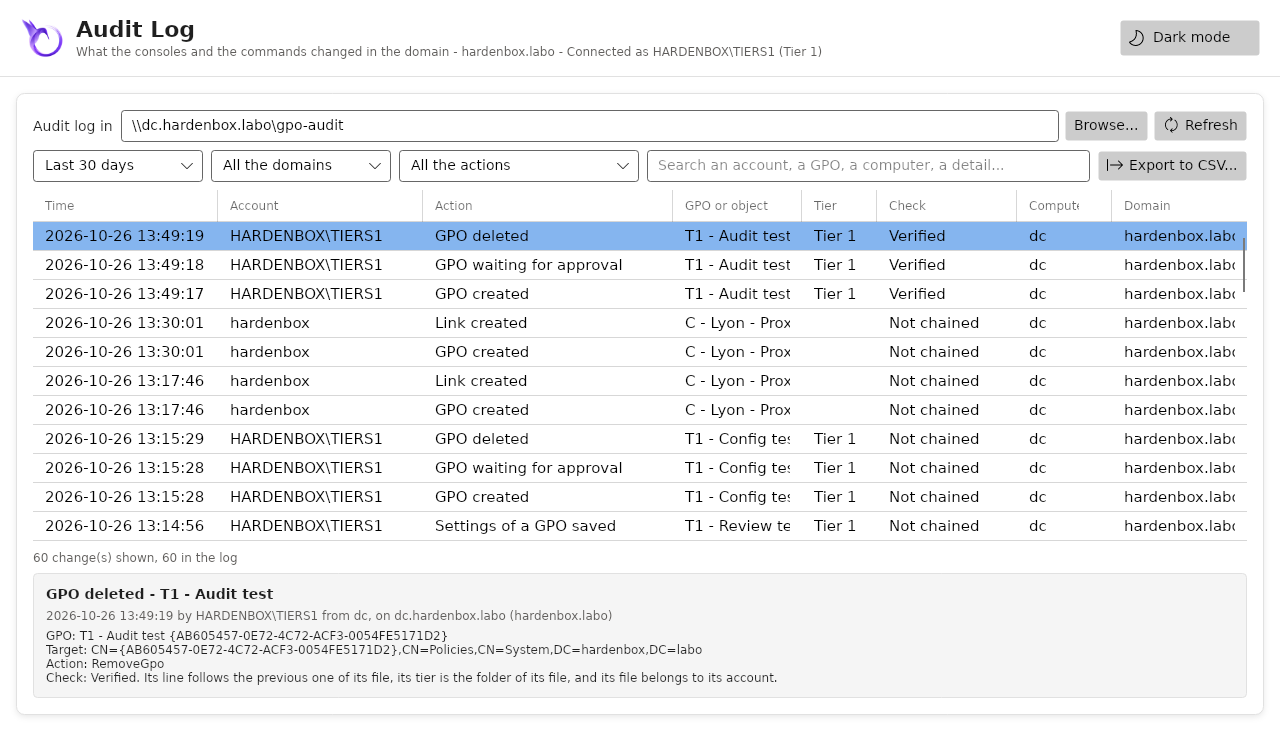
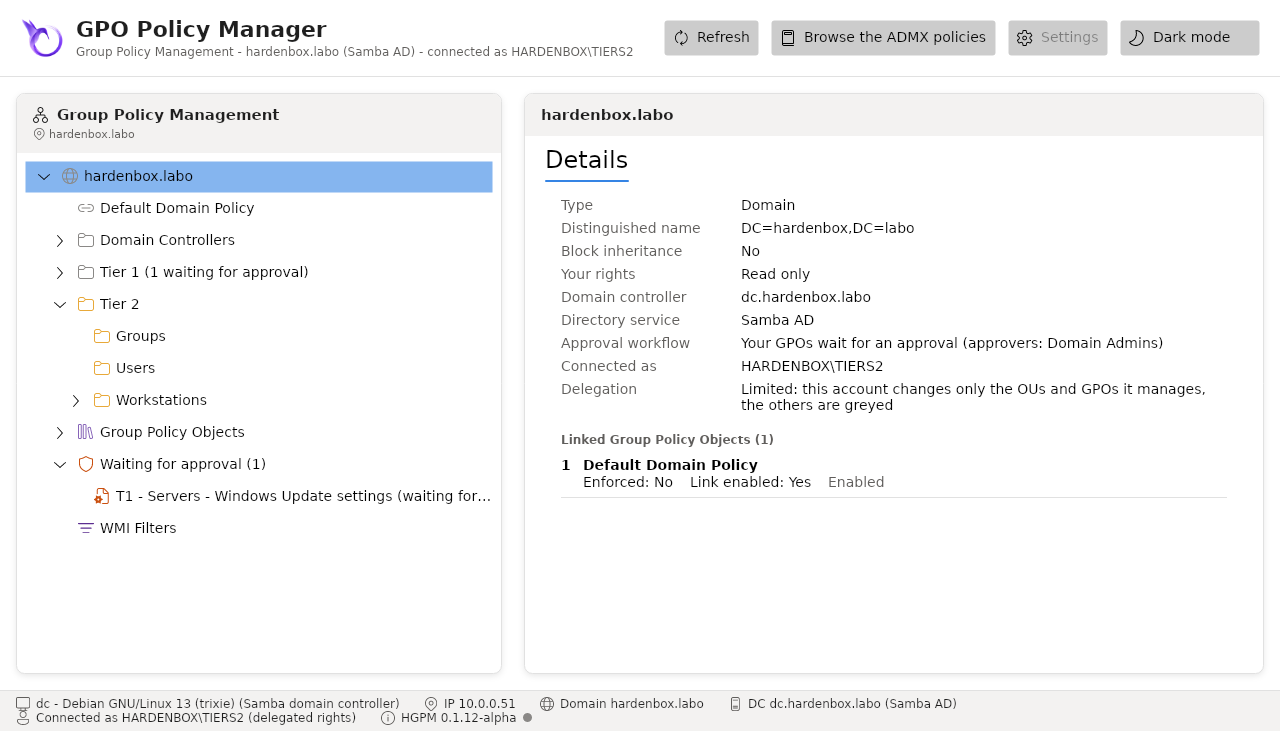
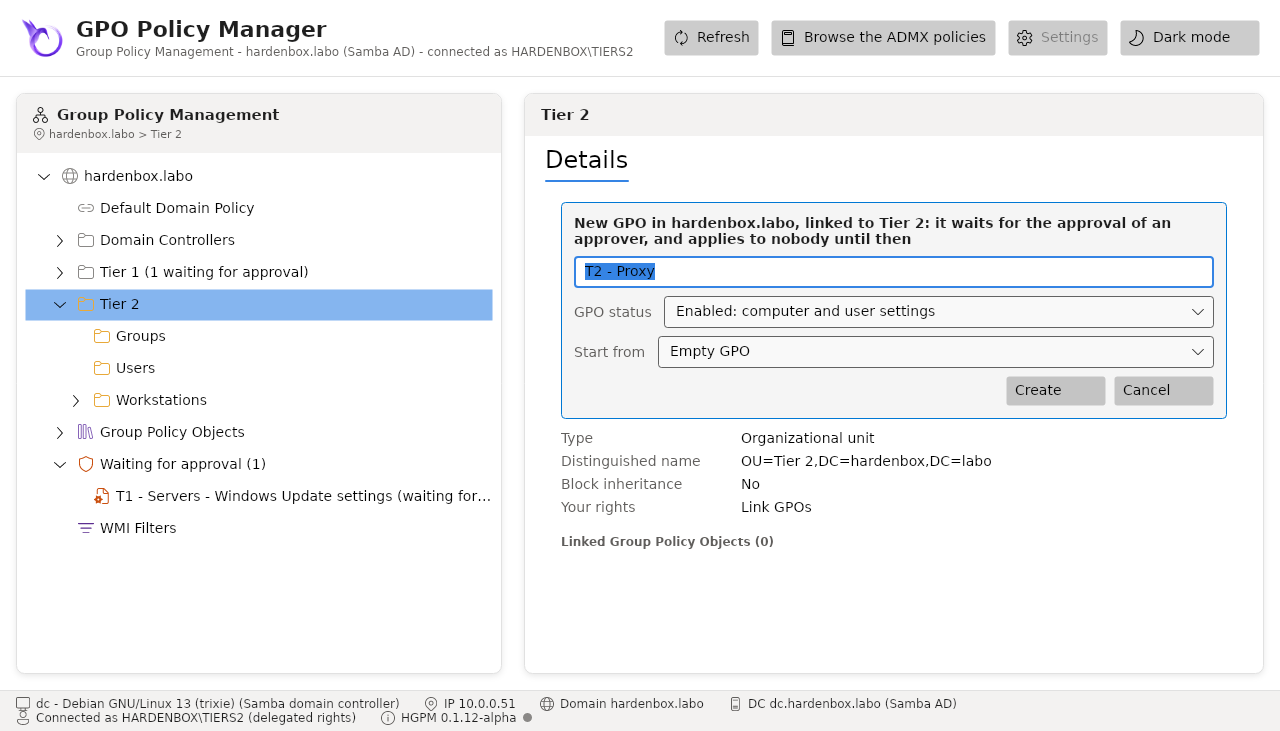
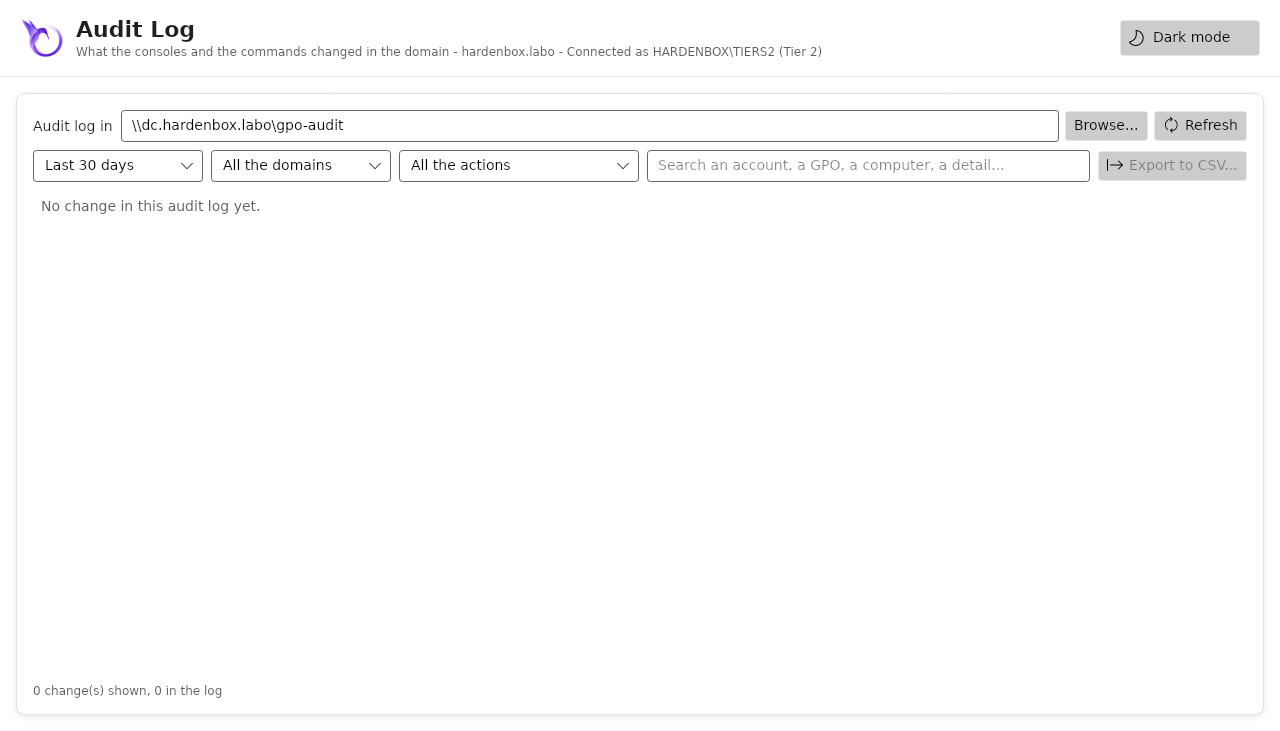
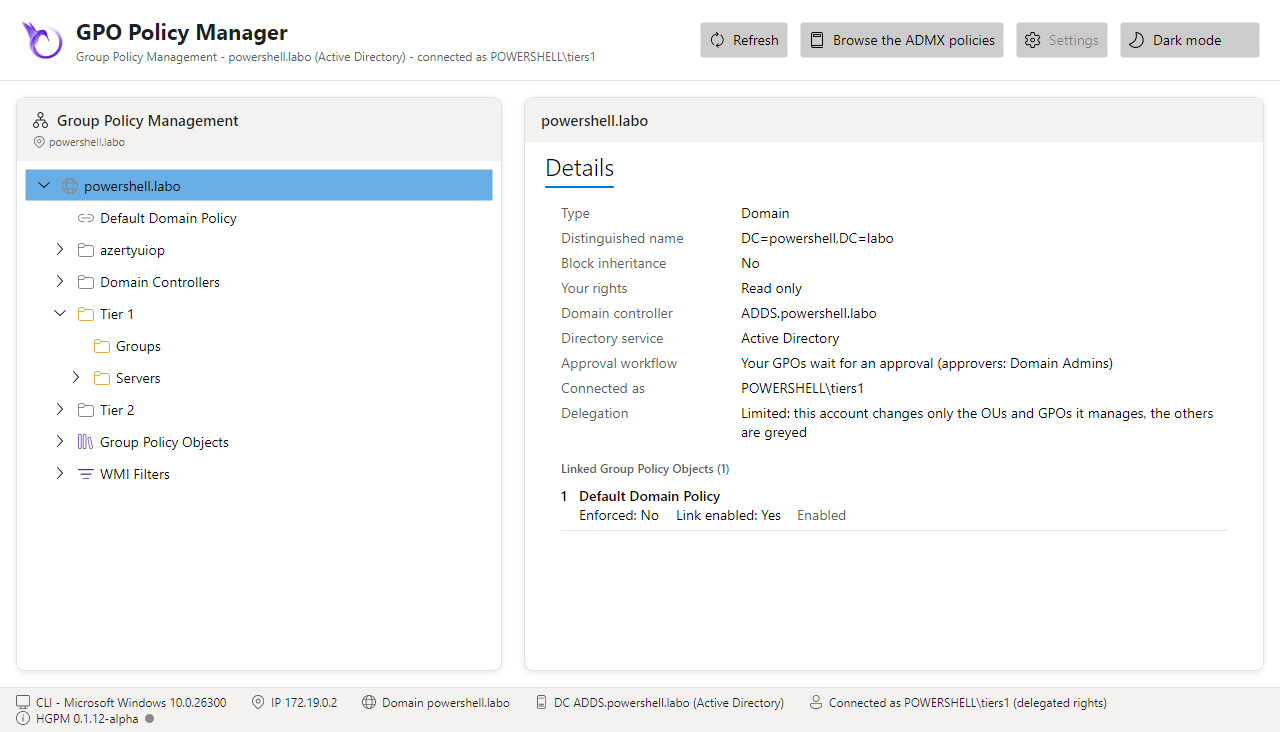
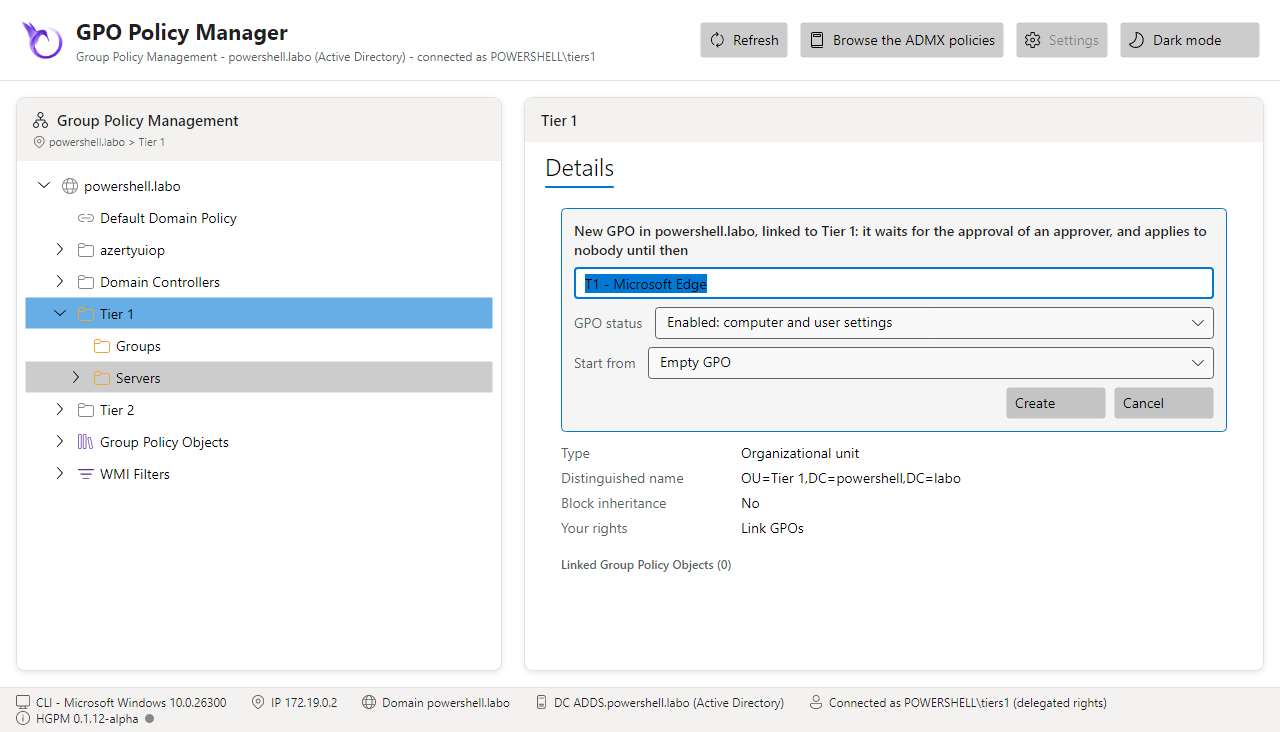
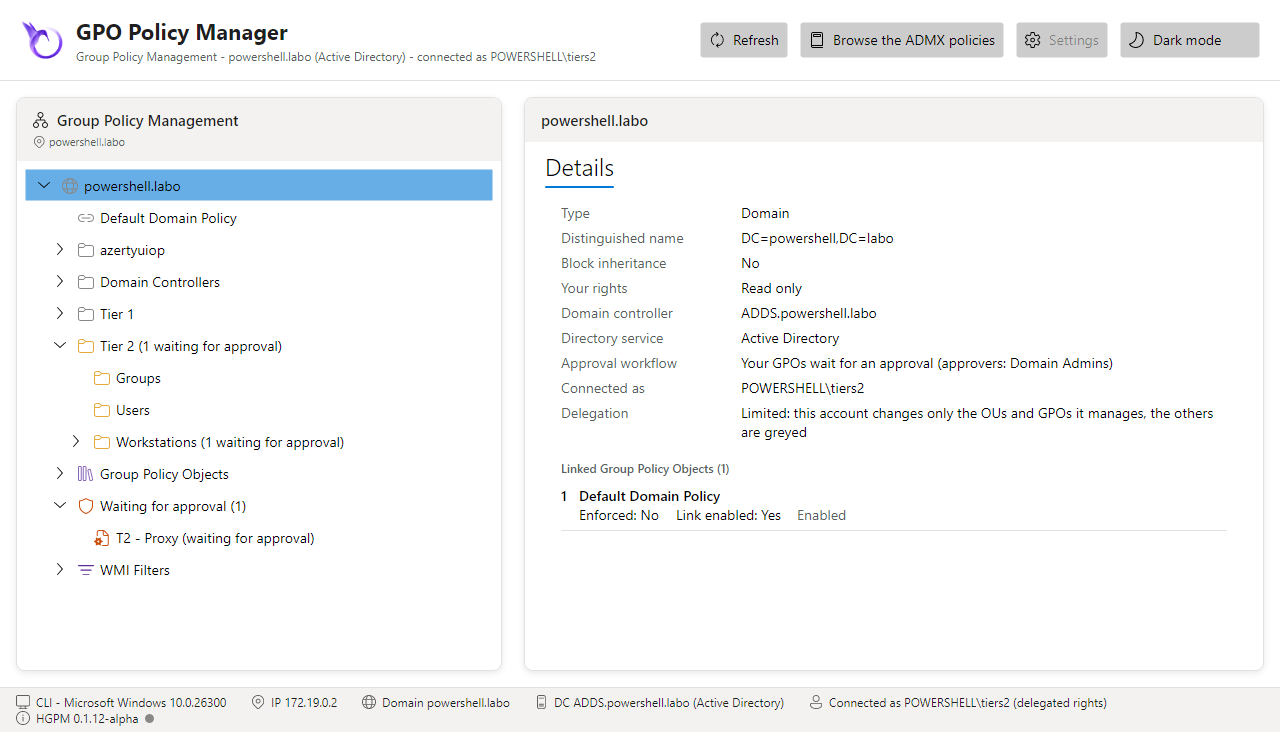
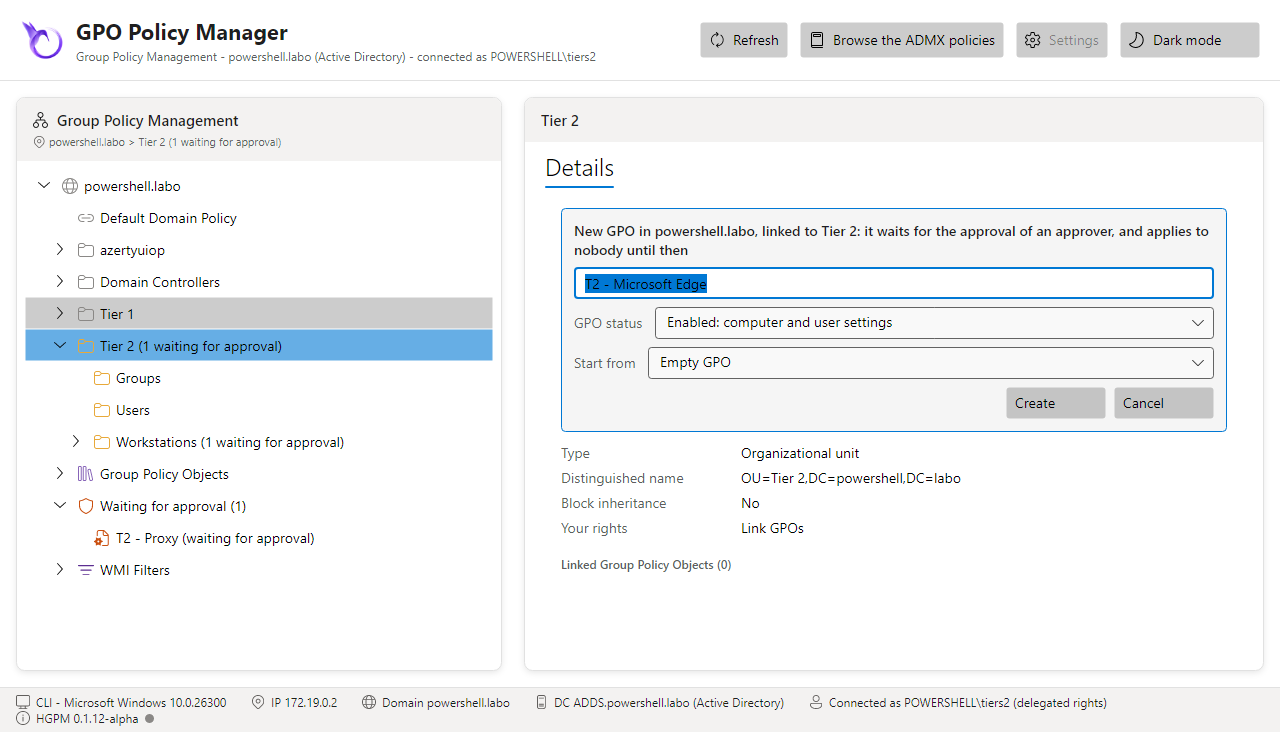
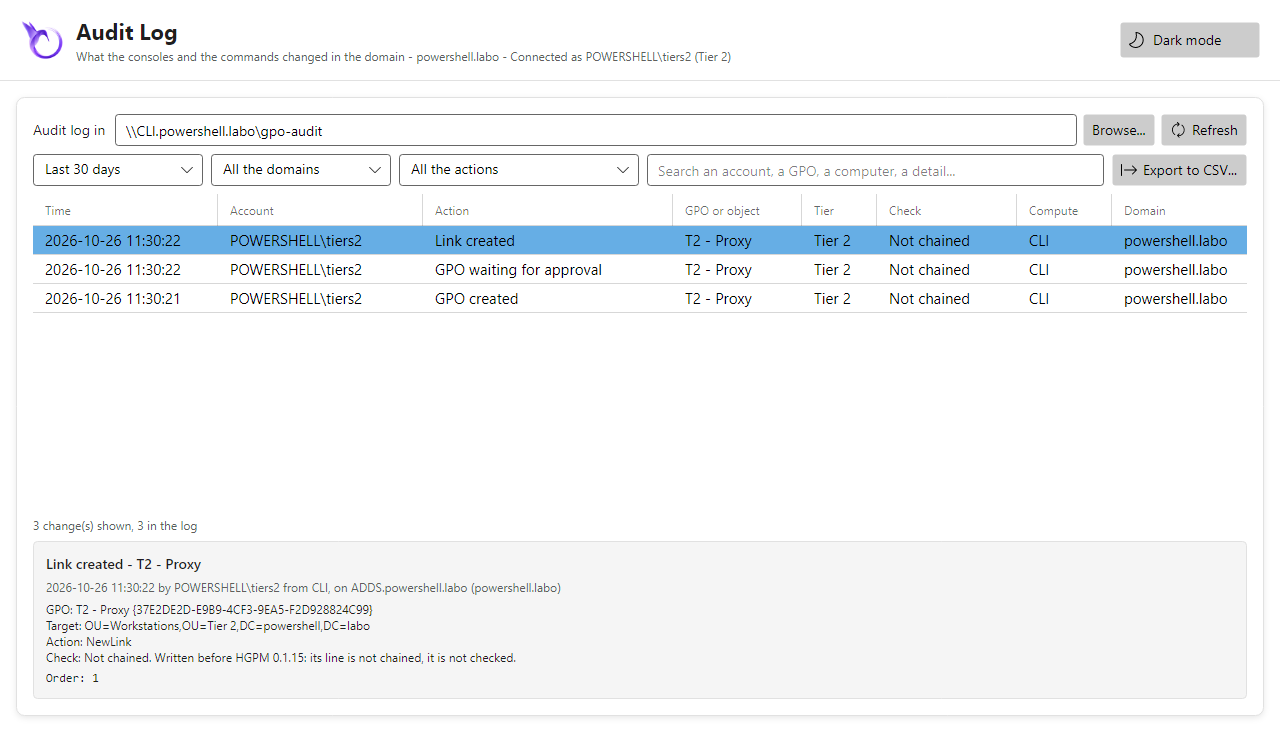
Log on as tiers1 or tiers2 (Linux: kinit tiers1; Windows: a session of the account, or
runas /user:POWERSHELL\Tiers1), then Show-GPOManagerAvalonia: the console shows the whole
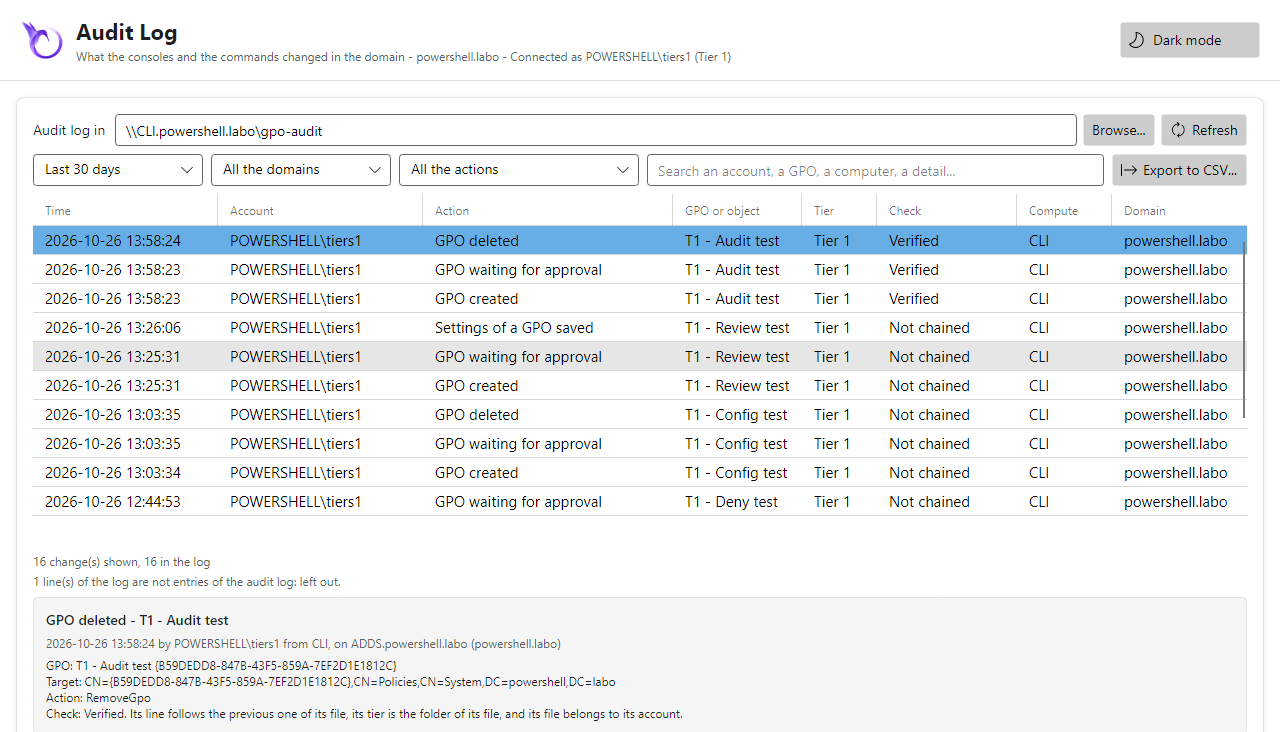
domain, greyed but the OUs of its tier, and the GPOs it creates wait for an approval. Settings is
greyed, the History tab and the deleted GPOs are not there (the backups are for Tier 0), and the
audit log shows the changes of its tier only: empty for an account that changed nothing yet.
Only Link an Existing GPO... in the menu of its OU
The technician does not create GPOs: the rights of the workflow are missing (the script ran
before Workflow.Creators was set, or with -WhatIf). As a domain administrator,
Initialize-PSGPOWorkflow says what is missing (Missing), Initialize-PSGPOWorkflow -Apply
adds it; the technician opens its console again.
Tier 1 (tiers1)
Tier 2 (tiers2)
Tier 1 (Tiers1)
Tier 2 (Tiers2)
The integration tests of the module run against such a domain controller, these scripts included (on the domain of the CI): see Tests.