Managing GPOs
Everything is in the context menu of the tree; the menu offers only what your account may do in the domain (see delegation).
Create a GPO
Create a GPO in this domain, and Link it here... on the domain or an OU, or New GPO... on Group Policy Objects:
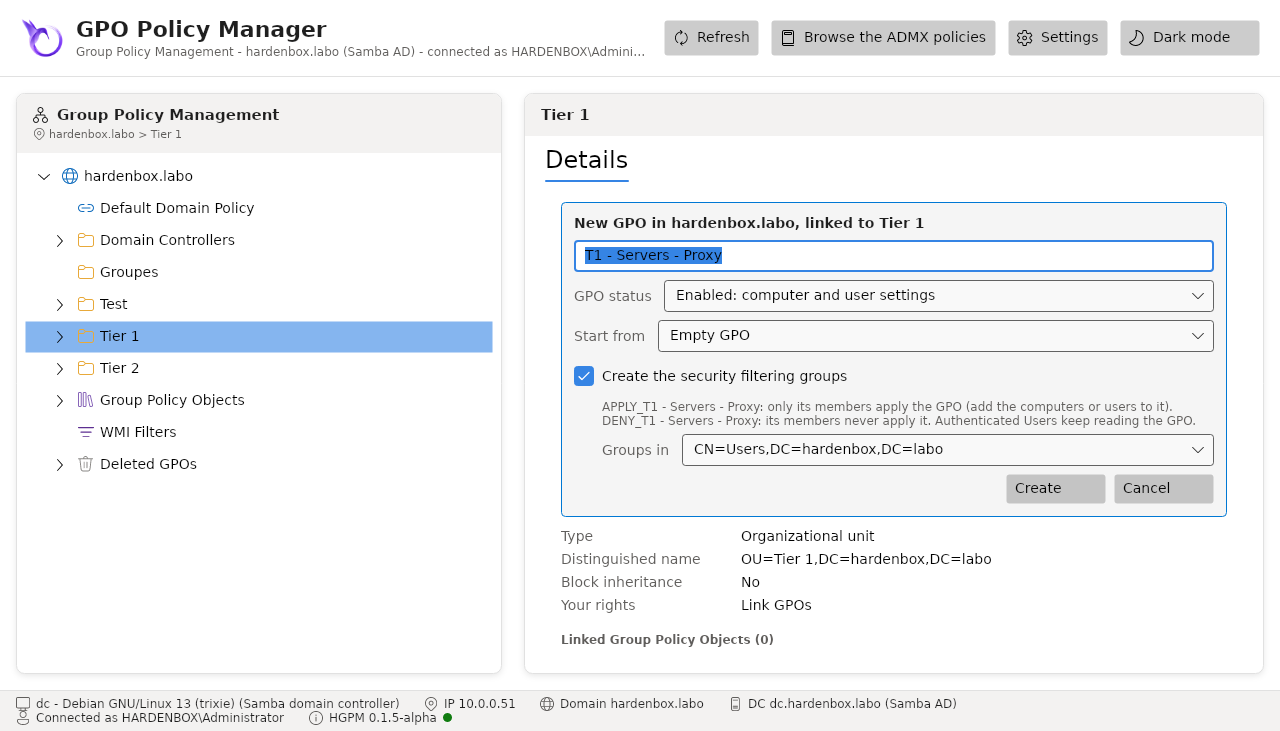
| Field | |
|---|---|
| Name | proposed by the configuration (NewGpo.DefaultName) |
| GPO status | enabled, computer settings only (user configuration disabled), user settings only |
| Start from | an empty GPO, or a template |
| Create the security filtering groups | APPLY_<GPO> (its members alone apply it) and DENY_<GPO> (its members never apply it), in the container chosen |
The GPO is created in the domain controller the console reads, with New-GPO (RSAT) on Windows and samba-tool gpo create on Linux: both create its container in the directory and its folder in SYSVOL with its permissions, as GPMC does. Then its status, its template, its security filtering groups and its link are set, in that order. It is not linked when its security filtering failed: it would apply to every computer and user.
The command line does the same:
The security filtering groups
Create the security filtering groups gives the new GPO two security groups of its own, so that it applies only where you decide:
| Group | Members | Right on the GPO |
|---|---|---|
APPLY_<GPO> |
the computers or users that apply it | read and "Apply Group Policy" |
DENY_<GPO> |
the computers or users that never apply it | "Apply Group Policy" denied |
- Their names, scope (Global, Domain local, Universal), descriptions and container come from the
configuration (
NewGpo.SecurityFilteringGroups); the form lists the container of the configuration first, then the users container and the OUs. - Authenticated Users no longer applies the GPO but keeps reading it: the computers must read every GPO (MS16-072).
- The groups belong to the account that creates them, which manages their members.
- The groups are created before the link: if they cannot be created (no right in the container, a name already used, a name longer than 64 characters...), the GPO is created but not linked, and the console says why.
With the approval workflow, a Tier 1 creator is not offered the groups: a GPO waiting for its approval applies to nobody, and its security filtering is set at the approval, where the approver can create the same groups.
Link a GPO
Link an Existing GPO... on the domain or an OU lists the GPOs not linked there yet, searched by name; the link gets the lowest precedence (the last link order), as in GPMC.
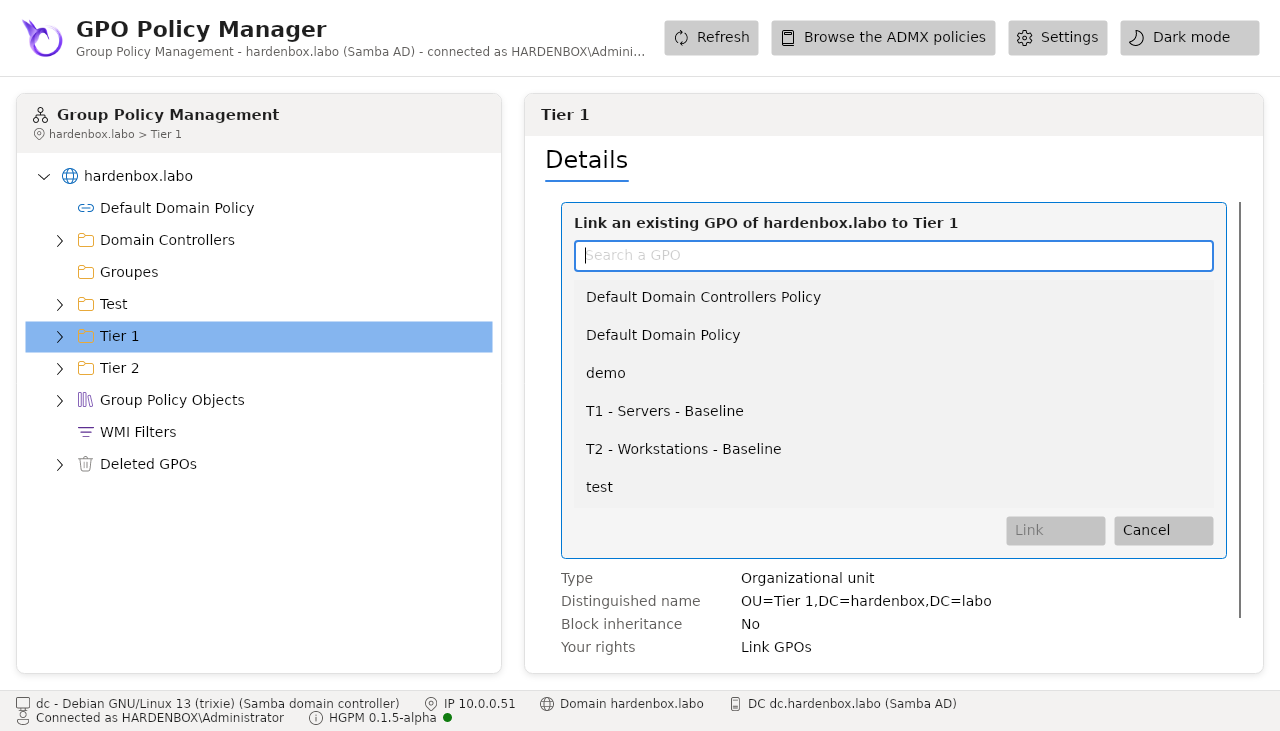
Delete link... on a link removes it, after confirmation; the GPO itself stays in Group Policy Objects with its other links, and the links after it move up one link order.
The links are written in the gPLink attribute over LDAP: the old value is removed and the new
one added in one request, so that a link someone added meanwhile is never lost.
Links and inheritance
The context menu of a link has the items of GPMC:
| Item | Does |
|---|---|
| Enforced | the GPO applies even below an OU that blocks the inheritance, and wins over the GPOs linked below |
| Link Enabled | unchecked, the GPO no longer applies there; the link stays, to enable it again |
| Move link up / Move link down | changes its link order: 1 is applied last, so it wins over the others |
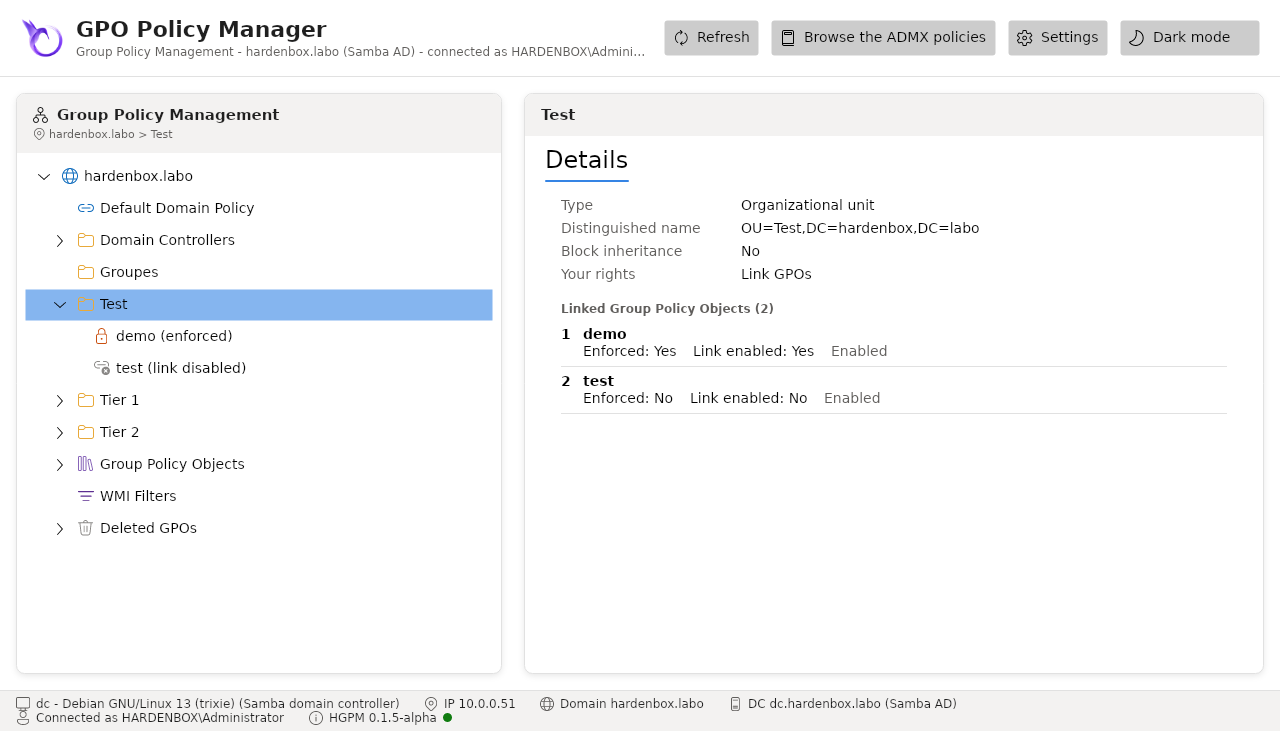
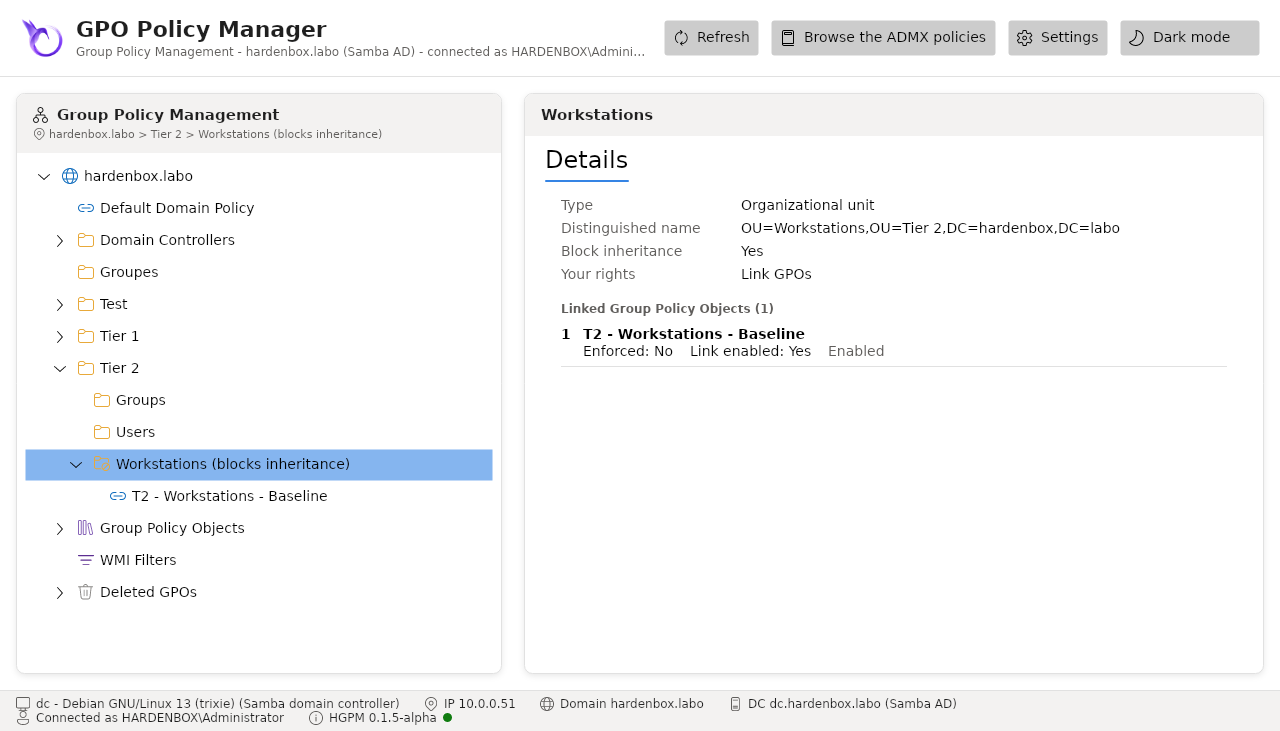
and the context menu of the domain or an OU, Block Inheritance: the GPOs linked above no longer apply there, but for the enforced links. The tree shows them as GPMC does: a lock for an enforced link, a crossed link for a disabled one, a crossed folder for an OU that blocks the inheritance.
The tabs of the domain or an OU
Selected in the tree, the domain or an OU has the two tabs of GPMC:
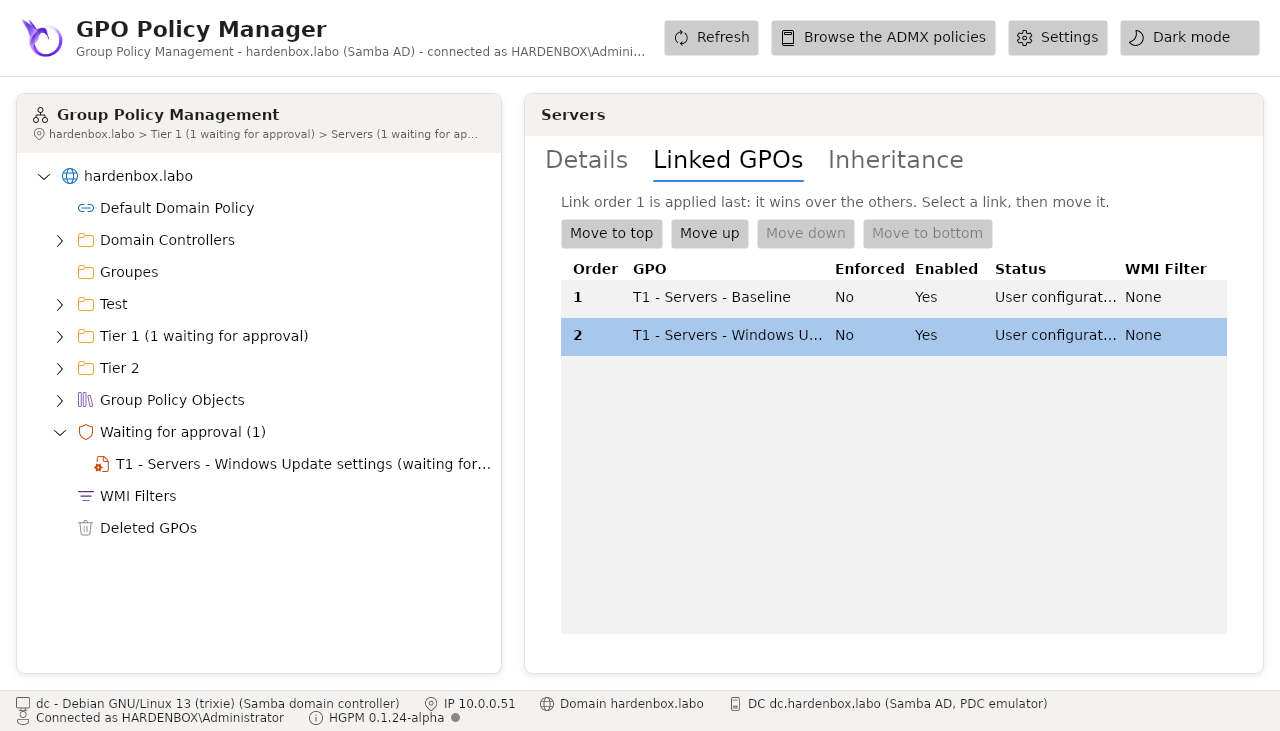
- Linked GPOs (Linked Group Policy Objects): its links by link order, with their state (enforced, enabled, the status and the WMI filter of the GPO). Move to top, Move up, Move down and Move to bottom change the link order of the link selected, where the account links GPOs: link order 1 is applied last, so it wins over the others.
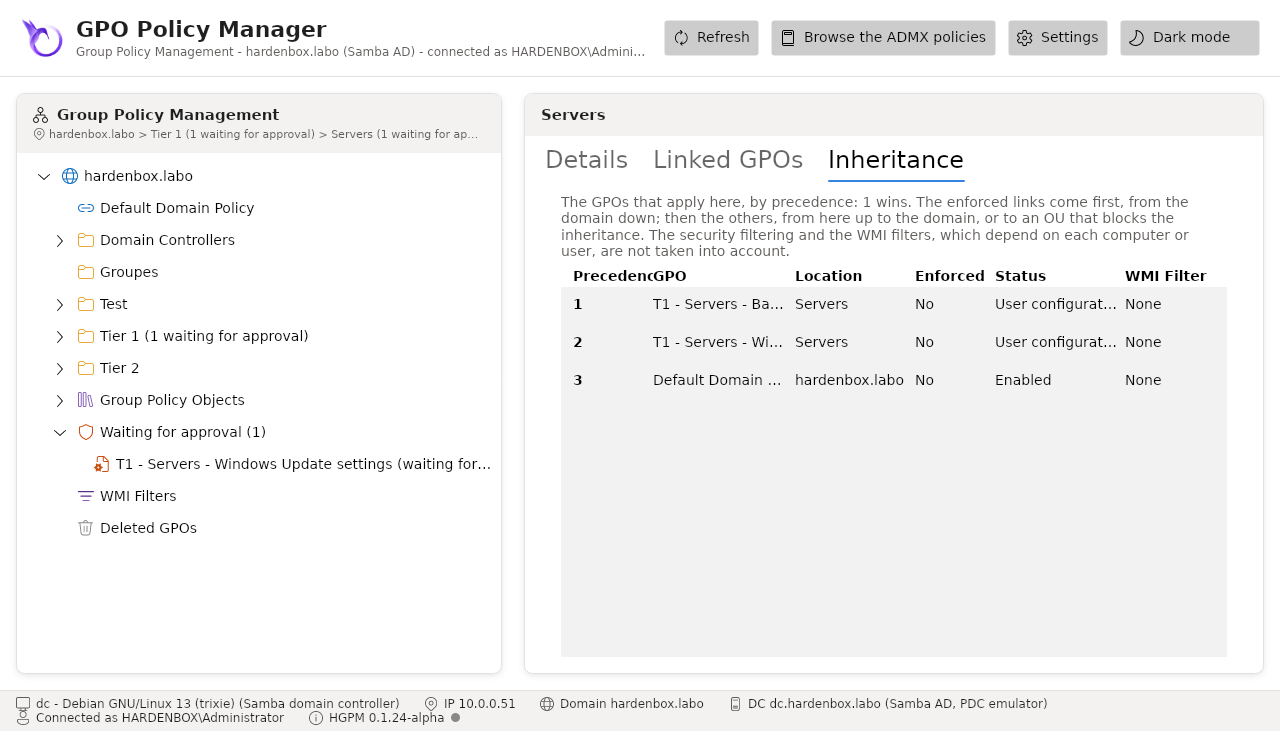
- Inheritance (Group Policy Inheritance): the GPOs that apply there, by precedence (1 wins), and where each is linked. The enforced links come first, from the domain down; then the others, from the OU up to the domain, or to an OU that blocks the inheritance, which the tab says. A disabled link does not apply; a GPO whose settings are all disabled is listed, with its status. The security filtering and the WMI filters, which depend on each computer or user, are not taken into account, nor the links of the sites.
Each change is written to the domain at once, and only what changes: the console reads the
gPLink (or the gPOptions) again, changes its link, and writes it in one request that also
removes the value read. A change another console made meanwhile is kept, a link order another
console changed in between is refused rather than lost. The same delegation as for linking GPOs
is needed ("Link GPOs" of GPMC: write gPLink and gPOptions).
New-PSGPOLink -Name 'C - Servers - Baseline' -Target 'OU=Servers,DC=contoso,DC=com' -Enforced
Set-PSGPOLink -Name 'U - Lyon - Printers' -Target Lyon -Enabled $false
Set-PSGPOLink -Name 'C - Servers - Baseline' -Target Servers -Order 1
Set-PSGPOInheritance -Target 'OU=Kiosks,DC=contoso,DC=com' -Blocked $true
(Get-PSGPOInheritance -Target 'OU=Kiosks,DC=contoso,DC=com').InheritedGpoLinks   # the GPOs that apply there, by precedence
Remove-PSGPOLink -Name 'U - Lyon - Printers' -Target Lyon
-Target is a distinguished name, the name of the domain, or the name of an OU when only one OU
has it.
The sites of the forest
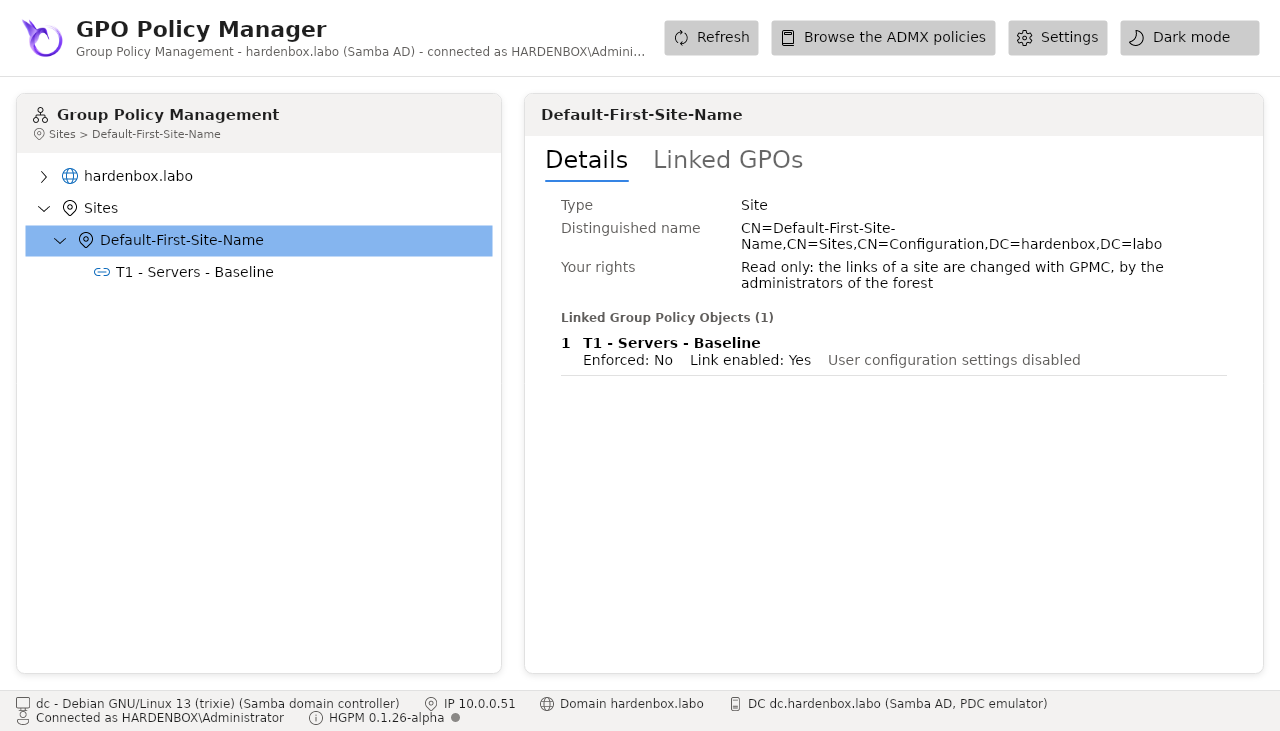
Sites, beside the domain in the tree, shows the sites of the forest (CN=Sites of its
configuration) and the GPOs linked to each, as GPMC does. The domain controllers and the computers
of a site apply its GPOs before those of their domain and OUs. The console reads these links and
does not change them: they are written in the configuration of the forest, by its administrators,
with GPMC. A site has its Linked Group Policy Objects tab, without the arrows, but no Group
Policy Inheritance tab: what applies there depends on the OU of each computer. A GPO linked to a
site shows the site among its links; deleting it leaves the link of the site, to a GPO not found,
and the console says so. Find-PSGPO -LinkedTo takes the name of a site, and a GPO linked to a
site only is not one linked nowhere.
GPO status and security filtering
GPO Status in the context menu of a GPO sets which part of it the computers apply, as in
GPMC: all its settings, those of the computers only (User Configuration Settings Disabled), those
of the users only, or none (Set-PSGPO -Status).
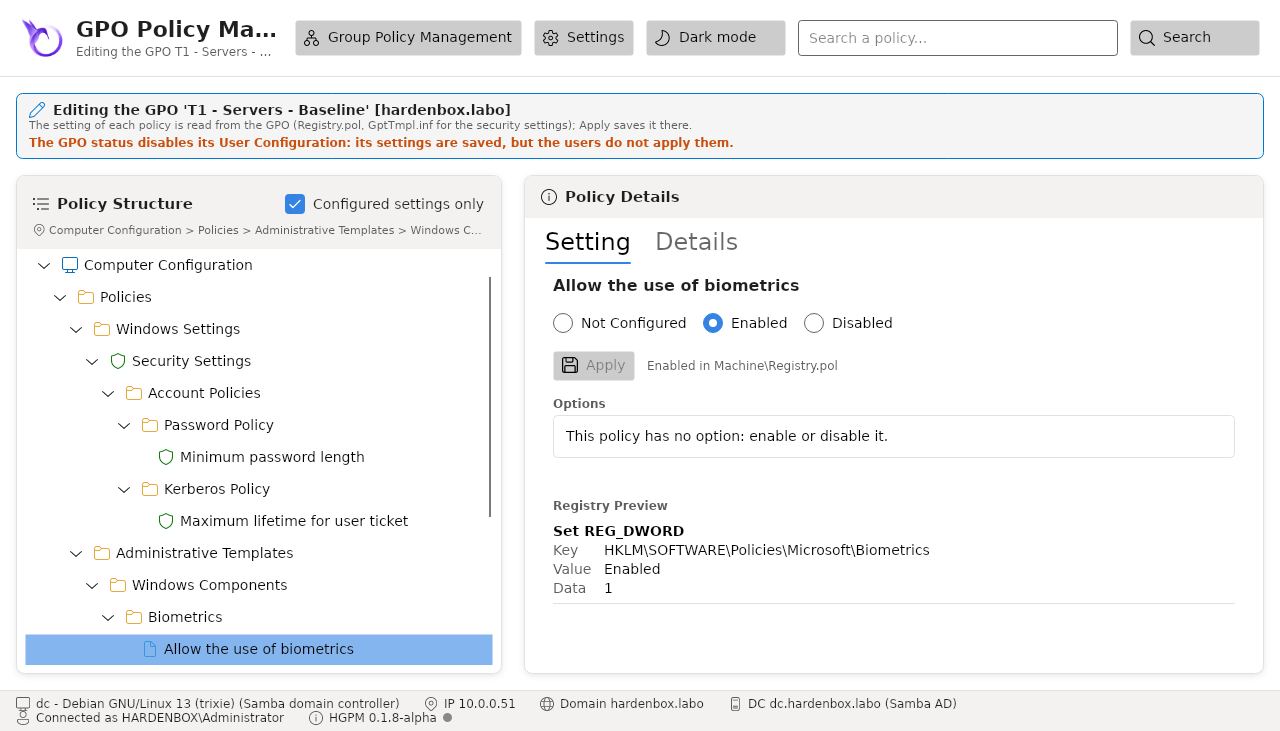
The part of a GPO its status disables can still be edited, as in GPMC: its settings are saved, but nobody applies them. The editor says so above the policies:
The details of a GPO show its status and its security filtering, as the Scope tab of GPMC: who applies it ("Apply Group Policy") and who is denied it. The security filtering groups of a new GPO are created with the prefixes, scope and descriptions of the configuration; Authenticated Users keep reading the GPO, as the computers must (MS16-072).
Permissions of a GPO (Delegation tab)
The Delegation tab of a GPO shows and changes its permissions, as the Scope and Delegation tabs of GPMC.
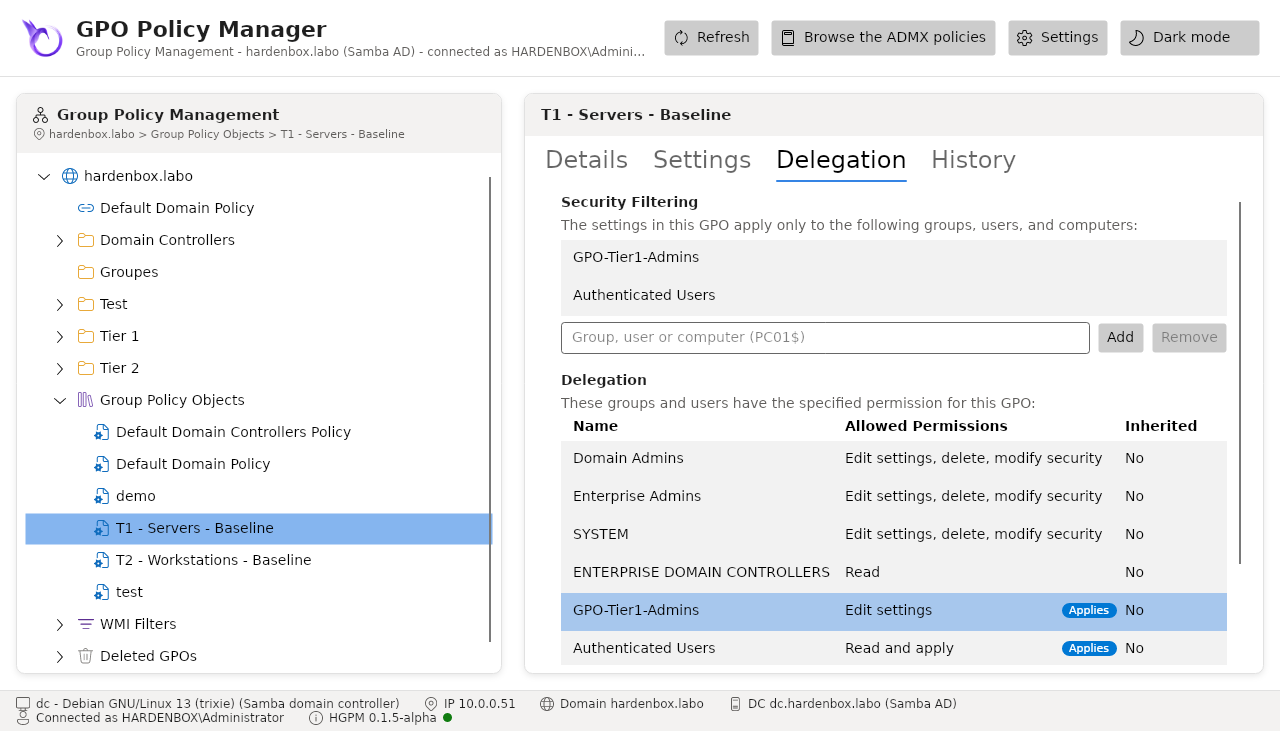
- Security Filtering: the groups, users and computers that apply the GPO. Add one (its
name,
DOMAIN\name, a computer asPC01$): it reads and applies the GPO, a denial that named it removed. Remove one: it no longer applies the GPO, and no longer reads it when that was all it did. Authenticated Users keeps reading it: the computers must read every GPO (MS16-072). - Delegation: every account of the permissions of the GPO with its level: Read, Read and apply, Edit settings, Edit settings, delete, modify security, or Custom (other rights, or a denial). Choose a level and Set the permission for an account, or Remove it. Read and apply reads and applies the GPO (Apply Group Policy), as an account added to the security filtering; GPMC names it Read (from Security Filtering). A level replaces the one the account had: to keep an editor and make it apply the GPO, Add it to the security filtering instead. An editor that applied the GPO keeps applying it. The Applies badge marks every account that applies the GPO, whatever its level. The inherited permissions come from the Policies container of the domain: they are shown, not changed.
A change is written on the GPO in the directory (its DACL read again first: a change another
console made is kept), then on its SYSVOL folder and everything in it, with the ACL derived from
the directory as GPMC and samba-tool do. The tab says when no computer can read the GPO anymore.
A GPO waiting for its approval is not changed: its permissions are set when it is approved. Every
change goes to the audit log.
Get-PSGPOPermission -Name 'C - Workstations - BitLocker'
Set-PSGPOPermission -Name 'C - Workstations - BitLocker' -Account 'GPO-Tier2-Admins' -Permission GpoEdit
Set-PSGPOPermission -Name 'C - Workstations - BitLocker' -Account 'Paris-Workstations' -SecurityFiltering Add
Set-PSGPOPermission -Name 'C - Workstations - BitLocker' -Account 'Authenticated Users' -SecurityFiltering Remove
WMI filters
A WMI filter makes the computers apply a GPO only when each of its WQL queries returns something
(the workstations only, a version of Windows, the laptops...), as the WMI Filtering of the Scope
tab of GPMC. The filters are objects of the domain (msWMI-Som in
CN=SOM,CN=WMIPolicy,CN=System), which Samba AD keeps for the Windows computers; a GPO names its
filter in gPCWQLFilter. A Linux computer joined with Samba ignores the WMI filters: see
WMI filters and Linux clients.
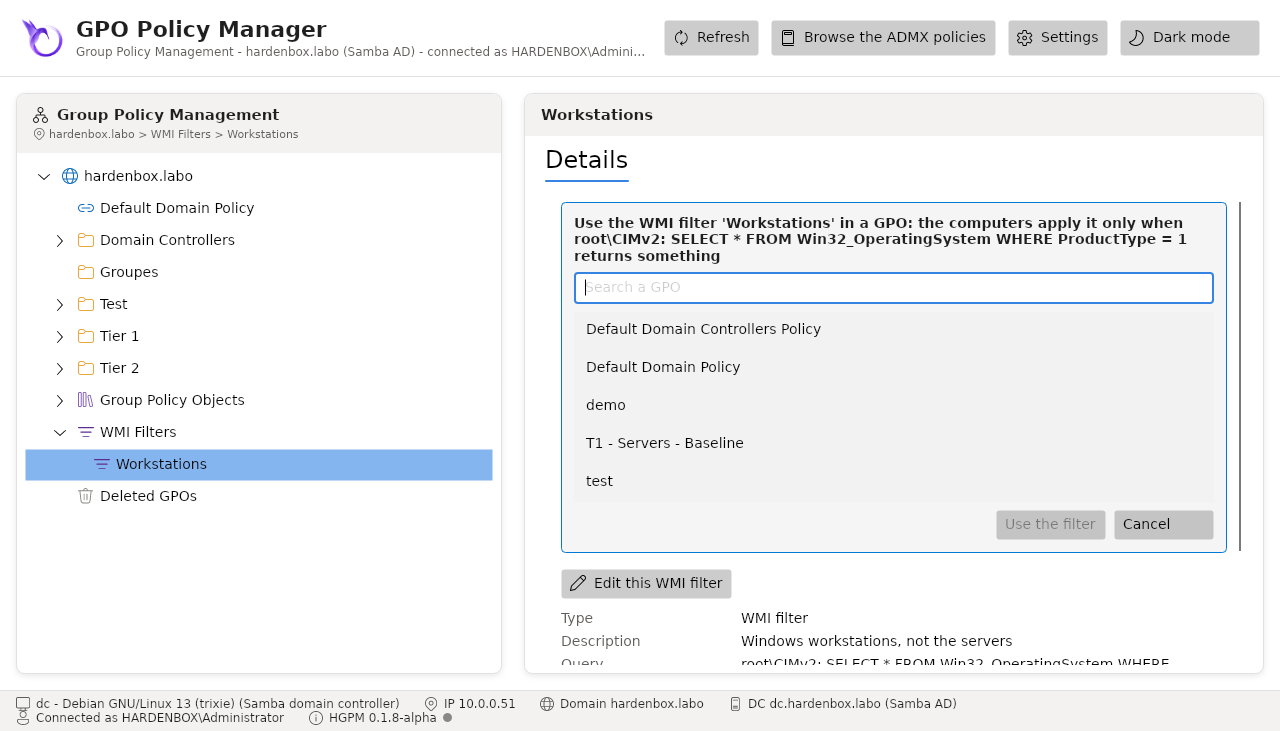
WMI Filters, in the tree below Group Policy Objects, lists the filters of the domain with their queries, as GPMC does. A filter shows its description, its queries, the GPOs that use it and its distinguished name:
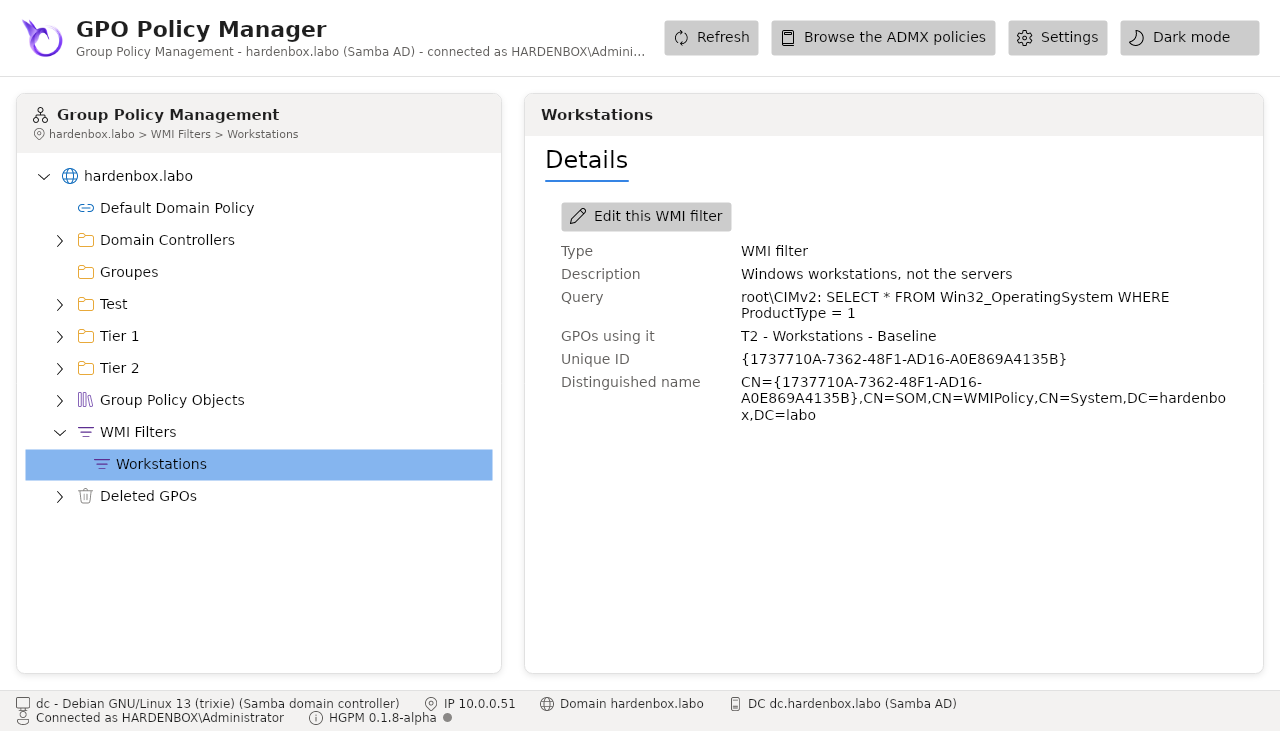
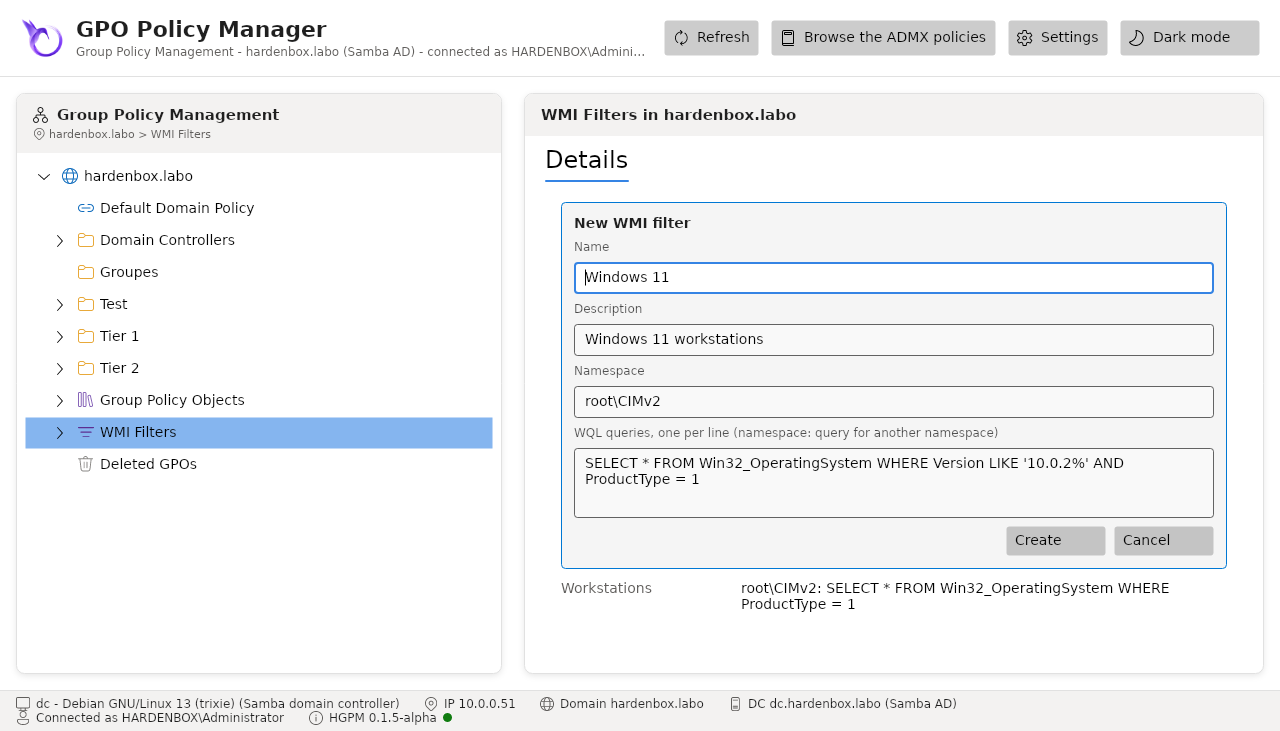
New WMI Filter... in the context menu of WMI Filters creates one: its name, a description,
the WMI namespace (root\CIMv2) and its WQL queries, one per line. Delete WMI filter... in
the context menu of a filter deletes it, once no GPO uses it.
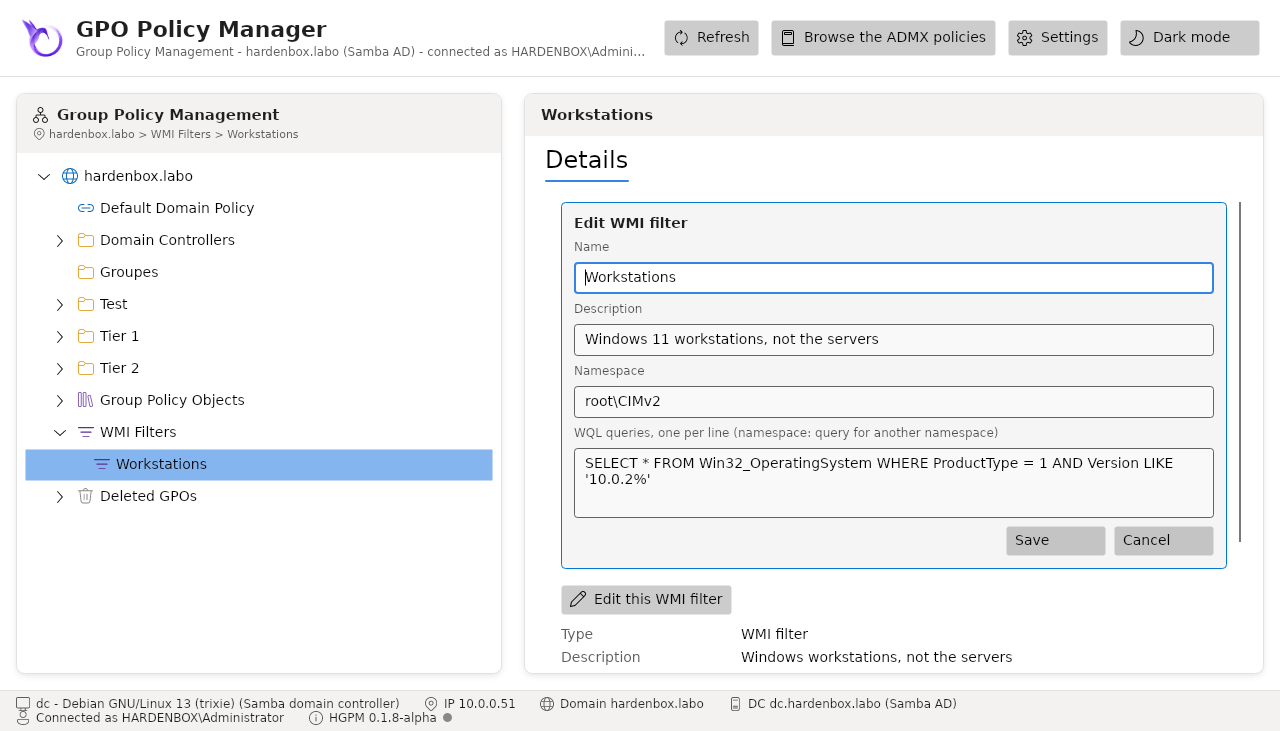
Edit WMI filter... in the context menu of a filter, or Edit this WMI filter in its
details, changes it in the same form: its name, its description, its queries. Rename... (or
F2) changes its name only. The filter keeps its identity (msWMI-ID): the GPOs linked to it keep it
and the computers apply them with its new queries, as when GPMC edits a filter. A query of another
namespace than the one of the form is a line namespace: query
(root\WMI: SELECT * FROM BatteryStatus). The change is refused if the filter changed in the
domain since the console read it.
WMI Filter in the context menu of a GPO lists the filters of the domain: the one checked is the filter of the GPO, (none) unlinks it. The details of the GPO offer the same choice in their WMI filter list, as the Scope tab of GPMC, and show the filter and its queries, or say that the filter of a GPO is not in the domain anymore (the computers then ignore the GPO).
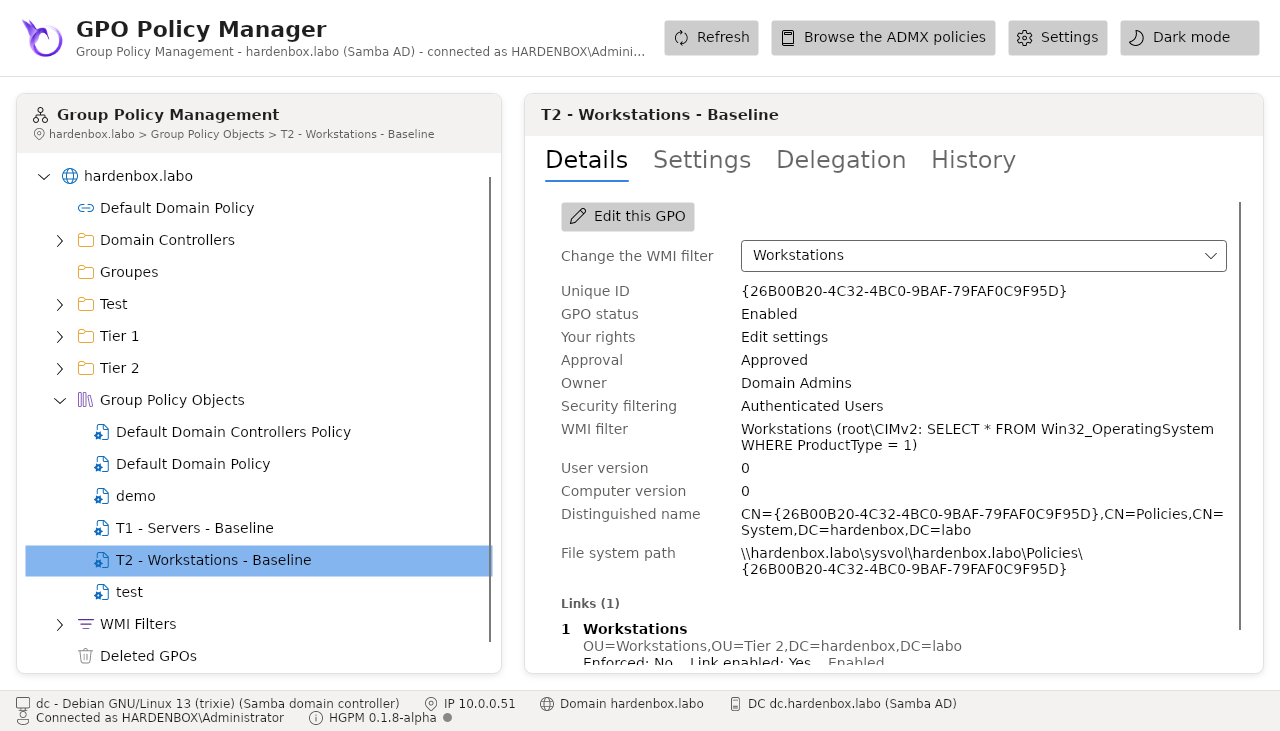
From the filter, Use it in a GPO... lists the GPOs your account edits that do not use it yet (search one by its name): the GPO chosen is linked to the filter, its former filter replaced.
New-PSGPOWmiFilter -Name 'Workstations' -Query 'SELECT * FROM Win32_OperatingSystem WHERE ProductType = 1' -Description 'Windows workstations, not the servers'
Set-PSGPO -Name 'T2 - Workstations - Baseline' -WmiFilter 'Workstations'
Get-PSGPOWmiFilter | Format-Table Name, Queries, Gpos
Set-PSGPOWmiFilter -Name 'Workstations' -Query 'SELECT * FROM Win32_OperatingSystem WHERE ProductType = 1 AND Version LIKE ''10.0.2%''' -Description 'Windows 11 workstations'
Set-PSGPO -Name 'T2 - Workstations - Baseline' -NoWmiFilter
Remove-PSGPOWmiFilter -Name 'Workstations'
A filter a GPO uses is not deleted, those GPOs your account cannot see included. The backups keep the filter of a GPO (its name and queries): the drift shows when it changed, and a restore links the GPO to it again when it is still in the domain, or says it is not.
Export and import a WMI filter
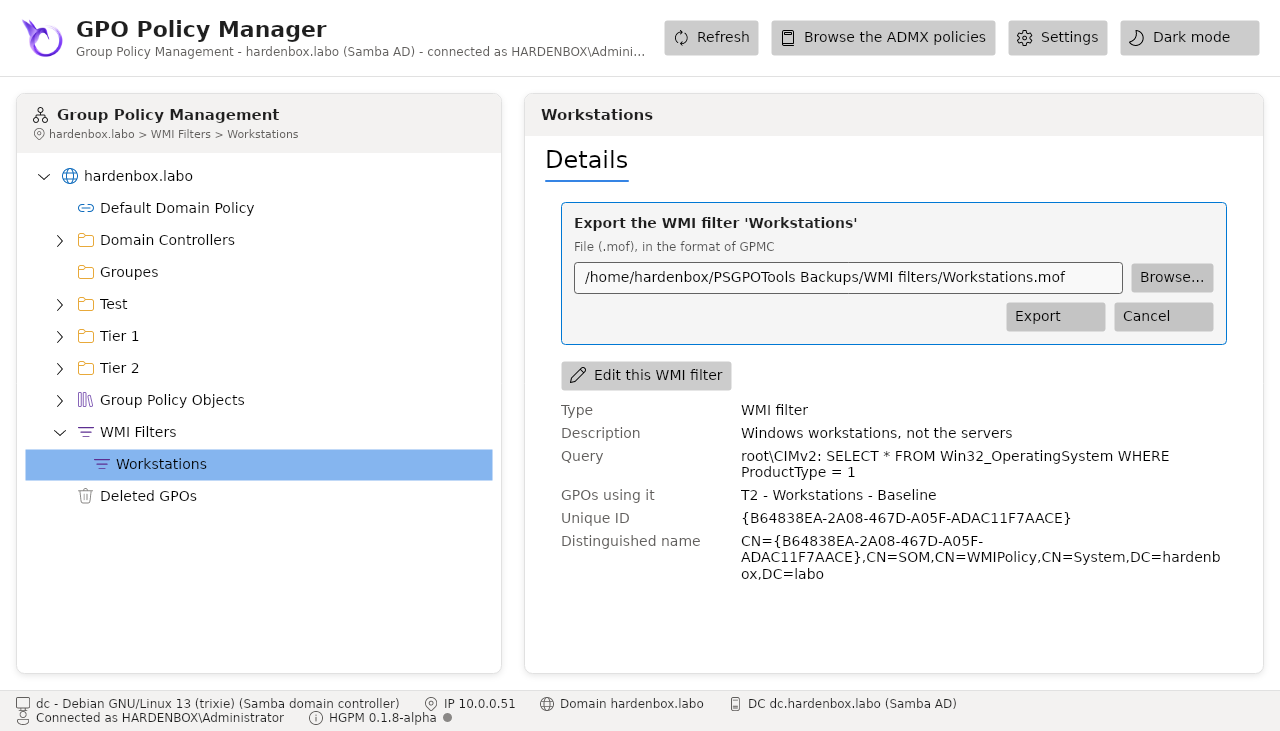
Export... in the context menu of a filter writes it to a .mof file, as GPMC does: the same
format (UTF-16, an instance of MSFT_SomFilter with its rules), so GPMC imports it in another
domain. The file is proposed in the folder WMI filters of the folder of the backups; Browse...
chooses another one, and a file there is replaced once confirmed.
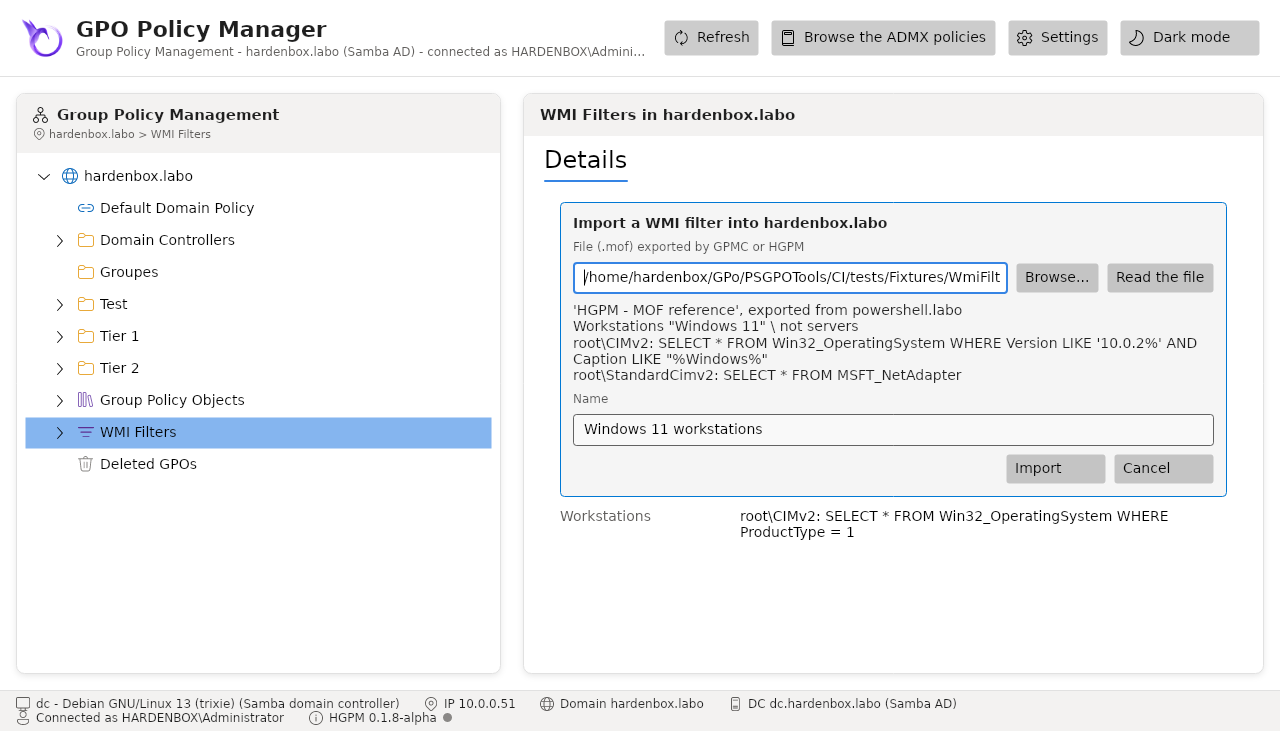
Import... in the context menu of WMI Filters reads a .mof file exported by GPMC or by HGPM:
Read the file shows its filter (its domain, description and queries), then Import creates
it in the domain, under its name or another one. It gets a new Id, so a file of this domain is
imported beside its filter; a name the domain has already is refused. As in GPMC, the console
imports a file of one filter; Import-PSGPOWmiFilter imports them all.
The files were checked on a Windows domain: a filter exported by HGPM is created again by Windows
from its file (the root\policy provider of the filters, as GPMC), and a file of Windows is
imported by HGPM, then read by GPMC.
Export-PSGPOWmiFilter -Name '*' -Path C:\Exports
Get-ChildItem C:\Exports -Filter *.mof | Import-PSGPOWmiFilter -Server dc.fabrikam.com
Import-PSGPOWmiFilter -Path C:\Exports\Workstations.mof -Name 'Workstations (lab)'
Delegation of the WMI filters
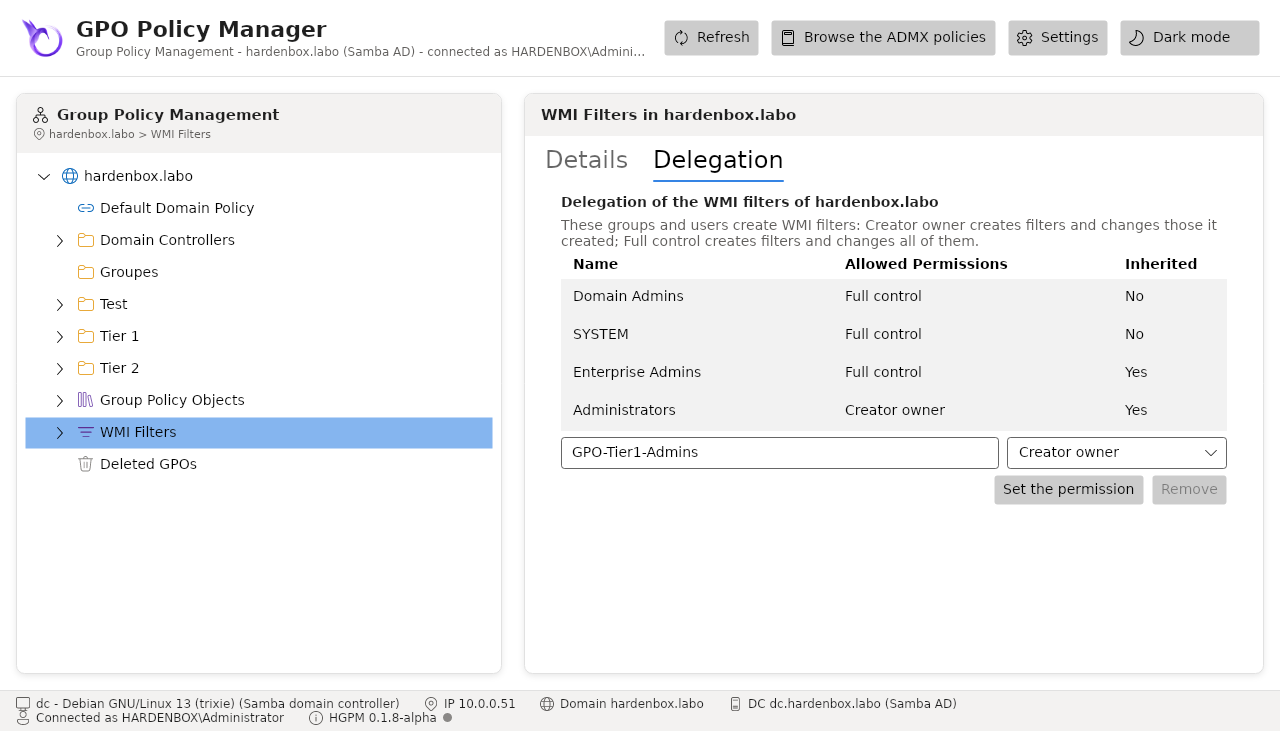
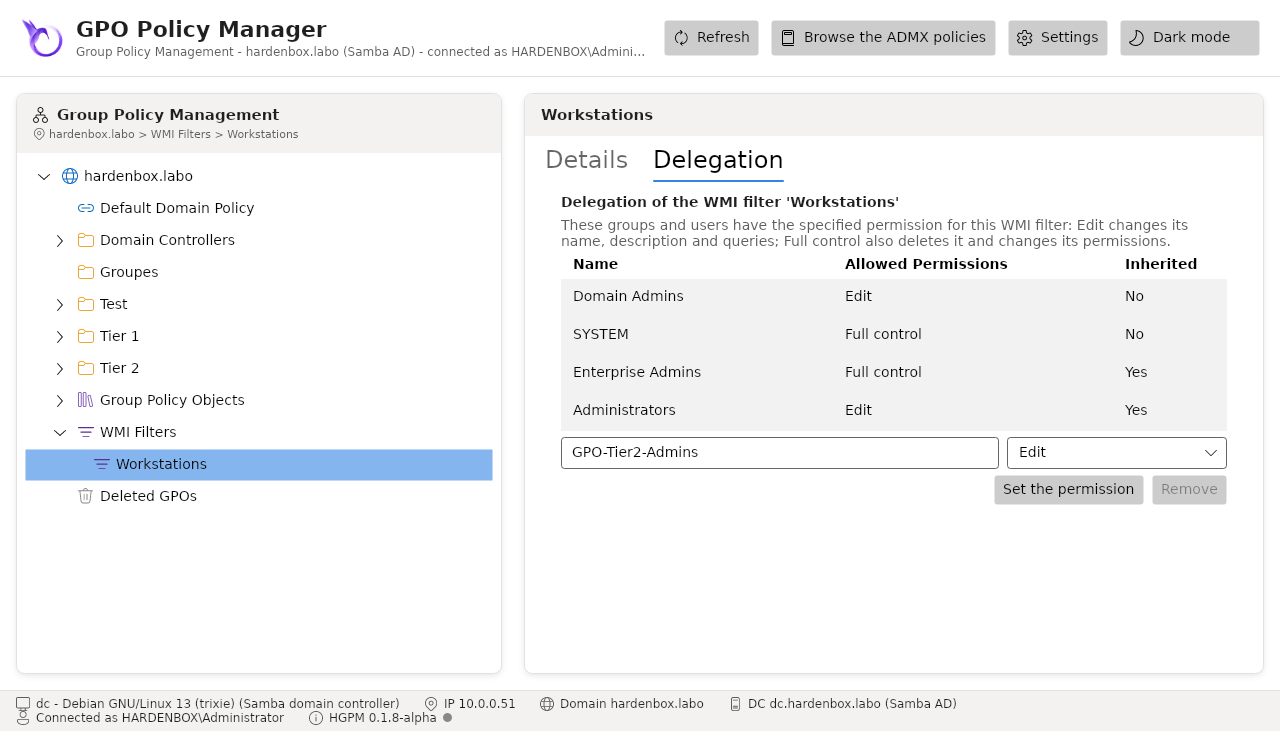
The Delegation tab of WMI Filters says who creates WMI filters in the domain, and the one of a filter who changes it, as the Delegation tabs of GPMC, with the same levels and the ACEs GPMC writes:
| Where | Level | The account |
|---|---|---|
| WMI Filters | Creator owner | creates filters, and changes those it created |
| WMI Filters | Full control | creates filters, and changes all of them: each filter inherits it |
| A filter | Edit | changes its name, description and queries |
| A filter | Full control | also deletes it and changes its permissions |
Type a group or a user, choose its level and Set the permission; Remove takes back what
the account has there. An inherited permission (on a filter, the full control of WMI Filters) is
shown, not changed. Only the administrators of the domain change who creates filters, and an
account changes the permissions of the filters it may change. Each change goes to the
audit log (SetWmiFilterPermission). Read and written both ways with the GPMC
API on a Windows domain: what HGPM gives, GPMC reads at that level, and the other way.
Get-PSGPOWmiFilterPermission
Set-PSGPOWmiFilterPermission -Account 'GPO-Tier1-Admins' -Permission WmiCreate
Set-PSGPOWmiFilterPermission -Name 'Workstations' -Account 'GPO-Tier2-Admins' -Permission WmiEdit
Rename a GPO
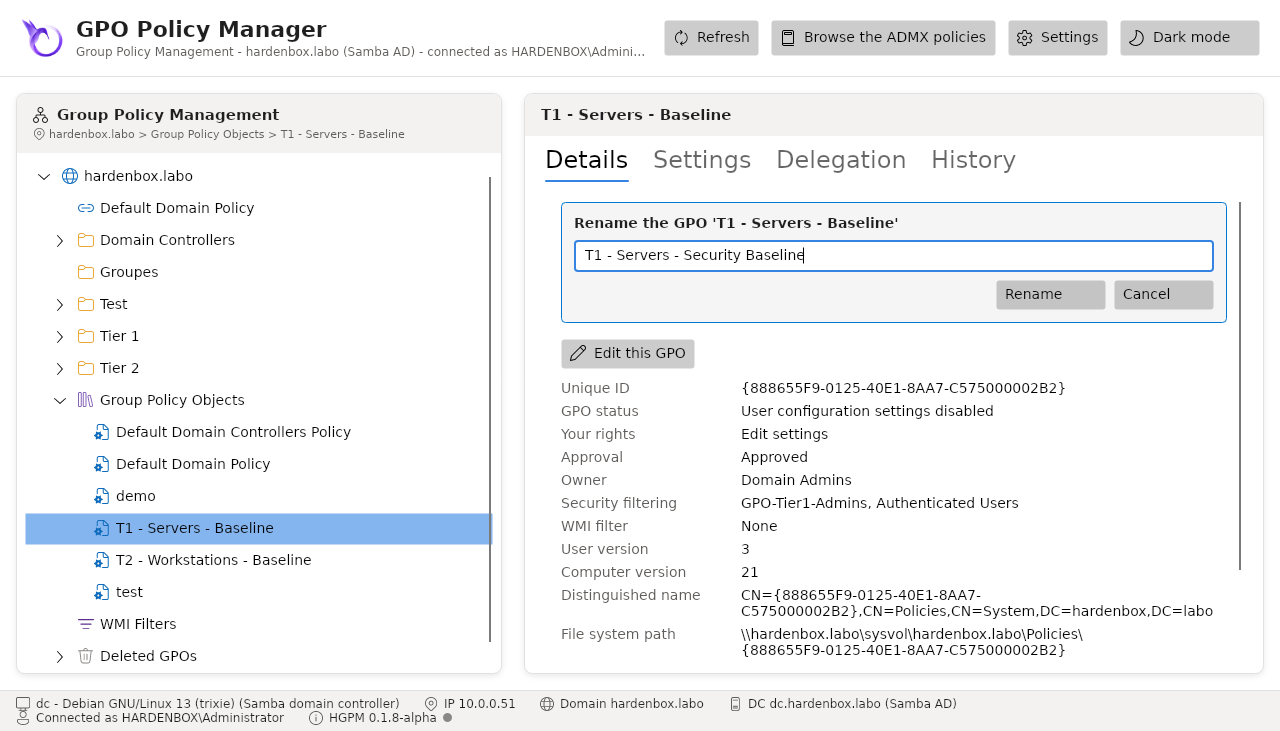
Rename... in the context menu of a GPO, or of a link to it, or F2 in the tree, gives it a
new name, as GPMC does. Only its display name changes: its GUID, so its SYSVOL folder, its links,
its settings, its backups (the History tab) and its security filtering groups are kept. The name
of another GPO of the domain is refused, and so is a GPO renamed in the domain since the console
read it. The rename goes to the audit log (RenameGpo).
Copy a GPO
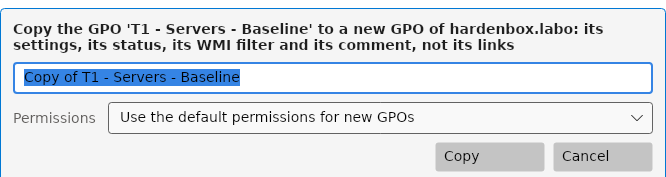
Copy... in the context menu of a GPO, or of a link to it, makes a new GPO of the domain from it, as Copy and Paste of GPMC: the files of its folder in SYSVOL (its settings, its preferences, its scripts, its comment), its status, the client-side extensions it declares and its WMI filter. Its links are not copied: the copy applies nowhere until it is linked where it applies. Its permissions are those of a new GPO, or, with Preserve the existing permissions, those of the GPO copied; a denied or custom permission is not a level the console gives: it is said, to give it in the Delegation tab. Under the approval workflow, the copy of a creator waits for its approval as any new GPO, and the approval gives its permissions. The copy is made in the background (long operations), then shown in the tree.
Copy-PSGPO -Name 'C - Workstations - BitLocker' -TargetName 'C - Laptops - BitLocker'
Copy-PSGPO -Name 'C - Servers - Baseline' -TargetName 'C - Servers - Baseline (test)' -CopyAcl
Search the GPOs
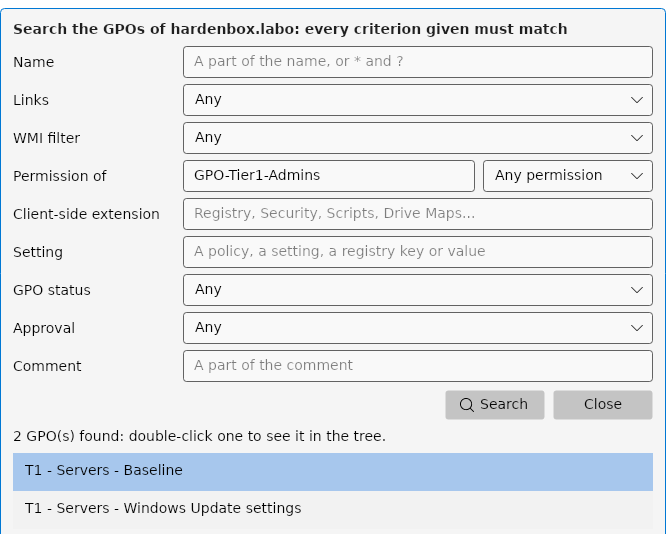
Search... (the context menu of the domain or of Group Policy Objects, or Ctrl+F) finds
the GPOs of the domain, as the Search of GPMC: every criterion given must match. The name (a part
of it, or a pattern with * and ?), the links (linked somewhere, or nowhere: GPOs forgotten), the
WMI filter, the GPO status and the approval are those of the domain read; the permission of an
account or a group (by its name or its SID, any permission or one of them), a client-side extension
(Registry, Security, Scripts, Drive Maps...), a text of the settings (as the Settings tab shows
them: the policies, the registry keys and values) and a text of the comment are read for each GPO,
in the background (long operations).
The results stay while one of them is shown in the tree (double-click or Enter), until Close.
Find-PSGPO does the same in PowerShell, its results going on to the other commands:
Find-PSGPO -NotLinked                                            # the GPOs linked nowhere
Find-PSGPO -Account 'Paris-Workstations' -Permission GpoApply     # the GPOs that apply to a group
Find-PSGPO -Setting 'Turn off Windows Defender' | Get-PSGPOReport -ReportType Html -Path ./reports
Find-PSGPO -Extension 'Scripts' -LinkedTo 'OU=Servers,DC=contoso,DC=com'
The comment of a GPO
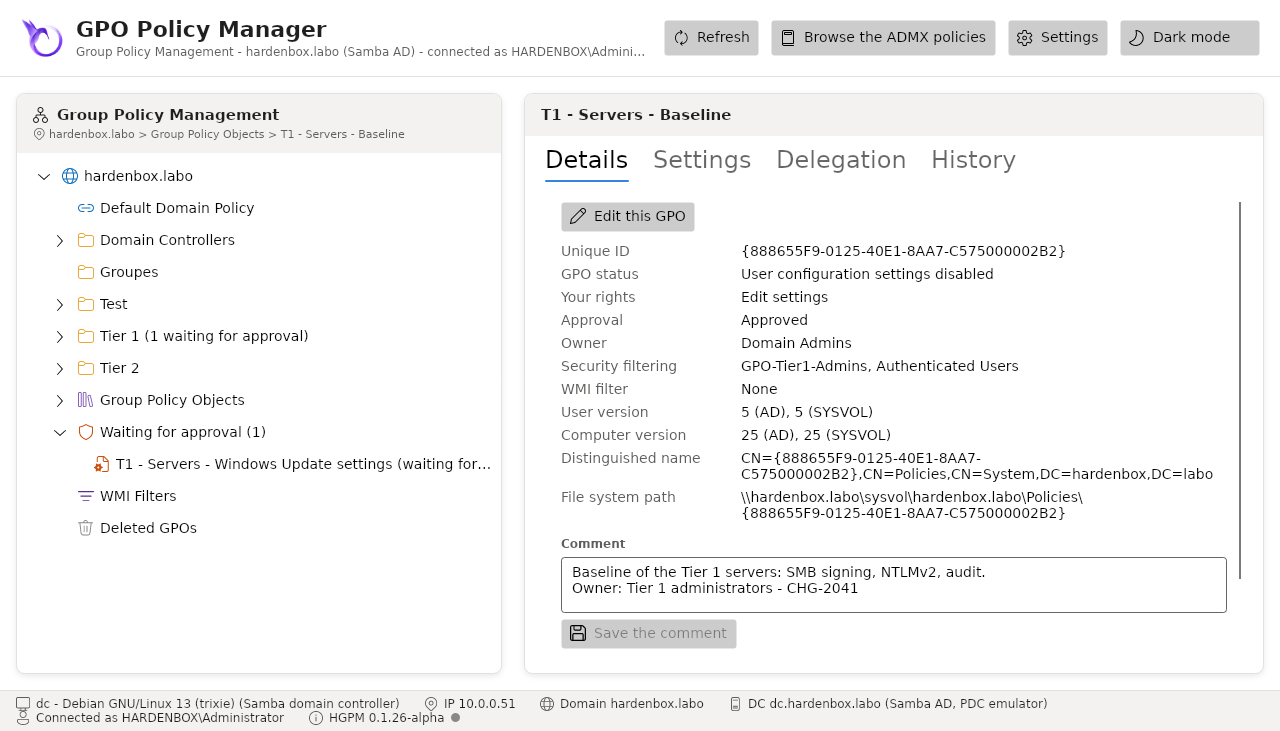
The details of a GPO end with its comment, as the Details tab of GPMC: the file GPO.cmt of its
folder in SYSVOL, read after the click (the details show at once) and kept until the domain is read
again. An account that edits the GPO changes it in the box and saves it with Save the comment;
for the others it is read only. The comment is not a setting the computers apply: the version of
the GPO does not change, as with GPMC, and the Settings tab and the drift leave it out. It is in
the report of the GPO, and goes to the audit log (SetGpoComment, event
1012).
Set-PSGPO -Name 'C - Kiosks - Baseline' -Comment "CHG-2041: kiosks of the halls`nOwner: workplace team"
New-PSGPO -Name 'C - Kiosks - Halls' -Comment 'Kiosks of the halls'
Set-PSGPO -Name 'C - Kiosks - Baseline' -Comment ''      # removes it
Delete a GPO
Delete GPO... on a GPO of Group Policy Objects, after confirmation:
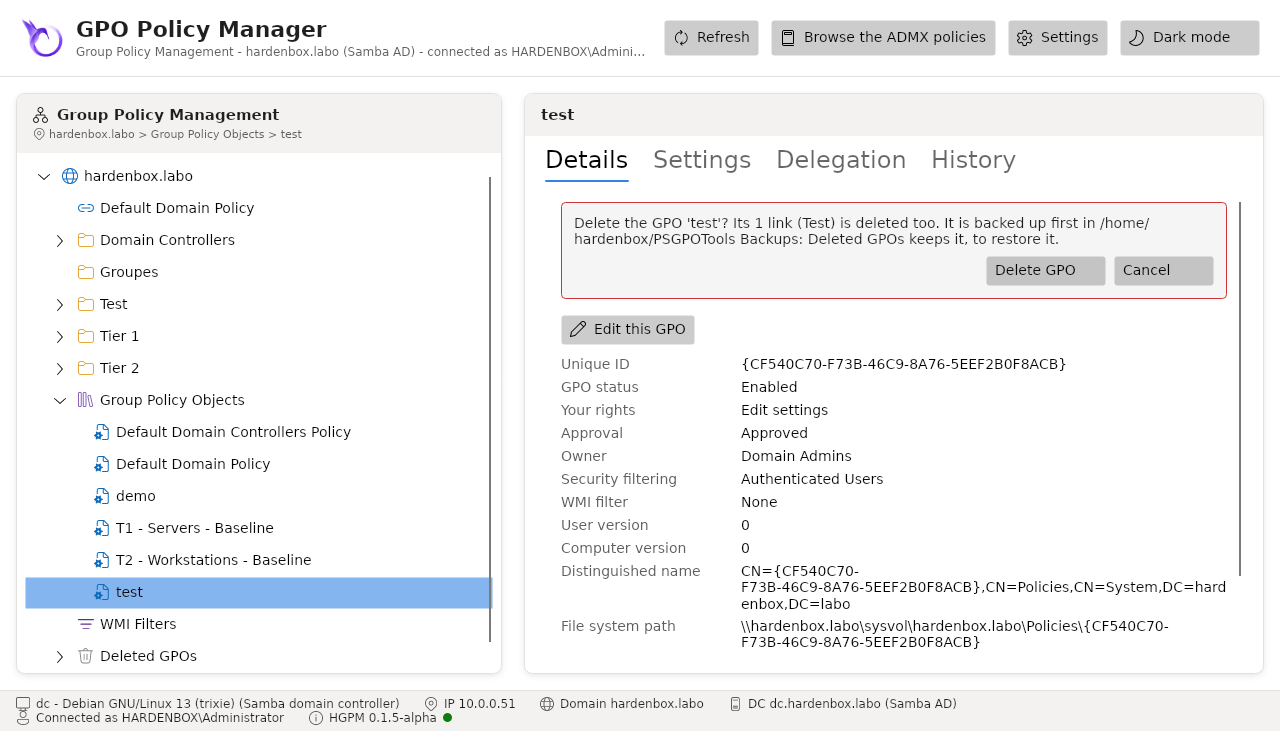
- The GPO is backed up first, in the folder of the History tab; its last backup says when and by whom it was deleted.
- Its links in the domain are deleted. If your account cannot delete one of them, nothing is deleted.
- The GPO, its container and its SYSVOL folder are deleted (Remove-GPO on Windows, samba-tool gpo del on Linux), and the console checks it is gone.
The Default Domain Policy and the Default Domain Controllers Policy are never deleted.
Note
The links of the sites (in the configuration partition) are not read by the console: a link of a site to a deleted GPO stays there.
The recycle bin
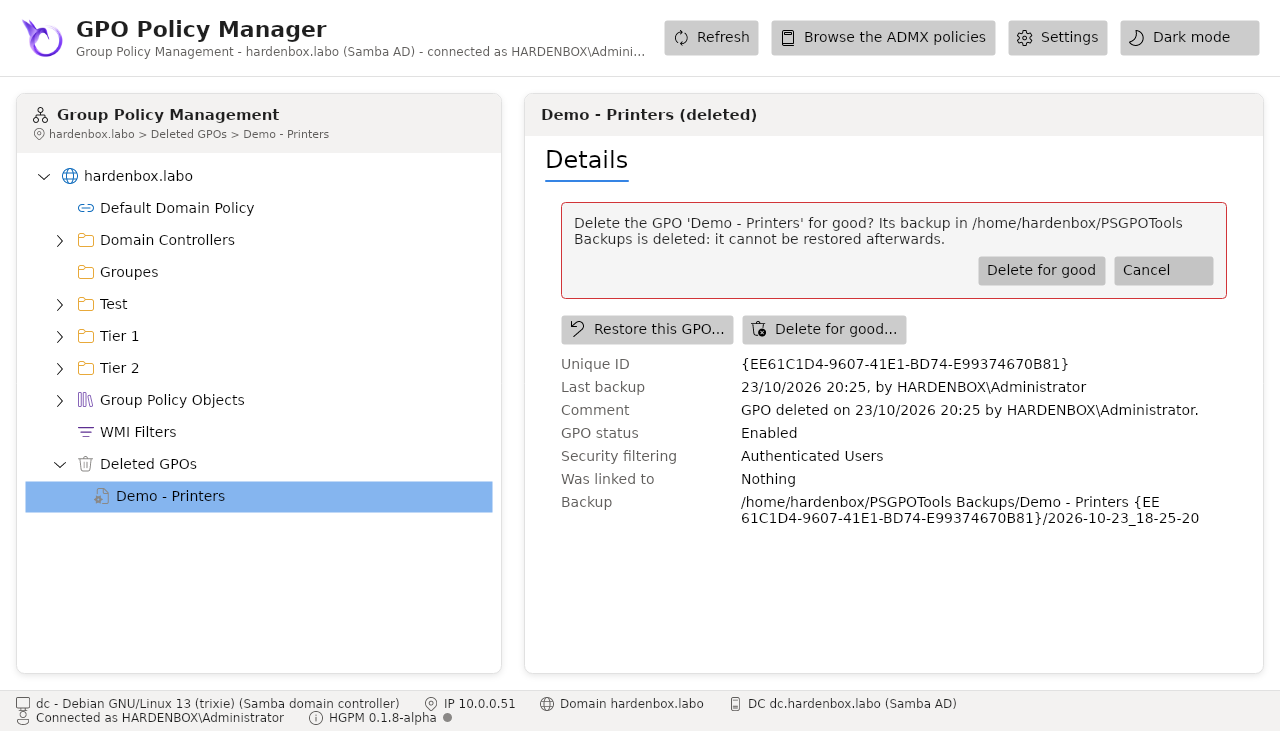
Deleted GPOs lists the GPOs of the domain that are not in it anymore and have a backup (the newest one). Restore... creates the GPO again from it:
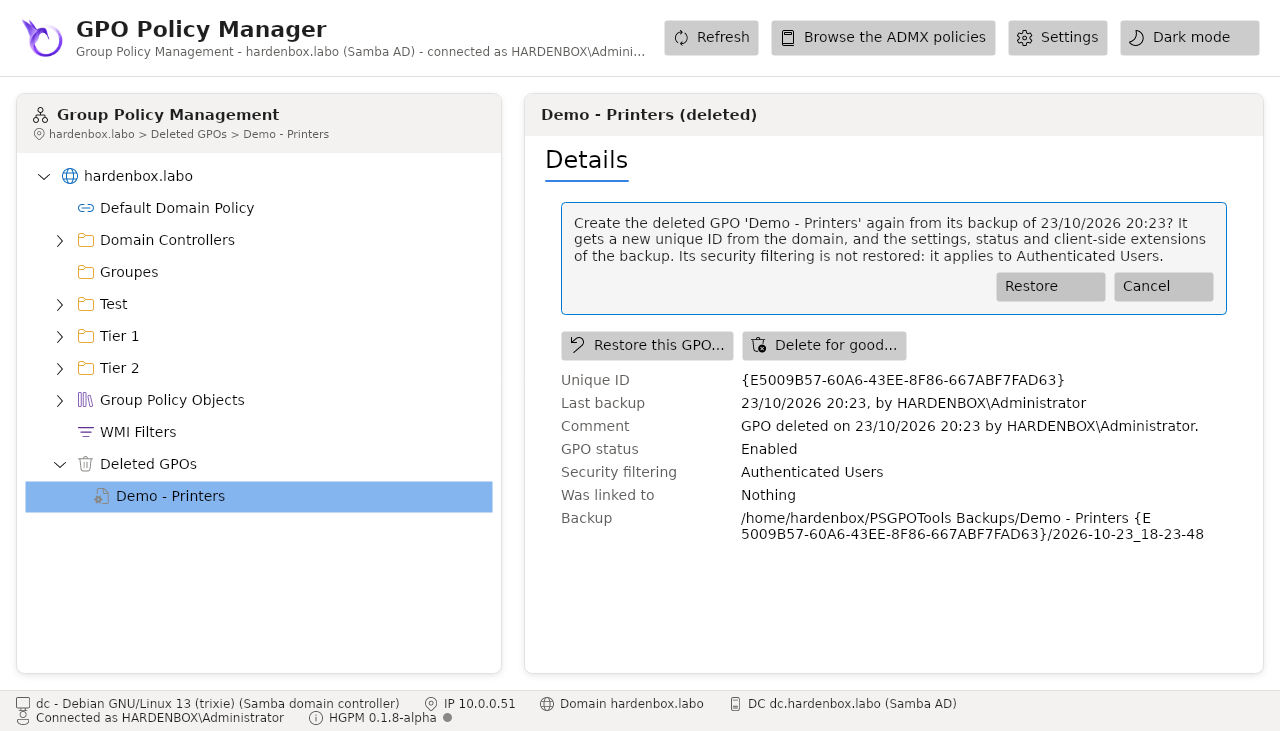
- a new GPO, with a new GUID given by the domain (neither New-GPO nor samba-tool choose it), the name, settings, status and client-side extensions of the backup;
- Link it again where it was: to its containers that still exist, only when its security filtering was Authenticated Users and its links were enabled. Its security filtering is not restored, so a GPO filtered on a group is not linked again (it would apply to everyone);
- the new GPO is backed up at once, saying where it comes from, and leaves the recycle bin.
Delete for good... empties the recycle bin of a GPO, after confirmation: every backup of it in the folder of the History tab is deleted, the templates made from it too (the confirmation counts them). It cannot be restored afterwards. The backups of a GPO that is still in the domain are its history: they are never deleted this way.
Templates
A backup labelled Template (the check box in its notes, History tab) is proposed in Start from of the New GPO form, whatever domain it comes from: the new GPO starts with its settings, checked against their SHA-256 first.
$Template = Get-PSGPOBackup -Path /srv/gpo-backups -Template -Name 'Template - Servers' | Select-Object -First 1
New-PSGPO -Name 'C - Servers - Lyon' -Template $Template
Starter GPOs
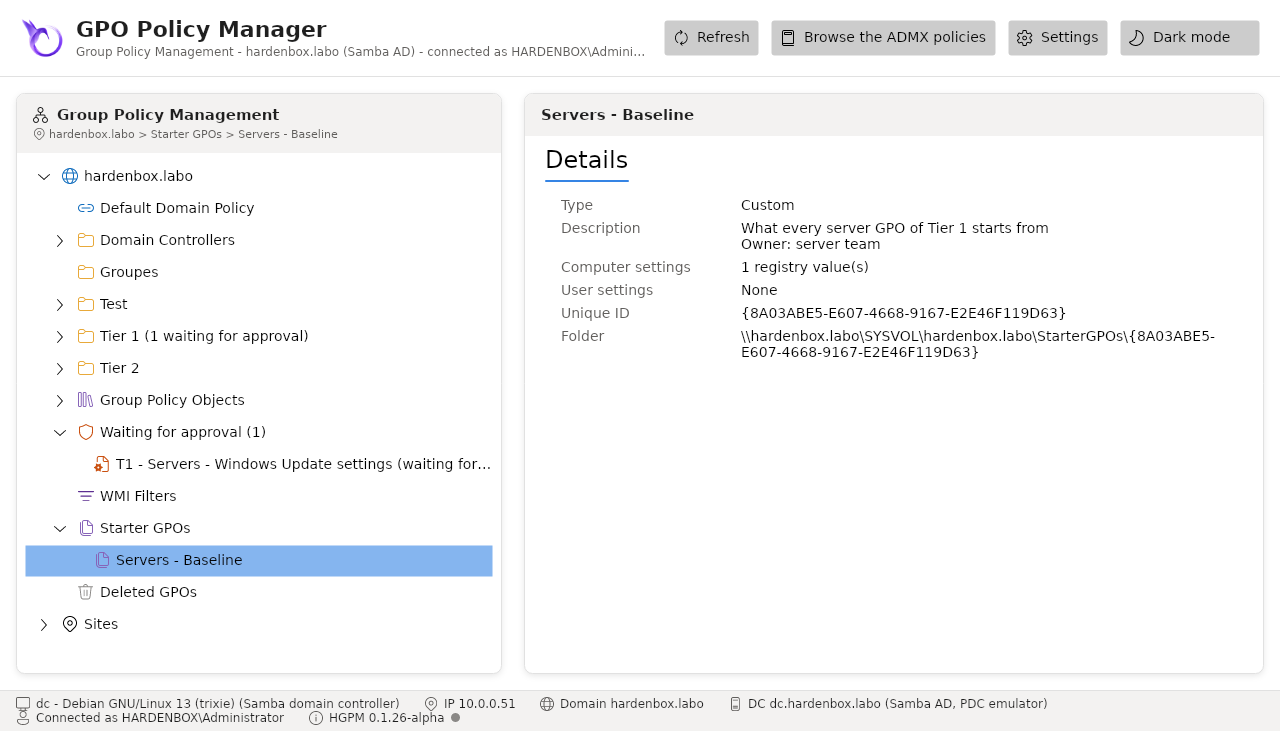
Starter GPOs, under the domain, lists the Starter GPOs of the domain, as GPMC: a set of
Administrative Templates new GPOs start from. GPMC keeps each in a folder of
SYSVOL\<domain>\StarterGPOs, without an object in the directory: the console reads them when
their node is selected, in the background. The System Starter GPOs are those of Microsoft,
which GPMC adds with the folder, read only; the Custom ones are those of the domain.
- New Starter GPO... (the context menu of Starter GPOs) creates one, with its description:
empty, or with the Administrative Templates of a GPO (its computer and user
Registry.pol); a Starter GPO holds no other settings. The folder of the Starter GPOs is created with the first. - New GPO from Starter GPO... (the context menu of a Starter GPO) opens the New GPO form, started from it; Start from of that form proposes every Starter GPO too. The new GPO gets its settings, declared as GPMC declares them; not its description, which GPMC does not take as the comment of the GPO either.
- Delete Starter GPO... deletes a Custom one; the GPOs created from it keep their settings.
GPMC reads the Starter GPOs HGPM writes, and creates GPOs from them, as HGPM does from those of
GPMC (checked on a Windows domain). The changes go to the audit log
(SaveStarterGpo, RemoveStarterGpo).
Get-PSGPOStarterGpo                                                    # System and Custom
New-PSGPOStarterGpo -Name 'Workstations - Baseline' -Description 'What every workstation GPO starts from' -FromGpo 'C - Workstations - Security Baseline Windows 11'
New-PSGPO -Name 'C - Workstations - Lyon' -StarterGpo 'Workstations - Baseline'
Remove-PSGPOStarterGpo -Name 'Workstations - Baseline'