Backups and history
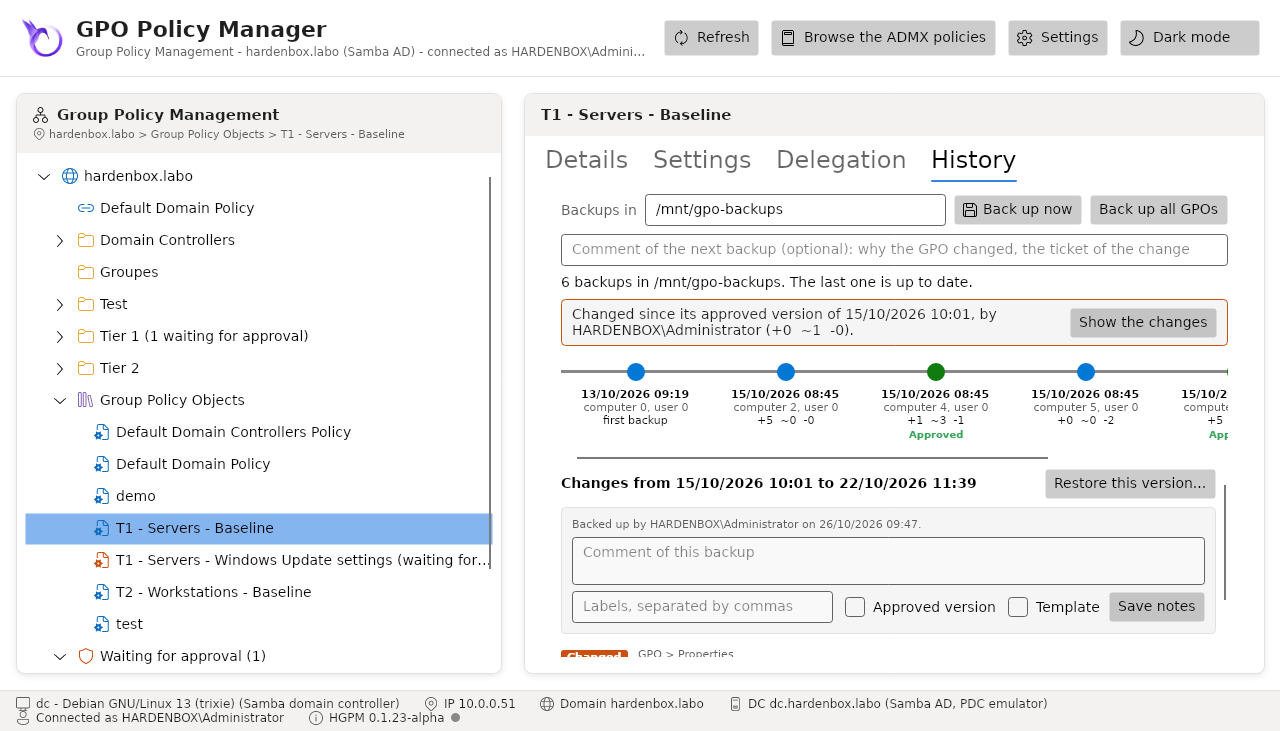
HGPM keeps the history of each GPO as backups, in a folder you choose (by default
PSGPOTools Backups in your documents). The History tab of a GPO shows them as a timeline.
Backups
<root>/<GPO name> {<GUID>}/<last change of the GPO, UTC: yyyy-MM-dd_HH-mm-ss>/
    manifest.json       the GPO and the SHA-256 of each file
    notes.json          its comment and labels, when it has some
    Files/              the files of its SYSVOL folder, as they are
- The GUID keeps the history of a GPO that is renamed.
- A backup is written only when the GPO changed since the last one (its files or its
properties: name, status, security filtering, links), as GPMC
Backup-GPOby date of change.-Forcebacks it up anyway. - They are not GPMC backups:
Restore-GPOandImport-GPOdo not read them.
Back up now (one GPO) and Back up all GPOs (those you can see) take the comment typed above the timeline. The same from the command line, for a scheduled task:
The timeline
Oldest first, as the branch of a git graph. Each node is a backup, with its date, its versions
(computer 3, user 0) and what changed since the node before it (+added ~changed -removed); Now
is the GPO as it is, when it changed since its last backup. Select a node to see its changes
setting by setting, with the value before (struck out) and after.
The changes are those of the Settings tab: the policies by category path, the security settings,
the preference items (by their uid), the other files by their hash, and the name, status,
security filtering and links of the GPO.
$Backups = Get-PSGPOBackup -Path /srv/gpo-backups -Name 'Default Domain Policy'
Compare-PSGPOBackup -ReferenceBackup $Backups[1] -DifferenceBackup $Backups[0]
Restore
Restore this version... puts the GPO back as the backup has it, as GPMC Restore-GPO:
- The files of the backup are checked against their SHA-256: a file missing or changed since stops the restore.
- The GPO as it is now is backed up first, its comment saying it.
- Its files are replaced (those the backup does not have are deleted), its status and client-side extensions are those of the backup.
- Its version increases in both scopes, so that the computers apply it again.
Its links and its permissions do not change; its WMI filter is the one of the backup, when that filter is still in the domain.
A backup is never restored in another domain, even on a GPO with its GUID: the Default Domain Policy and the Default Domain Controllers Policy have the same GUID in every domain. Use it as a template of a new GPO instead.
Each path of the manifest must be a file of the GPO folder (no .., no rooted path): a backup
whose manifest names another one is ignored, with a warning, as a damaged manifest is; the other
backups are listed.
Get-PSGPOBackup -Path /srv/gpo-backups -Name 'T1 - Servers - Baseline' |
    Where-Object { $_.Modified.Date -eq [datetime]'2026-10-15' } | Select-Object -First 1 | Restore-PSGPO
Notes: comments and labels
The notes of a backup are kept beside it, in notes.json; its manifest and files never change,
so a restore still checks them. Select a node to change them: its comment, its labels, and two
check boxes:
- Approved version: the label of the approved versions (
Backup.ApprovedLabelof the configuration,Approvedby default); - Template: the label of the templates of new GPOs (
Backup.TemplateLabel,Template).
On the timeline, the labels are under each node, the comment is its tool tip, and the approved version is green.
Get-PSGPOBackup -Path /srv/gpo-backups -Name 'Default Domain Policy' | Select-Object -First 1 |
    Set-PSGPOBackup -Approve -Comment 'Reviewed with the security team'
Drift from the approved version
The newest backup with the approved label is the approved version of the GPO. Over the
timeline, the console says whether the GPO is still it, or what changed since: in the console,
with GPMC, samba-tool, a script, whoever made the change.
| State | |
|---|---|
InSync |
the GPO is its approved version |
Drifted |
it changed since: Show the changes lists them |
NotApproved |
no backup has the approved label yet |
See the drift workflow and the approval workflow.
Central backups, for Tier 0
The backups of a domain are central on a share of a file server, Backup.Path of the
configuration of the domain: the same History tab, approved versions and deleted GPOs for every
console of Tier 0. Not SYSVOL: it is copied to every domain controller.
They are for Tier 0 only, the approvers of the workflow (Workflow.Approvers) and the
administrators of the domain:
| Tier 0 | Tier 1, Tier 2 | |
|---|---|---|
| History tab, drift, restore | yes | no tab |
| Deleted GPOs | yes | no node |
| Backup before a change (import, delete) | yes | none, said: the approval backs up the approved version |
1. The share
On a Windows file server, as an administrator:
On a Samba server, as root; then once on each Linux console of Tier 0, --fstab adds the share
to /etc/fstab with x-systemd.automount: only root mounts a share, and from then on it mounts
itself when the console of an account of Tier 0 reaches it (Kerberos: each account with its own
ticket). HGPM finds it in /proc/mounts, else in /etc/fstab:
sudo ./New-PSGPOShare.sh gpo-backups /srv/gpo-backups                               # the server
sudo ./New-PSGPOShareMount.sh //files.contoso.com/gpo-backups --fstab                # each console
Download linux/New-PSGPOShare.sh Download linux/New-PSGPOShareMount.sh
linux/New-PSGPOShareMount.sh
#!/usr/bin/env bash
# Mounts a share of HGPM on a Linux console of Tier 0: the central backups of the GPOs, which HGPM
# reads and writes as a folder. Kerberos, multiuser: each account of the computer reaches the share
# with its own ticket (kinit), the server checks its rights; HGPM finds the mount in /proc/mounts
# from Backup.Path (\\server\gpo-backups).
#
#   sudo ./New-PSGPOShareMount.sh //files.contoso.com/gpo-backups                 # /mnt/gpo-backups
#   sudo ./New-PSGPOShareMount.sh //files.contoso.com/gpo-backups /mnt/gpo-backups --fstab
#
# --fstab also adds it to /etc/fstab with x-systemd.automount: from then on it mounts itself when a
# console of Tier 0 first reaches it, after a restart too (HGPM finds it in /etc/fstab). Needs
# cifs-utils and keyutils
# (Debian/Ubuntu: apt install cifs-utils keyutils; RHEL/Fedora: dnf install cifs-utils keyutils),
# and the Kerberos ticket of the account that runs sudo (kinit), to mount.
#
# https://jm2k69.github.io/PSGPOTools/en/features/backup-history/
set -euo pipefail

source="${1:?Usage: sudo $0 //server/share [mount point] [--fstab]}"
target="${2:-/mnt/$(basename "$source")}"
fstab="${3:-}"
if [ "$target" = "--fstab" ]; then target="/mnt/$(basename "$source")"; fstab="--fstab"; fi

if [ "$(id -u)" -ne 0 ]; then
    echo "Run it as root: sudo $0 $*" >&2
    exit 1
fi
if ! command -v mount.cifs > /dev/null; then
    echo "mount.cifs is missing: apt install cifs-utils keyutils (or dnf install cifs-utils keyutils)." >&2
    exit 1
fi

# The ticket of the account that runs sudo mounts the share; then each account uses its own.
owner="${SUDO_UID:-0}"
options="sec=krb5,multiuser,cruid=$owner,noperm,_netdev,nofail"

mkdir -p "$target"
if mountpoint -q "$target"; then
    echo "$target is already mounted: kept."
else
    mount -t cifs "$source" "$target" -o "$options"
    echo "$source mounted on $target."
fi

if [ "$fstab" = "--fstab" ]; then
    if grep -q "^$source[[:space:]]" /etc/fstab; then
        echo "$source is already in /etc/fstab: kept."
    else
        cp /etc/fstab "/etc/fstab.$(date +%Y%m%d-%H%M%S).bak"
        # Mounted when it is first reached, unmounted after 10 minutes without use.
        echo "$source $target cifs $options,x-systemd.automount,x-systemd.idle-timeout=600 0 0" >> /etc/fstab
        systemctl daemon-reload
        echo "$source added to /etc/fstab: it mounts itself when it is reached."
    fi
fi
2. Backup.Path, and the permissions of Tier 0
Backup.Path = '\\files.contoso.com\gpo-backups' in Settings of the console, then:
It gives the share to SYSTEM, Administrators and Domain Admins (full control) and to the groups of the approvers (change); nobody else. Again when the approvers change: the backups are kept.
3. The backups of the consoles, copied into it
$central = '\\files.contoso.com\gpo-backups'                  # Linux: where it is mounted
Get-ChildItem "$HOME\Documents\PSGPOTools Backups" -Directory -Exclude Audit |
    Copy-Item -Destination $central -Recurse
Audit log
Each change the domain accepted, from the console or a command, is a line of the audit log:
| Field | |
|---|---|
Time |
when (UTC) |
Account, Computer, Server |
who, from which computer, on which domain controller |
Action |
NewGpo, RenameGpo, NewLink, SetLink, RemoveLink, SetBlockInheritance, SetGpoStatus, SetWmiFilter, NewWmiFilter, EditWmiFilter, RemoveWmiFilter, SetWmiFilterPermission, SetGpoPermission, SetGpoSecurityFiltering, SaveGpoFile, RestoreGpo, ImportGpo, ImportPolicyRuleSet, RemoveGpo, RemoveDeletedGpoBackup, PendingGpo, ApproveGpo, NewFilteringGroups, SaveConfiguration, InstallAdmx, NewPasswordPolicy, SetPasswordPolicy, RemovePasswordPolicy |
Target, GpoName, GpoId |
on what: the GPO, the domain or OU, the configuration |
Details |
how: the link options changed, the file saved with its SHA-256 and the new version, the rights of the creators and the permissions removed at an approval... |
The lines are only added, never rewritten: one file per domain and month,
<domain>-<yyyy-MM>.jsonl, in Audit.Path of the configuration (a share the
administrators of the GPOs write, the same for every console); by default in the folder Audit of
the backups of the account, which only its console sees. A log that cannot be written does not
undo the change, which is made: the console says so.
The log is on by default (Audit.Enabled). The Audit Log tool shows it in a
window, filtered by period, domain, action and a search; Get-PSGPOAuditLog reads it in a script:
Get-PSGPOAuditLog -After (Get-Date).AddDays(-7) | Format-Table Time, Account, Action, GpoName, Target
Get-PSGPOAuditLog -Name 'C - Servers - Baseline' -Action SaveGpoFile, ApproveGpo
Note
The log says what the consoles and the commands of HGPM changed, not what GPMC or another tool changed. Whoever can write its folder can change it: give the share to the administrators of the GPOs only, and keep a copy where they cannot write (a SIEM).