Back up and restore
Goal: keep the history of every GPO, see what changed, and go back to a version.
1. Back up on a schedule
A backup is written only when the GPO changed, so the same command can run every hour:
# /etc/systemd/system/psgpo-backup.service
[Service]
Type=oneshot
User=gpo-backup
# A keytab gives the account its Kerberos ticket without a password: a dedicated account of
# the domain, its keytab owned by gpo-backup, mode 600 (install -o gpo-backup -m 600 ...).
ExecStartPre=/usr/bin/kinit -k -t /etc/hgpm/gpo-backup.keytab gpo-backup@HARDENBOX.LABO
ExecStart=/usr/bin/pwsh -NoProfile -Command "Backup-PSGPO -Server dc.hardenbox.labo -Path /srv/gpo-backups"

# /etc/systemd/system/psgpo-backup.timer
[Timer]
OnCalendar=hourly
[Install]
WantedBy=timers.target
$Action = New-ScheduledTaskAction -Execute 'pwsh.exe' -Argument '-NoProfile -Command "Backup-PSGPO -Path D:\GPO_Backup"'
$Trigger = New-ScheduledTaskTrigger -Once -At 00:00 -RepetitionInterval (New-TimeSpan -Hours 1)
# A gMSA (New-ADServiceAccount, Install-ADServiceAccount): no password stored in the task
$Principal = New-ScheduledTaskPrincipal -UserId 'CONTOSO\hgpm-backup$' -LogonType Password
Register-ScheduledTask -TaskName 'HGPM backup' -Action $Action -Trigger $Trigger -Principal $Principal
The account needs to read the GPOs and their SYSVOL folders; Authenticated Users can. It needs
no right of an administrator: not Domain Admins. With the central backups
of Tier 0 (Backup.Path), only Tier 0 writes the share: back up from a console of Tier 0, or to a
folder of the computer as above.
2. Comment a change
Before or after a change, back up with the reason, from the History tab (the comment field above the timeline) or the command line:
Backup-PSGPO -Path /srv/gpo-backups -Name 'T1 - Servers - Baseline' -Comment 'CHG-1024: SMB signing required'
3. See what changed
History tab of the GPO: select a node of the timeline, its changes are listed with their value before and after. Between any two backups:
$Backups = Get-PSGPOBackup -Path /srv/gpo-backups -Name 'T1 - Servers - Baseline'
Compare-PSGPOBackup -ReferenceBackup $Backups[-1] -DifferenceBackup $Backups[0] |
    Format-Table Change, Path, Name, Before, After
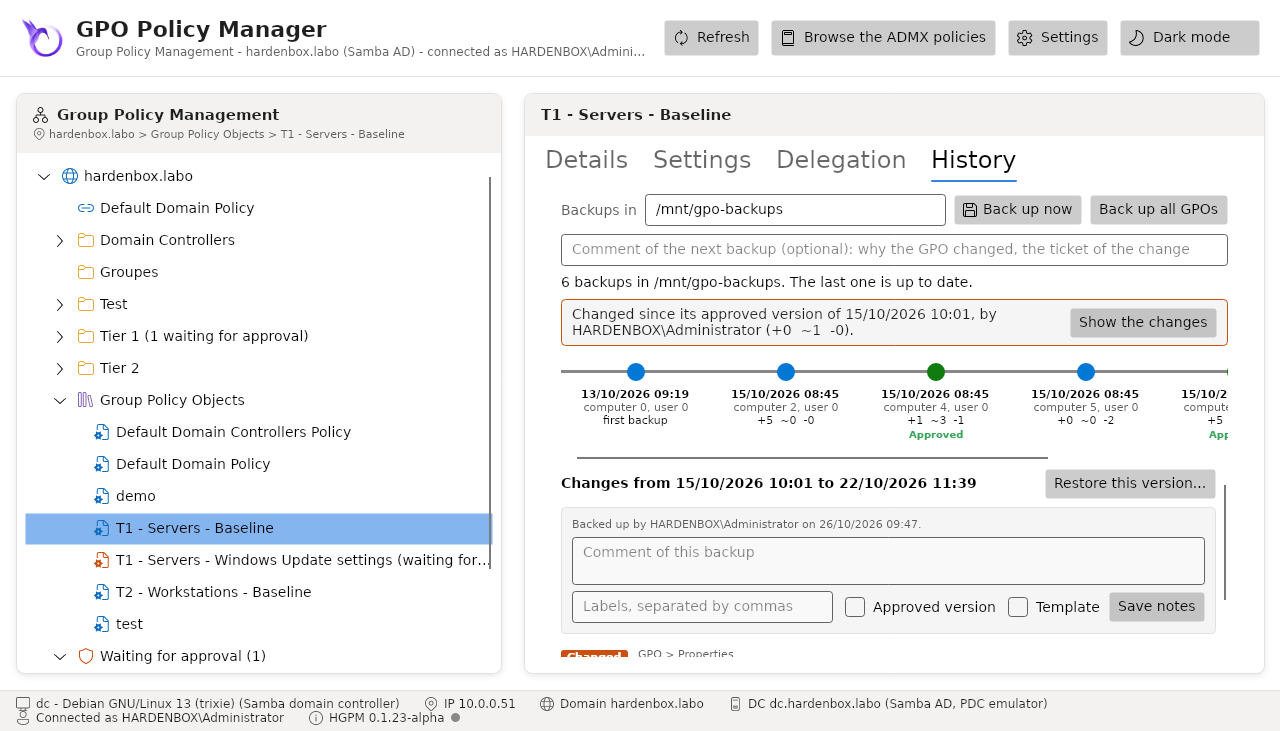
4. Restore a version
Select the node > Restore this version... > Restore. The GPO as it is now is backed up first: the restore can be undone the same way.
Get-PSGPOBackup -Path /srv/gpo-backups -Name 'T1 - Servers - Baseline' | Select-Object -Last 1 |
    Restore-PSGPO -Server dc.hardenbox.labo
Tip
-WhatIf says what a restore would do; -Confirm:$false restores without asking, in a script.