Import a GPO with a migration table
A GPO built in a test domain, or backed up in another forest, is brought into the domain with its settings, its accounts and its UNC paths mapped to those of the domain: as Import Settings of GPMC, with a migration table, and as the import of AGPM into an existing GPO, whose settings are replaced.
The backups
Import-PSGPO and Import Settings... read two kinds of backups:
- GPMC:
Backup-GPO, or Back Up... in GPMC. A folder holds one folder per backup, named by its ID, withbkupInfo.xml(the GPO, its domain, when),Backup.xml(its accounts with their SID, name, type and domain, and its client-side extensions) andDomainSysvol\GPO(its files). - HGPM:
Backup-PSGPOor the History tab; the newest backup of each GPO.
The migration table
A migration table (.migtable) is the XML file the Migration Table Editor of GPMC writes: one
entry per security principal or UNC path of the source, and what it becomes in the domain of the
import.
| Destination | In the editor | What the import does |
|---|---|---|
<DestinationSameAsSource/> |
Same As Source | the reference is kept |
<DestinationByRelativeName/> |
Map by Relative Name | the account of the same name in this domain (Domain Admins@test.contoso.com becomes Domain Admins of this domain) |
<DestinationNone/> |
No Destination | the account is removed from the setting |
<Destination>CONTOSO\Group</Destination> |
a name, or a path | that account of this domain, or that path |
The types of entries are those of GPMC: User, Computer, LocalGroup, GlobalGroup,
UniversalGroup, UNCPath, and Unknown for free text and SIDs (the built-in accounts, such as
Administrators or Backup Operators). As GPMC checks it, a UNC path is kept or mapped to another
path (never removed nor mapped by relative name), free text or a SID is not mapped by relative
name, and a destination is a name, not a SID. A table from GPMC works as it is; one written by the
console opens in the Migration Table Editor.
# As "Populate from Backup" of the editor: an entry per reference, to edit before the import.
New-PSGPOMigrationTable -Path C:\backupGPO\production.migtable -BackupPath C:\backupGPO -MapByRelativeName
Get-PSGPOMigrationEntry -Path C:\backupGPO | Format-Table Type, Source, Gpos
Get-PSGPOMigrationTable -Path C:\backupGPO\production.migtable
What is migrated
- The security settings (
GptTmpl.inf): the accounts of the user rights and of the restricted groups (*SIDor a name; a restricted group of an account removed goes with it), and the accounts of the permissions of files, registry keys and services (SDDL). - The preferences: the members of the local groups, the accounts of the targeting filters,
services and tasks (their
sidand name), and every UNC path (drive maps, shortcuts, files...). - The scripts and the folder redirection: their UNC paths and accounts.
- The administrative templates (
Registry.pol) are copied as they are, as GPMC does: GPMC does not migrate them either.
An account or path the table does not name is copied as it is; with -Exclusive ("Use migration table exclusively" of GPMC), the import stops instead. A destination that cannot be found in the domain stops the import before anything changes, as in GPMC; the destinations are found in the domain of the import (a name of another domain is refused).
Import
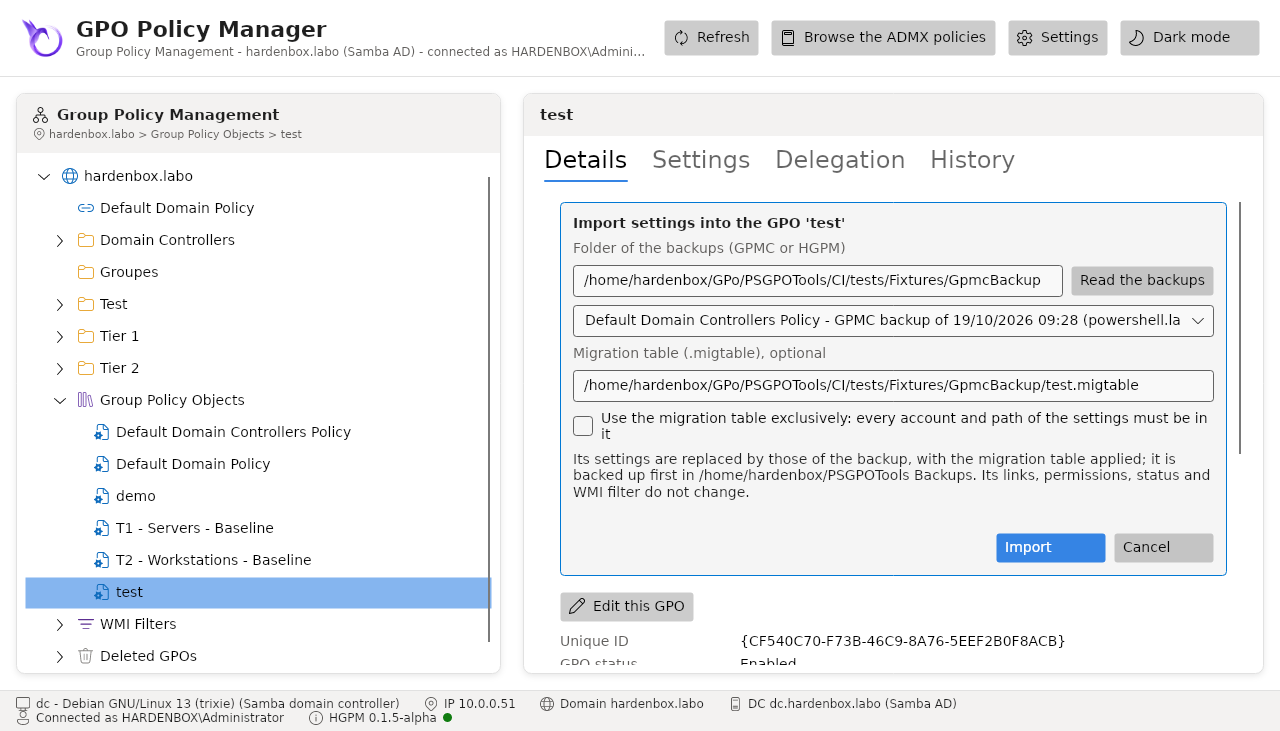
In the console, Import Settings... in the context menu of a GPO: the folder of the backups, the backup to import, the migration table, and whether it is used exclusively. The result says what each reference became.
Import-PSGPO -Path C:\backupGPO -SourceName 'C - Servers - Baseline' -TargetName 'C - Servers - Baseline' `
    -MigrationTable C:\backupGPO\production.migtable
Import-PSGPO -Path C:\backupGPO -SourceName TEST -TargetName 'C - Test' -CreateIfNeeded -WhatIf
The GPO is backed up first, in the folder of the History tab (-BackupPath, or none with
-NoBackup): its settings before the import can be restored. Its settings are replaced, as AGPM
does it for an existing GPO; its links, permissions, status and WMI filter do not change, its
version increases so that the computers apply it again, and the client-side extensions are those
of the backup (those of its files when the backup declares none). The import goes to the
audit log, with what was migrated.
Sources
- Creating Migration Tables and Migration tables (GPMC, Microsoft Learn)
- The Migration Table Editor (Microsoft Learn)
- IGPMMigrationTable::AddEntry: the types of entries (Microsoft Learn)
- Import a GPO from a File (AGPM, Microsoft Learn)
- The backups and the table of the tests come from GPMC on Windows:
CI/tests/Fixtures/GpmcBackup.